
15 Best AI Agent Tools and Platforms in 2026 (With Prices)
Quick Answer:
The best AI agent tools in 2026 pair a specific job with a pricing model your team can forecast, so the practical shortlist depends on the work you want automated and on how much you want to build yourself. Gumloop, Relay.app and Lindy fit marketing and operations automation, Devin AI covers autonomous engineering, HockeyStack and Decagon serve enterprise revenue and support, and Postman, Stack AI, Voiceflow, AirOps, Zep, IBM watsonx Orchestrate, CrewAI, 11x and ChatGPT Agent each own a narrower slice. The tool matters less than the foundation underneath it: clean data, connected systems, and clear ownership decide whether any agent produces value.
TL;DR:
After reviewing more than 25 tools, here is the shortlist for 2026, spanning ready-to-use agents, build-your-own platforms, a framework and an agent memory layer:
- Gumloop: drag-and-drop automation for marketing and document workflows, Pro from about $37/mo.
- Relay.app: human-in-the-loop automation, Professional $19/mo, Team $59/mo.
- HockeyStack: enterprise revenue analytics, quote-based from about $1,399/mo.
- Stack AI: no-code agent builder, free tier plus custom enterprise pricing.
- Voiceflow: conversational agents for support, Pro $60/mo per editor.
- ChatGPT Agent (formerly Operator): browser and multi-step tasks inside ChatGPT, included with paid plans.
- Devin AI: autonomous software engineer, Core from $20/mo, Team $500/mo.
- AirOps: programmatic SEO and content operations, Solo from about $199/mo.
- Zep: memory layer for agents, free tier plus Flex $125/mo.
- Postman: API-first agent building, Basic $14/user/mo, Professional $29/user/mo.
- Lindy: no-code AI assistants, Plus $49.99/mo, Pro $99.99/mo, Max $199.99/mo.
- IBM watsonx Orchestrate: enterprise agent coordination, Essentials from about $500/mo.
- CrewAI: multi-agent framework, free tier plus custom enterprise pricing.
- 11x: autonomous AI SDR, Growth from about $3,750/mo billed annually.
- Decagon: enterprise support automation, quote-based, roughly $95K to $590K per year.
A marketing lead picks an AI agent from a top-ten list, signs an annual contract, then finds it cannot read the CRM or the analytics stack it was bought to automate. The tool works in the demo and stalls in production, and the budget is already spent. That gap between a slick interface and a usable result is the reason this guide exists.
We reviewed more than 25 AI agent tools and kept the 15 that earned a place. The list mixes four kinds of product on purpose, since each is a different way to reach a working agent: ready-to-use agents you buy and point at a task, build-your-own platforms, a developer framework, and an agent memory layer. For each one you get its best-fit job, verified 2026 pricing with sources, and the kind of team it suits. The market itself is expanding fast: MarketsandMarkets values AI agents at USD 5.26 billion in 2024, rising to a projected USD 52.62 billion by 2030 at a 46.3% CAGR. The count of options keeps climbing, which makes a tested shortlist more useful than a longer catalogue.
Why the Foundation Decides Which AI Agent Works
The agent you choose matters less than the four conditions that let any agent perform. A tool inherits the state of the systems around it, so the same platform can be excellent for one team and useless for another. Darwin structures this readiness through Darwin Flux, and its four pillars map directly onto why agents succeed or fail in real deployments.
Surface is the first pillar: your data and content have to be discoverable and clean, because an agent reasoning over stale or duplicated records will act on stale or duplicated records. Connections is the second: an agent only automates work it can reach, so API access to your CRM, analytics and marketing tools sets the ceiling on what it can do. Clarity is the third: someone owns the outcome, defines what a correct result looks like, and reviews it, which keeps an autonomous tool accountable. Momentum is the fourth: value comes from steady iteration on a small set of workflows, since a large rollout nobody maintains stalls. Read every agent below against these four pillars and the shortlist narrows quickly.
After testing 25+ tools, these are our top picks:
| Category | AI Agent | Why It Stands Out |
|---|---|---|
| Best Overall | Relay.app | Balanced automation with human oversight, affordable, capable |
| Best for Beginners | Lindy | No-code, intuitive interface, large integration library |
| Best for Enterprise | HockeyStack | Full-stack revenue intelligence + predictive modeling |
| Best for Sales Teams | 11x | Autonomous sales rep (Alice) that never sleeps |
| Best for SEO Teams | AirOps | Programmatic SEO engine with brand-safe content |
| Most Innovative | ChatGPT Agent (formerly Operator) | Agentic browsing inside ChatGPT that operates web pages like a person |
| Best Developer Tool | Devin AI | Autonomous engineer for bug fixing, refactoring, and scaling |
Click to jump directly to the full review of each platform:
- Gumloop
- Relay.app
- HockeyStack
- Stack AI
- Voiceflow
- ChatGPT Agent (formerly Operator)
- Devin AI
- AirOps
- Zep
- Postman
- Lindy
- IBM Watsonx Orchestrate
- CrewAI
- 11x
- Decagon
If you're still not sure where to start, scroll to the bottom for a complete FAQ and comparison chart.
Bonus: Darwin AI Transformation Partner
Darwin Key Features
Darwin builds custom AI agents tailored to your business workflows, data sources, and compliance needs. Instead of a one-size-fits-all tool, you get AI capabilities mapped directly to your marketing, sales, and operational goals. Core offerings include:
- AI Readiness Audit & Roadmap: identify quick wins and integration points
- Custom Agent Development: lead routing, RAG-powered knowledge search, GEO/SEO optimization, automated reporting
- Integration & Privacy by Design: secure API connections, SSO, role-based permissions, compliance with GDPR/CCPA/HIPAA where required
- Performance Analytics: measure ROI and adoption across departments
Darwin Pros and Cons
Pros
- Bespoke AI workflows instead of generic templates
- Privacy-first architecture for regulated industries
- Smooth integration with existing CRM, analytics, and marketing stacks
Cons
- Requires collaborative discovery phase before deployment
- Best suited for companies ready to invest in custom solutions
Darwin Pricing
Free AI Readiness Workshop (discovery + roadmap)
Custom build & retainer pricing based on scope and integrations.
Best Use Case for Darwin
Perfect for growth teams, agencies, or enterprise departments that need custom AI agents integrated into their stack while respecting data governance and privacy rules. Ideal if off-the-shelf AI tools don’t quite fit your workflows.
FAQ
Q: Can Darwin integrate with my current marketing tools?
A: Yes. Darwin specializes in integrating AI agents with CRMs, analytics dashboards, CMS platforms, and marketing automation tools.
Q: Does Darwin handle privacy compliance?
A: Yes. Data privacy and secure architecture are core to the build process.
Gumloop

Gumloop is a drag-and-drop automation platform that lets non-technical teams build AI workflows on a visual canvas. It stands out because it gives everyone in a company the same automation reach, and it handles document-heavy processes end to end.
Gumloop Key Features
Gumloop centers on a visual canvas where you connect modular nodes into workflows the company calls flows. Each node runs a defined task such as data extraction, summarization or routing, and the platform automates document workflows in full: it pulls data from invoices or contracts, summarizes content, and moves the output where it needs to go. Integrations with Google, Slack and Semrush cover most marketing and operations stacks.
Gumloop Pros and Cons
Pros:
- Accessible drag-and-drop builder that non-engineers can learn quickly
- Solid integrations with Google, Slack and Semrush
- SOC 2 Type 2 and GDPR compliance stated by the vendor, with no training on your data
- Auto-scaling compute that adjusts to workload
Cons:
- You still need to understand workflow logic to build advanced flows
- Google can block some web-scraping tasks
Gumloop Pricing
The free tier includes 1,000 credits for testing. Paid pricing is credit-based with unlimited seats, and the Pro plan starts at about $37/mo. Some third-party sites still list old $97 or $297 figures, so confirm the current number on the official pricing page before you budget.
Out of all the AI tools I have tested, only one stands out right now: Gumloop.
– Omid Ghiam, founder of Marketer Milk
Best Use Case for Gumloop
Marketing teams get the most from Gumloop on SEO workflows, content generation and competitive analysis. It suits anyone who needs to extract, summarize and route documents at volume without writing code.
FAQ
Q: Is Gumloop a good alternative to Zapier?
A: Yes, especially for document automation and browser-based tasks. Gumloop uses a visual interface and supports OpenAI and Anthropic models, so it fits teams that want AI steps inside their automations.
Q: Does Gumloop work with Google Docs and Slack?
A: Yes. Gumloop integrates with Google services, Slack, Semrush and other common apps through pre-built modules, which covers most marketing stacks.
Q: What’s the biggest limitation of Gumloop?
A: Web scraping can get blocked by Google, and you need a basic grasp of workflow logic to build advanced flows.
Relay.app

Relay.app is an automation platform that got human-in-the-loop workflows right. It balances AI steps with human checkpoints, so teams can automate confidently while keeping a person on the decisions that matter.
Relay.app Key Features
Relay.app offers visual workflow automation with 100+ integrations. It handles branching scenarios through paths for divergent workflows and iterators that process lists of items. Rule-based wait steps pause a workflow until a condition is met, and built-in AI credits with pre-built actions for data extraction and content generation keep the AI work inside the same canvas.
Relay.app Pros and Cons
Pros:
- Accessible interface that opens automation to non-technical users
- Built-in AI credits and pre-built AI actions on every plan
- Human-in-the-loop checkpoints for sensitive steps
Cons:
- Integration library is younger and smaller than Zapier's
- Some advanced power-user features are still missing
Relay.app Pricing
The free tier includes 200 automation steps and 500 AI credits monthly. On annual billing the Professional plan is $19/mo and the Team plan is $59/mo, with monthly billing landing near $38 for Professional.
Best Use Case for Relay.app
Relay.app shines on content workflows: our blog-to-social tests saved hours each week. Customer-support triage also benefits from its ability to categorize and route requests while keeping a human on the exceptions.
FAQ
Q: What makes Relay.app different from Zapier or Make.com?
A: Relay combines AI-powered steps with human checkpoints. It fits teams that want human-in-the-loop review built into an automation from the start.
Q: Does Relay.app include free AI usage?
A: Yes. Every plan includes free AI credits and built-in GPT, Claude and Gemini integrations, so you can add AI steps without a separate subscription.
Q: Can non-technical users use Relay.app easily?
A: Absolutely. Its UI is beginner-friendly, but it may lack some advanced features power users want.
HockeyStack

HockeyStack is an enterprise-grade AI agent built for marketing teams that need deep revenue insight. It is more than another analytics dashboard: it unifies attribution, web analytics and intent scoring under one AI analyst.
HockeyStack Key Features
HockeyStack uses AI-driven modeling so you can test marketing ideas without spending real budget, which makes planning easier. Its AI marketing analyst, Odin, anchors the platform and learns continuously from your data. You tell Odin what you need in plain language and it returns the analysis, which lowers the barrier for marketers who do not write SQL. Per the vendor, Odin covers attribution, web analytics and intent scoring in one place. Our experience showed we could analyze dashboards, find underperforming campaigns, and get quick answers to tricky marketing questions.
HockeyStack Pros and Cons
Pros:
- Unified system that replaces several separate analytics tools
- Marketing and sales work from the same numbers
- AI analyst answers questions in plain language
Cons:
- Steep learning curve on complicated reports and data structures
- Initial setup takes time, with no heatmaps or session recording
HockeyStack Pricing
HockeyStack is priced for the enterprise and sold by quote, with no public self-serve tier. Current data from Docket and Factors puts the GTM Intelligence tier from about $1,399/mo, and the GTM Execution tier near $2,200/mo. Confirm your scope with sales, since the number scales with data volume and modules.
Best Use Case for HockeyStack
Enterprise B2B marketing teams get the most value when they analyze customer interactions across many channels. Its strength is revenue attribution and predictive modeling for teams with a serious analytics practice.
FAQ
Q: Who is HockeyStack best for?
A: Enterprise B2B marketing teams that need revenue attribution across channels and predictive modeling, with the analytics maturity to use it.
Q: Can I use HockeyStack without a developer?
A: You will want technical support during setup, especially to build dashboards or wire up integrations.
Q: Why is it so expensive?
A: It replaces several tools at once, covering attribution, web analytics and intent scoring, which is where its cost sits.
Stack AI

Stack AI is one of the most flexible no-code platforms for building agents. It is approachable for teams that are not staffed with engineers, which is where many rival builders assume too much.
Stack AI Key Features
Stack AI takes a full no-code approach through a visual canvas where you drag and drop components into workflows. It works with models from OpenAI, Anthropic and Google, along with open-source options from Meta and Mistral, so you can match the model to the task. The builder covers the whole workflow, input through to a deployed agent.
Stack AI Pros and Cons
Pros:
- Easy-to-use interface that non-engineers can pick up
- End-to-end workflow builder covering prototype through deployment
- Broad model choice across commercial and open-source providers
Cons:
- First setup can challenge absolute beginners
- Small businesses may find the paid tiers steep for their needs
Stack AI Pricing
Stack AI publicly lists a Free tier and a custom Enterprise tier only. Historically a Builder plan sat near $99/mo and a Team plan near $499/mo. Those are now handled through sales only, so treat any fixed mid-tier number online as dated. Public tiers checked on the official pricing page, August 2026.
Best Use Case for Stack AI
Stack AI works best on enterprise automation for knowledge-intensive tasks. Financial-services teams use it to analyze risk and process documents, and the vendor states HIPAA, SOC 2 and GDPR compliance for regulated work.
FAQ
Q: Is Stack AI really no-code?
A: Yes. You can build working agents visually without writing code, though the first build takes some orientation.
Q: What models does Stack AI support?
A: It supports OpenAI, Claude, Gemini, Mistral and Meta's Llama, so you can pick the model that fits each task.
Q: Does Stack AI work for healthcare or finance?
A: The vendor states HIPAA, SOC 2 and GDPR compliance, which supports use in regulated industries. Confirm current certifications directly for a compliance-critical deployment.
Voiceflow

Voiceflow is a leading platform for building conversational AI agents without code. Its visual, collaborative approach stands apart from other builders, which is why support teams keep choosing it.
Voiceflow Key Features
Voiceflow uses a drag-and-drop interface to make conversation design simple. Teams build agents visually by connecting components, edit together in real time much like Google Docs, switch between models, and scale up as volume grows. The vendor states SOC 2 Type 2 and GDPR compliance.
Voiceflow Pros and Cons
Pros:
- Live collaborative editing shared by the team
- Model switching and straightforward scaling
- SOC 2 Type 2 and GDPR compliance stated by the vendor
Cons:
- Analytics depth is limited next to enterprise platforms
- Live-chat integrations are thinner than dedicated support tools
Voiceflow Pricing
Students and hobbyists can start on a free tier. The Pro plan is $60/mo per editor, and the Business plan starts from $150/mo with additional editors at $50 each. Pricing checked August 2026.
Best Use Case for Voiceflow
Voiceflow is strongest in customer-service automation. It helps businesses build agents that resolve problems, which is where the collaborative design workflow pays off.
FAQ
Q: What’s the main use case for Voiceflow?
A: Building AI-powered chat or voice agents for customer service without a development team.
Q: Can multiple team members build flows together?
A: Yes. Live collaboration is built in, similar to Figma or Google Docs.
Q: What’s missing in Voiceflow?
A: Deep analytics and live-chat integrations are limited next to enterprise support platforms.
ChatGPT Agent (formerly Operator)

ChatGPT Agent is included here as a status note, since there is no longer a standalone agent product you can buy on its own. The lineage matters before you plan around it: Operator, OpenAI's first computer-using agent, shut down on August 31, 2025 and folded into ChatGPT Agent. In early August 2026 OpenAI removed the standalone agent mode itself and moved its capabilities into other surfaces inside ChatGPT. What survives is a set of agentic features bundled inside the paid ChatGPT plans, with no separately sold agent.
ChatGPT Agent (formerly Operator) Key Features
The capability runs on a Computer-Using Agent model that reads and operates web interfaces the way a person would, clicking and typing through pages the same way a user does. In 2026 OpenAI points users to ChatGPT Work for multi-step tasks, a cloud browser for logged-in browser workflows, and Codex for software engineering. The underlying computer-using model also reaches developers through the OpenAI Agents SDK.
ChatGPT Agent (formerly Operator) Pros and Cons
Pros:
- Web automation that operates real web interfaces, clicking and typing like a person
- Shared context and memory with the rest of ChatGPT
- Available inside plans many teams already pay for
Cons:
- The standalone agent mode was removed in August 2026 with no migration guide
- No single successor reproduces the old agent mode in full
ChatGPT Agent (formerly Operator) Pricing
You cannot buy ChatGPT Agent as a standalone product. Agentic features now come bundled inside the paid ChatGPT plans that many teams already hold, which replaced the separate $200/mo Operator subscription. OpenAI's help center still shows the older availability and message limits beneath the removal notice, so check your current interface for what your plan exposes.
Best Use Case for OpenAI Operator
For teams already inside ChatGPT, the successor surfaces suit multi-step research, document creation and browser tasks: ChatGPT Work for multi-step delegation, the cloud browser for logged-in browser sessions, and Codex for engineering. If your workflow depended on the old agent mode, test these surfaces directly, since no single one reproduces it in full.
FAQ
Q: Is OpenAI Operator still available?
A: No. Operator shut down on August 31, 2025 and folded into ChatGPT Agent, whose standalone agent mode was then removed in August 2026.
Q: What replaced ChatGPT agent mode?
A: OpenAI points to ChatGPT Work for multi-step tasks, a cloud browser for logged-in browser workflows and Codex for engineering, with no single feature reproducing the old mode.
Q: Can developers still use the computer-using model?
A: Yes. The computer-using capability is available to developers through the OpenAI Agents SDK.
Devin AI

Devin AI works as an autonomous software engineer that writes code, runs tests, fixes bugs and opens pull requests with limited supervision. It targets scoped, repetitive engineering work such as migrations and refactoring.
Devin AI Key Features
Devin runs in a dedicated workspace that combines a shell, a browser and a code editor. It handles engineering tasks end to end and integrates with Slack so a team can assign and review work in one place. Progress is measured in ACUs, where each ACU is roughly 15 minutes of active work.
Devin AI Pros and Cons
Pros:
- Autonomous problem-solving with minimal guidance
- Reported speed gains of 8 to 12x on engineering tasks
- Slack integration for team collaboration and review
Cons:
- Sessions running past about 10 ACUs show weaker output
- Debugging through Slack can feel disconnected from the code
- UI-heavy tasks are limited by restricted visual capability
Devin AI Pricing
The Core plan starts at $20/mo plus $2.25 per ACU, and the Team plan is $500/mo, which includes 250 ACUs at $2.00 each. Pricing checked across multiple sources, August 2026, and unchanged from the prior year.
Best Use Case for Devin AI
Migration and large refactoring projects are where Devin earns its keep. One company reported saving more than 20x on a migration by handing it to Devin, which suits engineering teams with well-scoped, repetitive work.
FAQ
Q: Is Devin AI only for coders?
A: Yes. It is an autonomous software engineer built for development teams doing migrations, refactoring or bug fixing.
Q: Can Devin AI work with Slack?
A: Yes. It integrates with Slack for collaborative engineering workflows and task assignment.
Q: Does performance drop over time?
A: Yes. Sessions running past roughly 10 ACUs can produce slower or weaker output.
AirOps

AirOps is a no-code workflow platform built for content teams that need to scale SEO and production. It suits teams struggling to publish at volume without adding headcount.
AirOps Key Features
AirOps runs AI-powered workflows that need no coding and connects to over 30 models including GPT, Claude, Llama and Perplexity. Its Knowledge Base grounds outputs in your own content, and the drag-and-drop builder assembles multi-step content pipelines that a marketer can maintain.
AirOps Pros and Cons
Pros:
- Strong reported organic-traffic gains on programmatic SEO
- Drag-and-drop builder maintainable by marketers
- Connects to 30+ models including GPT, Claude and Perplexity
Cons:
- Steep learning curve for new users
- Contact-sales pricing on higher tiers makes budgeting harder
- Works mainly on desktop, with limited mobile support
AirOps Pricing
The Solo plan starts at about $199/mo with a single user and capped tasks, and the Pro tier lands near $2,000/mo, with larger deployments quoted by sales. There is no self-serve mid-tier, so scope your volume before committing. Checked against third-party sources, August 2026.
Best Use Case for AirOps
AirOps is best for programmatic SEO and large-scale content operations. Teams managing tens of thousands of pages get the most from it, and it fits content operations that publish at industrial scale.
FAQ
Q: What’s the best use case for AirOps?
A: Programmatic SEO and large-scale content operations, especially for teams managing 10,000+ pages.
Q: Do I need a developer to use AirOps?
A: No. It is fully no-code and ships with drag-and-drop templates.
Q: Is AirOps mobile-friendly?
A: Not yet. It works best on desktop, with limited mobile support.
Zep

Zep gives AI agents a memory layer through a temporal knowledge graph. It structures memory into a graph the agent can query, so assistants recall context reliably without reloading full histories.
Zep Key Features
Zep's Graphiti engine structures memory as a hierarchical knowledge graph, so an agent recalls the relevant facts without reloading an entire conversation. The graph learns from every interaction, updates facts automatically, and tracks how they change over time. The vendor states SOC 2 Type II certification, which supports use in security-conscious teams.
Zep Pros and Cons
Pros:
- Knowledge graph that updates facts automatically over time
- Efficient recall without reloading full conversation history
- SOC 2 Type II certification stated by the vendor
Cons:
- Fits existing agents better than building new ones from scratch
- New developers may find the memory concepts a learning curve
Zep Pricing
The free tier includes 10,000 credits monthly. The Flex plan is $125/mo, or $104/mo on annual billing. Some sites cite a $25 figure, which is a credit top-up applied on usage, so read the tier before you budget.
Best Use Case for Zep
Customer-support teams use Zep to track past interactions and keep context across sessions. The vendor's stated HIPAA compliance makes it valuable in healthcare, and it serves best as a memory layer for agents you have already built.
FAQ
Q: What makes Zep different from other memory tools?
A: Its Graphiti engine builds a temporal knowledge graph, so agents recall facts without reloading full histories and see how those facts change over time.
Q: Is Zep HIPAA compliant?
A: The vendor states HIPAA, CCPA and GDPR compliance for enterprise users. Confirm current certifications directly before a regulated deployment.
Q: Can I build new AI agents inside Zep?
A: It is possible, though Zep works best as a memory layer for agents you have already built.
Postman

Postman grew from an API testing tool into an AI agent platform, and longtime users would barely recognize how far it has come. Its AI Agent Builder lets teams build, test and deploy API-powered agents without writing code, which plays to Postman's API-first roots.
Postman Key Features
The AI Agent Builder is Postman's newest addition, letting you build, test and deploy API-powered agents from a visual Flows editor. It works with models from OpenAI, Anthropic, Meta and others, so teams already living in Postman can add agents to workflows they already maintain.
Postman Pros and Cons
Pros:
- Familiar interface for teams that already use Postman
- Works with models from OpenAI, Anthropic, Meta and more
- API-first design suits DevOps and integration-heavy agents
Cons:
- Users report occasional slow response times
- Setup can get involved, and some features sit behind paid tiers
Postman Pricing
The free tier supports a small team with limited features. On annual billing, Basic is $14/user/mo and Professional is $29/user/mo, with Enterprise quoted by sales. Monthly Professional billing is higher at about $39/user. Note that the free tier tightened its collaborator limit in 2026.
Best Use Case for Postman
Postman is strongest for API-first agent development. It fits companies building DevOps, marketing or customer-support agents that lean on many API calls, where its testing heritage is an advantage.
FAQ
Q: Can I use Postman to build AI agents?
A: Yes. The AI Agent Builder lets you create agent flows that combine APIs and LLMs inside Postman.
Q: What models can I use in Postman?
A: You can plug in models from OpenAI, Anthropic, Meta and others to match the task.
Q: What’s Postman’s biggest drawback for AI work?
A: Users cite slower response times and a setup process that can get involved.
Lindy

Lindy is a remarkable platform that lets anyone build no-code AI agents (called "Lindies") without any technical background. Our experience showed we could create automation workflows in just minutes.
Lindy Key Features
A visual drag-and-drop builder connects apps and actions, and the multi-agent system lets several Lindies coordinate on a task. The integration library is large, reaching thousands of apps, and detailed academy training helps new users get productive. Lindy leans toward email, scheduling and outreach work.
Lindy Pros and Cons
Pros:
- Anyone can build custom AI assistants without code
- Large integration library across thousands of apps
- Round-the-clock support with detailed academy training
Cons:
- Occasional bugs and integration friction
- Credit-based billing where overages cost double, so usage needs watching
Lindy Pricing
Lindy restructured its pricing in early 2026 and dropped its free plan for a 7-day trial. The current tiers are Plus at $49.99/mo, Pro at $99.99/mo and Max at $199.99/mo, each metered on credits underneath. Older guides citing a $299.99 Business plan predate the change, so use the live page.
Best Use Case for Lindy
Email automation is Lindy's strongest suit: it sorts messages, drafts replies in your voice and manages follow-ups. It also works well as a sales assistant for lead qualification and outreach sequencing.
FAQ
Q: What are Lindies?
A: Custom no-code AI assistants built in Lindy. They handle email, meetings and outbound sales tasks.
Q: Is Lindy good for sales outreach?
A: Yes. It automates lead qualification, email sequencing and CRM updates, though voice-calling features add cost.
Q: Does Lindy integrate with Zapier-style workflows?
A: Yes. It connects with thousands of apps through native integrations, covering most Zapier-style needs.
IBM Watsonx

I took a deep look at IBM Watsonx, which stands out as the enterprise leader in the AI agent space. Our tests showed this isn't just another AI tool - it's a powerful suite built for serious business use.
IBM watsonx Orchestrate Key Features
watsonx Orchestrate brings AI agents, workflows and enterprise tools together in one governed platform, connecting to 700+ enterprise systems. It coordinates multiple agents across HR, sales, procurement and customer care, and it lets teams pick their preferred foundation models. Prebuilt domain agents and no-code and pro-code tools cover both business and technical builders.
IBM watsonx Orchestrate Pros and Cons
Pros:
- Connects to 700+ enterprise systems with prebuilt domain agents
- Model choice with enterprise-grade governance
- Runs as managed SaaS on IBM Cloud or AWS, or on-premises
Cons:
- Steep learning curve and strong technical setup requirements
- Best value lands with existing IBM-ecosystem customers
IBM watsonx Orchestrate Pricing
watsonx Orchestrate offers a free trial and three paid tiers. The Essentials tier starts at about $500 to $530/mo, while the Standard and Premium tiers are quoted by sales and add higher throughput, prebuilt domain agents and data-isolation options. The prior fixed Standard price no longer applies, so request a current quote.
Best Use Case for IBM watsonx Orchestrate
watsonx Orchestrate is best for large enterprises that need agent governance across many departments. Regulated industries in banking, healthcare and the public sector get the most from its compliance and integration depth.
FAQ
Q: What is watsonx Orchestrate best for?
A: Enterprise-grade agent coordination across departments, with governance and broad system integration.
Q: Does IBM watsonx Orchestrate support RAG?
A: Yes. Retrieval-augmented generation is available through the watsonx platform's AI tooling.
Q: Who uses watsonx Orchestrate?
A: Large enterprises in banking, telecom, healthcare and government that need control, security and custom agents.
CrewAI

CrewAI is a multi-agent framework that feels like managing a team of specialized AI workers, each with a defined role. The approach suits builders who want several specialized agents collaborating on a shared goal.
CrewAI Key Features
CrewAI excels at role-based agent design, where each AI worker handles tasks matched to its defined expertise. It supports Crews for autonomous problem-solving and Flows for controlled, event-driven execution, so you can choose how much structure a workflow needs. The open-source framework is MIT-licensed and free to run on your own keys.
CrewAI Pros and Cons
Pros:
- Role-based design that mirrors an efficient virtual team
- Open-source MIT-licensed framework, free to self-host
- Clear separation of agent responsibilities
Cons:
- Non-linear workflows with heavy branching are harder to model
- Anonymized usage-data collection concerns privacy-focused teams
CrewAI Pricing
The open-source framework is free, and the managed platform includes a free Basic tier with 50 workflow executions per month. Paid access is now quote-based Enterprise: the previously published $25 mid-tier was withdrawn in 2026, and older $99/mo or $6,000/year figures are stale. Treat anything other than a written quote as outdated. Enterprise pricing is confirmed only by CrewAI directly; the tier history here is drawn from third-party pricing trackers, checked August 2026.
Best Use Case for CrewAI
Marketing teams find CrewAI valuable for content generation and SEO workflow management, where several agents divide a pipeline. It suits engineering-capable teams comfortable defining roles and running the framework themselves.
FAQ
Q: What is CrewAI used for?
A: Building multi-agent systems that work together like a remote team, which suits marketing and SEO pipelines.
Q: How customizable is it?
A: You assign roles to each agent and swap agents in and out, which gives fine control over a workflow.
Q: What are its limitations?
A: It handles heavy branching less gracefully and rewards careful planning before you build.
11x

11x runs an autonomous sales platform led by an AI SDR named Alice, and it operates differently from a typical automation tool. Alice prospects, writes personalized outreach and books meetings around the clock, aimed at teams that want outbound at scale.
11x Key Features
Alice, the AI sales agent, works across email and LinkedIn to engage prospects. She writes tailored messages from prospect data and manages follow-ups and meeting booking. A companion agent, Julian, handles inbound qualification by phone, so the platform covers both sides of a pipeline.
11x Pros and Cons
Pros:
- Outbound volume scales without adding SDR headcount
- Multi-channel outreach across email, LinkedIn and phone
- Personalized messaging drawn from prospect data
Cons:
- Relies on several third-party integrations to run well
- Annual and increasingly multi-year contracts lock in spend before results
11x Pricing
11x now publishes a starting price. The Growth plan begins at $3,750/mo billed annually, roughly $45K per year, with Pro and Enterprise tiers quoted by sales. Adding Julian for phone raises the quote, and implementation fees can apply, so budget the full contract.
Best Use Case for 11x
Companies with large addressable markets that need high-volume outreach with light personalization get the most from 11x. It suits scaling sales teams that already run a structured outbound motion and can support the setup.
FAQ
Q: What does 11x do?
A: It automates outbound sales through Alice, an AI SDR that writes emails, books meetings and follows up, with Julian handling inbound calls.
Q: Does it support multilingual outreach?
A: Yes. Alice can run outreach across many languages, which helps for international pipelines.
Q: What type of company is 11x ideal for?
A: Scaling sales teams with high-volume lead-generation goals and the budget for an annual contract.
Decagon

Decagon is a conversational AI platform for autonomous customer support, and it has become an enterprise favorite for high-volume teams. It resolves support conversations end to end, closing tickets without a human sending the reply.
Decagon Key Features
Agent Operating Procedures anchor Decagon, combining natural-language instructions with code-level precision so non-technical teams can define how the agent behaves. Through integrations with Stripe, Shopify and Salesforce, it takes real actions such as processing refunds and updating orders. Omnichannel deployment unifies chat, email and voice under one layer.
Decagon Pros and Cons
Pros:
- Autonomous resolution that closes tickets end to end
- Natural-language Agent Operating Procedures for non-technical teams
- Omnichannel coverage across chat, email and voice
Cons:
- Enterprise-only, with no self-serve tier or free trial
- Resolution-based billing has gray areas worth pinning down in contract
Decagon Pricing
Decagon is quote-based with two models: per-conversation and per-resolution. There is no public pricing page, so a firm number requires a sales conversation. Third-party procurement data from Vendr, checked August 2026, puts the median annual contract near $386,000 to $400,000, with deals ranging from about $95,000 to $590,000+, above a platform-fee floor around $50,000 per year. Treat these as third-party estimates; they are not published list prices from Decagon.
Best Use Case for Decagon
Enterprise customer-support automation is where Decagon fits. High-volume teams like Rippling use it for complicated cases, and it suits organizations with the ticket volume to justify an enterprise contract.
FAQ
Q: What makes Decagon unique?
A: Its Agent Operating Procedures (AOPs) allow non-technical teams to build precise AI agents with developer-level control.
Q: What industries use Decagon?
A: Fintech, SaaS and customer support orgs that need omnichannel automation at scale.
Q: What’s the biggest barrier to entry?
A: Setup effort. Smaller teams may need onboarding help.
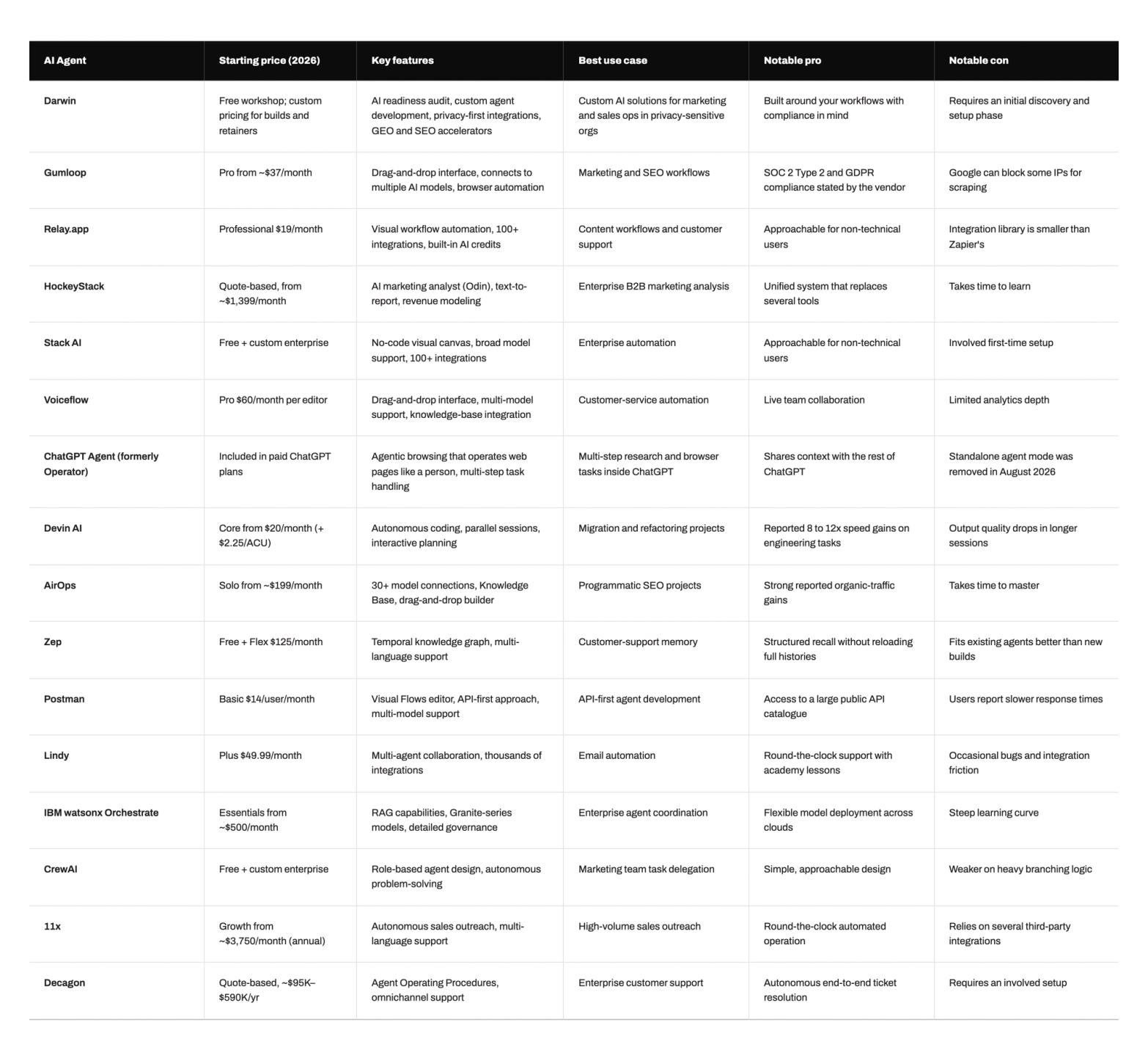
AI Agents Compared
The table below sets the 15 tools side by side on type, best-fit job and 2026 starting price, so you can shortlist before reading the full reviews. Every price links to its source in the tool's section above.
How Darwin Can Help
The tool is rarely what breaks an AI agent project. The ground under it is. A team signs for an agent to automate reporting or support, then finds the analytics data full of gaps, the CRM locked behind permissions the agent cannot reach, and no one who owns what a correct result even looks like. Whatever the agent does next, it does on top of those problems.
This is the work Darwin does before an agent goes live. For Cleo, we connected GA4, Salesforce, BigQuery and Looker Studio into one reliable reporting layer. Data accuracy climbed to 90% from a starting 70%, the team recovered around two days a month of manual work, and the setup saved roughly $50,000 a year. The dashboard on top earned its keep because the data feeding it had become trustworthy.
So pick the agent that fits the job, then check that your foundation can carry it. An agent performs when the data is clean and discoverable, the systems it needs are connected, someone owns the outcome, and the team keeps iterating on a few workflows. Handle those four things and almost any agent on this list becomes worth its price.
FAQs
Q1. What is the best AI agent in 2026?
There is no single best agent, because the right choice depends on the job. Gumloop, Relay.app and Lindy fit marketing and operations automation, Devin AI covers engineering, and HockeyStack and Decagon serve enterprise revenue and support. Match the agent to the task and to the data it will work with.
Q2. How much do AI agents cost in 2026?
Prices range widely. Free tiers and tools near $20 per month serve solo users and small teams, mid-market platforms sit between $50 and a few hundred dollars monthly, and enterprise agents run from a few thousand dollars a month into six-figure annual contracts. Usage-based billing is common, so forecast volume before committing.
Q3. Which AI agents are best for marketing and sales?
For marketing automation and content, Gumloop, Relay.app and AirOps stand out. For revenue analytics, HockeyStack fits enterprise teams. For outbound sales, 11x runs an autonomous SDR, and Lindy handles lead qualification and outreach for smaller teams.
Q4. Do AI agents need technical skills to set up?
It depends on the tool. No-code platforms such as Lindy, Voiceflow and Stack AI let non-engineers build working agents, while frameworks like CrewAI and enterprise suites like IBM watsonx Orchestrate expect engineering support. Even no-code tools need someone who understands the workflow being automated.
Q5. What makes an AI agent succeed or fail in production?
The foundation decides the outcome more than the tool. An agent needs clean, discoverable data, API access to the systems it automates, a clear owner who defines a correct result, and steady iteration on a few workflows. When those conditions are missing, even a capable agent underperforms.