Quick Answer:
n8n is an open-source automation platform that connects marketing tools through pre-built integrations. Teams use it to automate lead scoring, content publishing, attribution reporting, competitor monitoring, email sequences and sales handoff. Each workflow runs on a defined trigger, applies logic or AI processing, and routes outputs to CRM systems, Slack or reporting tools with no manual steps. The gain shows up in operations: fewer manual handoffs between marketing and sales, more consistent CRM records and reporting numbers your team can trust.
TL;DR
- n8n is an open-source automation platform with thousands of integrations and pre-built templates. This article covers ten workflows for the most common marketing operations scenarios in 2026. If your team works with pipeline or revenue data, start with lead routing, sales handoff or attribution reporting before social publishing.
- Lead routing and qualification. Inbound leads are scored using BANT logic and routed to CRM or nurture sequences automatically, without manual review.
- Email sequences. Lead records are enriched before drafting. Messages are generated from structured context that the workflow assembles for each lead.
- Competitor and review monitoring. Pricing pages and review platforms are checked on a schedule. Material changes trigger alerts automatically.
- Content operations. Assets from WordPress or RSS feeds are reformatted for each channel and distributed without manual coordination.
- Attribution and reporting. Closed deals are matched to originating lead sources. Revenue per channel is calculated and delivered to stakeholders automatically.
- A/B testing and optimization. Conversion data from Google Analytics is retrieved and analyzed on a schedule. Recommendations are routed without manual spreadsheet work.
- Sales handoff. Qualified leads are compiled into structured briefs and routed to sales with CRM task creation and escalation logic built in.
- Marketing dashboard. Metrics from ad platforms, CRM and analytics tools are centralized into one reporting layer that updates on schedule.
Marketing operations teams lose hours each week to repetitive coordination tasks. Email sends, post scheduling, lead routing and attribution reporting each take only minutes, yet together they consume a large part of weekly capacity.
n8n is an open-source workflow automation platform with thousands of integrations and a large library of pre-built templates. It connects tools such as HubSpot, Google Sheets, Slack, OpenAI, LinkedIn and Stripe, allowing processes to run automatically without building custom infrastructure.
n8n earns its place as a connective layer. It sits between the CRM, reporting stack, content operations and sales handoff, moving records and signals between systems that were never designed to talk to each other. The value comes from the connections it creates, so the surface each team already works on stays clean and the numbers stay clear enough to act on. This is the same operating logic behind Darwin Flux, which treats momentum as the outcome of connected systems, where clarity comes from how the pieces line up.
The 10 workflows below reflect common operational scenarios for marketing teams in 2026. Each example explains how the tools are connected, what decisions happen inside the workflow and how teams reduce routine work.
How to Pick Which Workflow to Build First
Ten workflows, and the right first one depends on where your stack already leaks. Start with the surface: the CRM record and the report your team opens every morning. Whichever one your team keeps correcting by hand points to the workflow you need first. Check the connections next, because a workflow is only as good as the webhook feeding it and the CRM field receiving it. Clarity decides whether it holds: one definition of a qualified lead, one revenue number per channel, agreed before anything runs automatically. Momentum is the test after launch, when someone owns the workflow the day an API changes. This is the operating logic behind Darwin Flux.
1. How Does n8n Automate Cross-Platform Social Media Scheduling And Publishing?
n8n connects content planning, AI generation and publishing APIs into one coordinated workflow. A shared calendar becomes the control point for distribution across platforms, with approval and status tracking embedded into the same flow.
How the n8n Workflow Orchestrates Multi-Channel Publishing
A scheduled trigger reads planned posts from Google Sheets and sends them to OpenAI’s GPT-4, which generates platform-specific versions in a single request. Posts are adapted for Twitter, LinkedIn and Instagram without manual reformatting.
DALL-E generates supporting visuals, which are stored in a connected asset repository such as Cloudinary before publishing. Before publishing, formatted previews are routed for approval. Once confirmed, posts are scheduled through Buffer. The spreadsheet updates with publishing status, previews and URLs to keep activity aligned.
What Integrations Does This Workflow Use?
This workflow connects Google Sheets for planning, OpenAI’s GPT-4 and DALL-E for content and asset generation, and Buffer for scheduled publishing. Each social platform connects through its API credentials, including LinkedIn OAuth2 and the Facebook Graph API. These integrations run content creation, approval and distribution inside one coordinated flow.
Who This Workflow Fits Best
Teams managing shared content calendars and approval dependencies reduce coordination overhead. Agencies gain clearer publishing status tracking across client accounts.
Measurable Results and ROI
A documented case study shows more than 20 hours per week recovered after moving scheduling and follow-up processes to n8n workflows. The workflow reduced coordination time and stabilized publishing cadence.
2. n8n Lead Scoring and Qualification Workflow
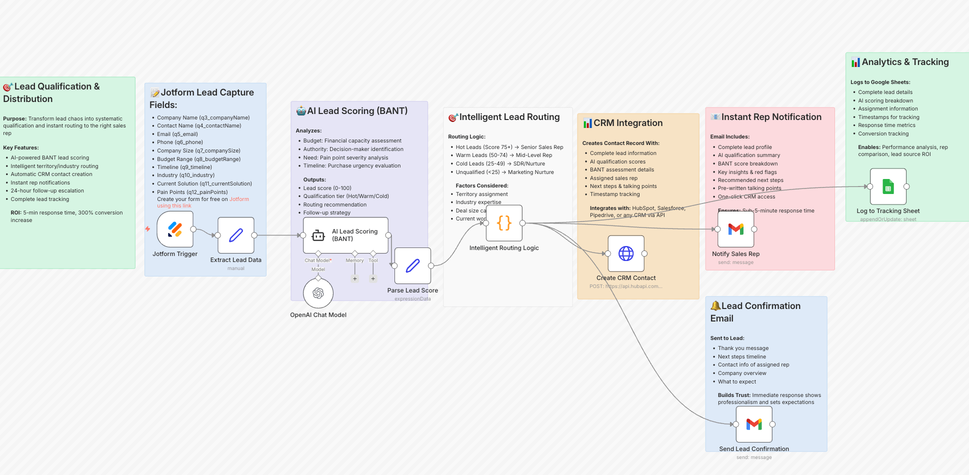
n8n scores and routes inbound leads immediately after submission. Qualification logic assigns priority based on defined criteria before records reach the CRM.
How the n8n Workflow Handles Lead Scoring and Routing
Inbound form submissions enter n8n through a webhook. The workflow applies BANT scoring using structured inputs such as budget, authority level, business need and timeline. Each prospect receives a score between 0 and 100, which determines routing logic.
High-score prospects are pushed directly into the CRM with predefined ownership rules and trigger instant notifications for the sales team. Mid-range scores enter a nurture sequence with AI-generated follow-up drafts prepared for review. Low-score submissions remain outside the active pipeline until additional signals are captured.
The workflow can also enrich records using website and company data to add context before scoring, improving assignment accuracy at the first routing stage.
What Integrations Does This Workflow Use?
This workflow connects Typeform or Jotform via webhook, an AI model for scoring logic, email verification services such as Hunter or Abstract API, and CRM platforms including HubSpot, Salesforce or Pipedrive.
Who This Workflow Fits Best
B2B SaaS companies, enterprise sales teams and professional services firms handling high inbound volume benefit from structured qualification and faster routing decisions.
Measurable Results and ROI
A documented B2B SaaS case study shows response time reduced from more than 48 hours to minutes after implementing automated scoring in n8n. Routing accuracy improved and qualified prospects were assigned without manual review.
"Activities need to have a revenue outcome. Otherwise, you run out of money." — Steffen Hedebrandt, CMO & Co-founder, Dreamdata
3. How Does n8n Build Context-Aware Email Sequences?
n8n builds enriched email sequences by connecting lead sourcing, profile enrichment and AI drafting inside one coordinated workflow. Each message is generated from structured context the workflow assembles for that lead.
How the n8n Workflow Builds Context Into Each Message
Lead records enter n8n from sourcing tools and are enriched before drafting begins. Profile attributes such as role, company context and recent activity are parsed and stored in the CRM to create a unified prospect view.
The workflow then generates subject lines and email bodies using the enriched dataset. Messages carry real context for each lead, with no static template fields in the send. Delivery timing, reply detection and follow-up sequencing are managed within the same workflow, ensuring outreach logic stays consistent.
What Integrations Does This Workflow Use?
This workflow connects sourcing platforms via API, profile enrichment services, OpenAI’s GPT-4 or Claude for content generation, CRM systems such as HubSpot or Salesforce, and email delivery tools including Smartlead or similar platforms. Optional verification services validate addresses before sending.
Who This Workflow Fits Best
Sales development teams, agencies running outbound campaigns and companies executing account-based outreach benefit from structured enrichment and consistent sequencing logic.
Measurable Results and ROI
Outbound preparation shifts from manual research and drafting to structured automated processing, increasing daily outreach capacity without additional headcount.
4. How to Monitor Competitor Pricing and Website Changes with n8n
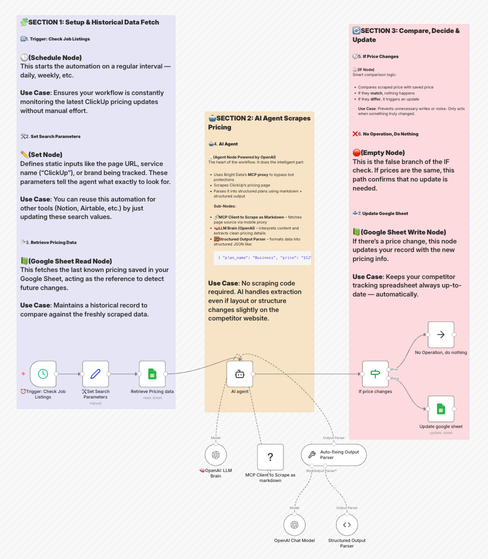
n8n monitors competitor websites and tracks pricing pages, feature updates and positioning changes automatically. The workflow compares current and previous versions and triggers alerts when pricing, feature sets or messaging change.
The example below illustrates pricing monitoring logic implemented in n8n.
How the Workflow Detects Relevant Changes
Website data is collected on a defined schedule through scraping or API access. Each new version is stored and compared with historical records to identify specific differences.
Detected updates are evaluated before notification. Pricing adjustments, new feature releases and messaging updates are flagged, while minor formatting edits are ignored. Structured records are stored for reference and trend tracking.
What Integrations Does This Workflow Use?
Web scraping tools or APIs connect external pages to n8n. OpenAI GPT-4o helps evaluate whether detected updates represent material changes. Google Sheets or PostgreSQL store structured records. Slack or similar tools deliver notifications.
Who This Workflow Fits Best
Product teams tracking competitor releases, sales teams monitoring pricing shifts and marketing teams reviewing positioning benefit from automated change detection. Business intelligence teams gain structured historical records without maintaining manual tracking files.
Measurable Results and ROI
Manual site checks are replaced with event-based monitoring. Material updates surface automatically, allowing teams to react without maintaining separate tracking spreadsheets.
5. How to Automate Customer Review Monitoring and Response with n8n
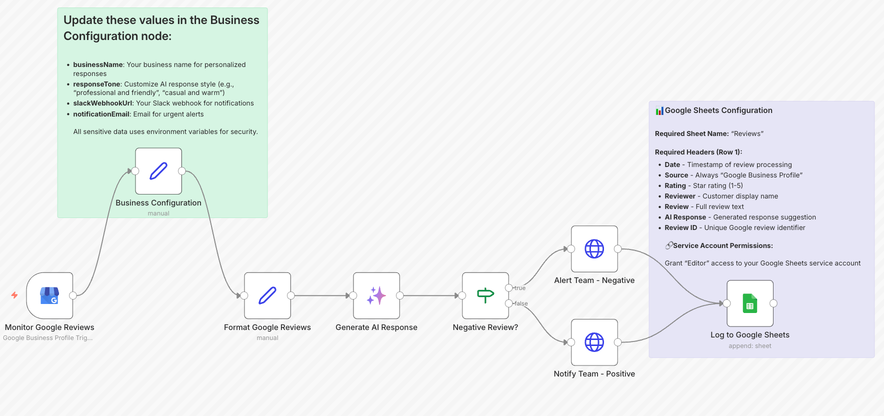
n8n collects reviews from multiple platforms, analyzes them and routes feedback automatically. Reviews are analyzed, categorized and assigned without manual checks.
How the Workflow Collects and Routes Reviews
The workflow retrieves product URLs or account references and checks platforms such as Google Business Profile, Trustpilot and Google Play on a defined schedule.
Each review is analyzed, scored and tagged before routing. Negative reviews trigger immediate Slack or email alerts with full context. Positive reviews can be formatted for reuse on websites. All entries are logged with timestamps and sentiment data.
What Integrations Does This Workflow Use?
Google Business Profile API, Trustpilot data integration, Google Play Console API, OpenAI GPT-4o or Google Gemini for analysis, and Slack or email routing tools.
Who This Workflow Fits Best
E-commerce businesses managing multiple listings, local companies monitoring reputation and app developers tracking store feedback benefit from centralized monitoring and automated routing.
Measurable Results and ROI
Manual review checks are removed from daily operations and response time improves once alerts are automated. Feedback lands in one place, tagged and traceable.
6. How to Orchestrate Multi-Channel Content Operations with n8n
n8n centralizes routing, formatting and distribution across channels inside one operational workflow. Assets are reformatted, scheduled and tracked without manual coordination between tools.
How the Workflow Routes Content Across Channels
The workflow pulls content from WordPress or RSS feeds and reformats it for each channel. A single source asset becomes LinkedIn posts, newsletter summaries, short social updates or blog excerpts, each adapted for its destination.
Distribution runs on schedule and outputs are logged for tracking. The team sees what is published, pending or under review from one control layer.
For video content, YouTube URLs are retrieved and transcripts extracted before AI generates derivative formats. Engagement signals collected after publishing can trigger follow-up workflows or reporting updates.
What Integrations Does This Workflow Use?
WordPress or RSS feeds for content input, OpenAI, Anthropic or Gemini for content rewriting, transcription APIs for video, publishing tools such as Buffer or SocialBu for distribution, and Airtable for tracking and status management.
Who This Workflow Fits Best
Agencies managing multiple client accounts and teams maintaining cross-channel consistency benefit from centralized routing. It is effective when content volume makes manual coordination inefficient.
Measurable Results and ROI
Publishing logic runs from a single source, reducing channel drift and eliminating the need for parallel coordination across tools.
7. How to Automate Marketing Attribution and ROI Tracking with n8n
n8n connects lead sources, deals and revenue data inside one workflow. Closed revenue is matched back to original acquisition channels automatically.
How Closed-Won Deals Are Matched to Original Lead Sources
The workflow retrieves closed deals on a defined schedule and matches each deal to its originating lead source. Revenue per source, cost per lead, conversion rate and return on investment are calculated and stored.
A separate process aggregates UTM-based leads by channel and aligns advertising spend with revenue outcomes. Reporting outputs are generated automatically and delivered to stakeholders without manual consolidation.
What Integrations Does This Workflow Use?
CRM systems for deal data, Google Sheets or Airtable for lead tracking, advertising platform APIs for spend data, OpenAI GPT-4o for report generation, and Slack or email for distribution.
Who This Workflow Fits Best
Marketing teams running multi-channel campaigns and agencies building client attribution reports benefit from centralized revenue mapping. It is relevant when manual spreadsheet reconciliation becomes unreliable.
Measurable Results and ROI
Channel-level revenue reporting replaces manual spreadsheet reconciliation. Revenue metrics update automatically, enabling faster budget decisions.
"Attribution is an input, not the gospel truth." — Kyle Lacy, CMO at Docebo
8. How to Automate Landing Page A/B Testing and Optimization with n8n
A/B tests generate page-level conversion data. n8n collects, evaluates and routes those results into structured recommendations automatically.
How Test Results Become Actionable
The workflow retrieves page views and conversions from Google Analytics on a defined schedule. Conversion rates are calculated and logged per variant.
When thresholds are met, automated analysis evaluates UX structure, messaging clarity, technical speed and conversion flow. Recommendations are stored and shared without manual spreadsheet work.
Test results append to Google Sheets. Slack notifications trigger when a variant outperforms the baseline.
What Integrations Does This Workflow Use?
Google Analytics for conversion data, Google Sheets for logging, OpenAI models for structured analysis, and Slack for notifications.
Who This Workflow Fits Best
E-commerce teams optimizing product pages, SaaS companies testing signup flows and agencies managing multiple landing pages benefit from automated evaluation and faster decision cycles.
Measurable Results and ROI
Variant conversion is calculated automatically and stored in a structured format. Optimization decisions are based on logged conversion data.
9. How to Automate Marketing-to-Sales Handoff with n8n
A qualified lead in the CRM is only valuable if the assigned rep has full context. n8n structures the handoff automatically once a lead reaches the defined qualification threshold.
How the Handoff Is Structured and Routed
When a lead meets scoring criteria, the workflow retrieves its full record, including UTM parameters, form responses, page activity, email engagement and qualification score. This data is compiled into a structured brief before assignment.
The brief is routed to the responsible rep via Slack and a follow-up task is created in HubSpot or Salesforce with a defined due date.
If no action is taken within a configured window, an escalation notification is sent to the sales manager. Each handoff is logged with timestamp, assigned rep and status.
For account-based campaigns, the workflow can append recent company updates or relevant talking points so the first outreach is informed by current context.
What Integrations Does This Workflow Use?
CRM platforms such as HubSpot or Salesforce for triggers and task creation, Slack for routing and escalation alerts, Google Sheets or Airtable for logging, and optional enrichment services for company-level context. OpenAI models generate the structured brief.
Who This Workflow Fits Best
B2B teams with defined sales cycles and shared ownership of inbound leads benefit most. It is relevant when marketing and sales operate in separate systems and handoff quality varies by rep.
Operational Impact
The time between lead qualification and first contact is reduced. Sales gets a brief with the context already pulled together. Lead-to-opportunity tracking becomes consistent because every handoff is logged and timestamped.
10. How to Build a Marketing Operations Dashboard with n8n
Marketing data lives in advertising platforms, CRM systems, finance tools and social channels. n8n centralizes these inputs into one structured reporting workflow.
How the Dashboard Stays Updated Automatically
Scheduled workflows retrieve campaign results from advertising platforms, CRM systems and analytics tools on a defined interval. Metrics such as spend, conversions, revenue and campaign results are normalized and stored in a central data layer.
Incoming signals such as social mentions or campaign alerts can be categorized automatically and appended to the same reporting structure.
The dashboard reflects updated metrics without manual data exports or spreadsheet reconciliation.
What Integrations Does This Workflow Use?
Advertising platform APIs for campaign results, CRM systems for pipeline data, Google Sheets or databases for structured storage, and OpenAI models for categorization or summary generation. Dashboard visualization tools consume the normalized dataset.
Who This Workflow Fits Best
Marketing leaders managing multi-channel results, operations teams responsible for reporting accuracy and product teams tracking growth signals benefit from centralized data aggregation.
Operational Impact
Reporting cycles move from manual data consolidation to automated updates. Dashboards remain current between reporting periods, and teams make decisions on synchronized data.
Comparison Table
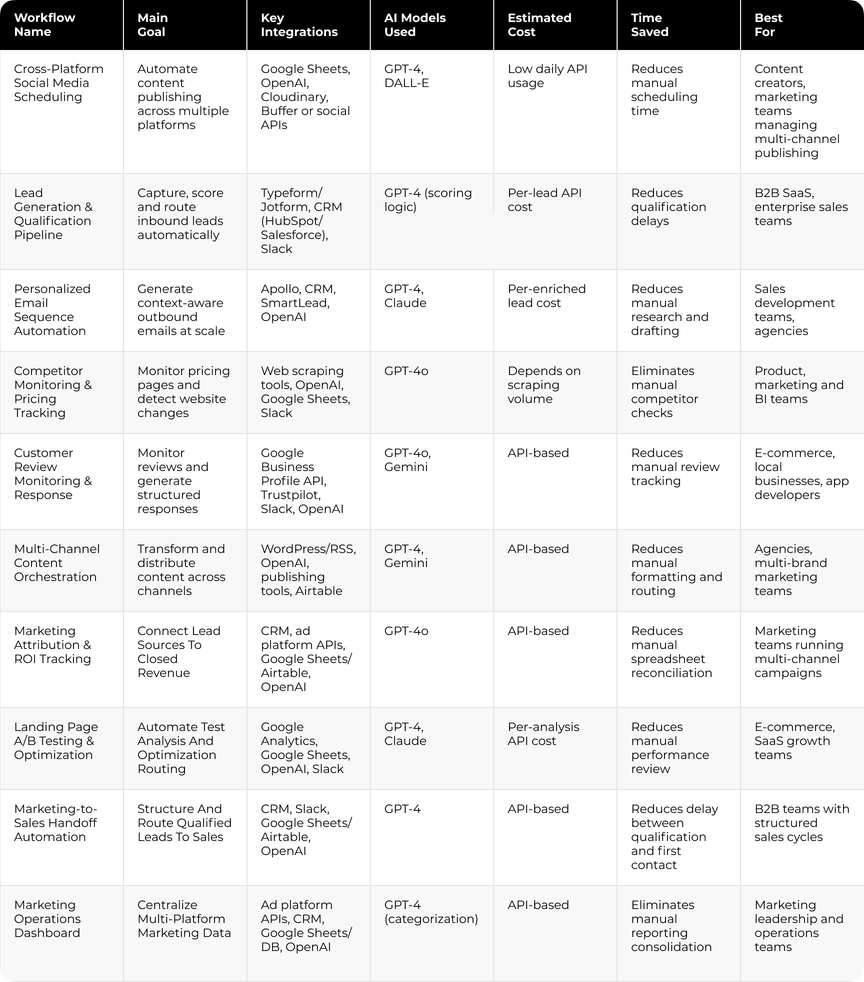
What Does It Cost to Run These Workflows?
Cost depends on the setup. n8n runs self-hosted at infrastructure cost, or on n8n Cloud with pricing tied to workflow executions. AI steps add model API usage on top, billed per call. Maintenance is the line teams forget: someone has to own the workflows when an API changes or a node breaks.
If you have never set up an n8n workflow before, this beginner tutorial walks you through installation, setup, and first use in one walkthrough.
Where n8n Should Stop
n8n should never become the source of truth for CRM, attribution or customer records. Use it to move and route data between systems. Ownership, field definitions and reporting logic belong in the systems your team already trusts, and each one needs a named owner before the first workflow goes live.
The Control Layer Above Your Workflows
The workflows described above automate individual processes: lead routing, attribution, reporting, content distribution and sales handoff. As these systems grow, coordination becomes more complex than execution.
Automation at scale requires structured control over how workflows interact, how AI outputs are routed, and how results are monitored across teams.
Darwin operates at this layer, wiring workflows into the rules that already run the business: CRM logic, reporting definitions, lead ownership and the pipeline decisions that follow.
What Darwin Adds to a Multi-Workflow Environment
- Cross-workflow coordination. Outputs from qualification, attribution or optimization workflows can trigger validated downstream actions based on shared business logic.
- System-level oversight. Execution status, dependencies and escalation paths sit on one dashboard covering every workflow.
- AI model governance. Prompt structures, model versions and output formats are managed centrally, allowing updates without destabilizing existing automation flows.
- Operational rule enforcement. Approval logic, routing standards and prioritization criteria remain consistent as automation expands across marketing and sales.
- Infrastructure stability. As new workflows are introduced, they integrate into an existing control structure, so parallel automation silos never form.
Darwin pulls automation systems into one coordinated whole, where every workflow answers to the same CRM rules, reporting logic and ownership model.
FAQs
Q1. What are the main benefits of using n8n for marketing automation?
n8n centralizes integrations, automates repetitive tasks and connects AI models with operational workflows. Teams reduce manual coordination and gain structured control over marketing processes.
Q2. How much time can marketing teams save with n8n workflows?
Time savings depend on the use case. Lead routing, reporting and social publishing automation can eliminate hours of manual coordination each week.
Q3. Do I need coding skills to set up n8n marketing workflows?
The visual editor covers standard marketing automation. Basic API understanding helps once workflows branch, though advanced coding stays optional.
Q4. What is the typical cost of running AI-powered workflows in n8n?
Costs are usage-based and tied to API calls. AI generation and analysis incur model fees, while integrations run on low or free tiers.
Q5. Which workflow should marketing teams implement first?
Start with the process that consumes the most manual time, such as lead qualification, reporting consolidation or multi-channel publishing.
Q6. Can n8n replace HubSpot or Marketo?
No. n8n moves records between systems, and the marketing platform still owns them. HubSpot and Marketo hold the contact records, campaign history and reporting definitions. Teams run n8n alongside a marketing platform, connecting it to the CRM they already run.
Q7. What should marketing teams automate first in n8n?
Start where pipeline and revenue data moves by hand. Lead routing, sales handoff and attribution reporting pay off faster than social publishing, because delays there cost deals.