
Quick Answer
The best lead-to-account matching tool depends on your CRM and how complex your routing is. LeanData and Traction Complete lead for Salesforce-native orgs with layered territories. ZoomInfo Operations fits teams that want matching, enrichment, and routing in one platform. HubSpot and Pipedrive cover lighter needs where domain matching is enough.
TL;DR
- Lead-to-account matching connects inbound leads to existing CRM accounts, so routing sends them to the right owner.
- Salesforce and most CRMs do not link leads to accounts on their own, so you need a dedicated tool or custom code.
- Enterprise Salesforce orgs get the deepest matching from LeanData, Traction Complete, and ZoomInfo Operations.
- Mid-market and SMB teams get enough from HubSpot native matching, Pipedrive, or LeadAngel.
- Clean CRM data decides matching accuracy: Salesforce estimates 91% of CRM data is incomplete.
Lead-to-account matching tools improve routing, but they cannot solve it on their own. As B2B SaaS teams adopt account-based strategies, routing leads without account context becomes increasingly expensive. Without proper lead-to-account matching, inbound leads land in the wrong queues, get assigned to the wrong reps, or slip through the cracks entirely. The median B2B SaaS company now spends around $2.00 to acquire every dollar of new ARR, and misrouted leads only push that number higher. Lead-to-account matching connects inbound leads to existing accounts before assignment, reporting, and attribution begin. This guide compares 11 tools that do it well for B2B SaaS teams in 2026.
What is Lead-to-Account Matching Software?
Choosing a matching platform starts with understanding the problem it solves. Lead-to-account matching connects people to accounts, giving sales and marketing the context needed to route, measure, and act with confidence.
Definition and Main Purpose
Lead-to-account matching software connects incoming leads to existing accounts in your CRM. Since Salesforce and most CRM platforms do not natively link these two objects, the relationship has to be built manually or through automation.
When someone fills out a form or books a meeting, you receive a person record with a name, email, maybe a company name and domain. Lead to account matching software looks at that information and asks: do we already have this company in the system? If yes, it connects the lead to that account. From there, routing rules take over, sending the lead to the account owner, not into a net-new queue.
How L2A Matching Works
The matching process evaluates multiple data points simultaneously. Email domain is the most common matching criterion. Company name gets compared too, often with fuzzy matching to catch variations like "IBM Corp" versus "International Business Machines".
Geographic data plays a role as well. If you have an account for Microsoft in the USA, a lead from Microsoft Canada will not match unless you also have a separate Canadian account. Some systems use additional signals like phone numbers, IP addresses, or website URLs.
The matching logic itself comes in two flavors. Rule-based matching uses manual criteria, something like "match if email domain equals account domain". AI-based matching uses machine learning to recognize patterns even when data quality drops, handling subsidiaries and corporate relationships that simple rules would miss.
When multiple accounts match a lead, the system applies tie-breaker logic. Priority goes to matches with both account name and email address, then account name only, then email address only. Geographic hierarchy breaks remaining ties.
Why B2B SaaS Companies Need It
Without lead-to-account matching, reps waste time chasing context and ownership when they should be closing deals. Multiple reps contact the same company without knowing it. Marketing inflates pipeline by counting leads that already belong to active accounts. Routing assigns work to the wrong team.
Matching gives every lead immediate account context, reducing duplicate outreach and aligning marketing and sales around a shared account view. For organizations running account-based strategies, matching becomes essential. At its heart this is a data problem before it is a software choice: matching only works when your connections between systems and the clarity of your account data hold up.
1. ZoomInfo Operations

ZoomInfo Operations sits at the intersection of data intelligence and workflow automation. The platform processes 1.5 billion data points daily through what they call the GTM Context Graph, fusing CRM records with intent signals and behavioral data. This means routing decisions reflect not just account ownership but actual buying readiness.
The system handles lead-to-account matching in real time using domain matching, company hierarchies, and subsidiary relationships. When Momentive implemented it, their speed-to-lead dropped from 20 minutes to 60 seconds.
Key Features
Waterfall enrichment pulls from 60+ data sources, including ZoomInfo's proprietary database of 500 million contacts and 100 million companies. The platform verifies first-party data at up to 95% accuracy, which earned it the G2 number one ranking in Data Quality for Summer 2025.
On top of enrichment, the platform automates deduplication using customizable matching rules and fuzzy logic for company name variations. It standardizes phone numbers, addresses, and field values to prevent data decay. The lead routing engine applies round-robin distribution, territory rules, and conditional logic without requiring code.
Pros
Single-platform consolidation removes the need for multiple vendors handling matching, enrichment, and routing on their own. The waterfall approach reduces match failures when CRM records are incomplete. No-code configuration means RevOps teams can update routing rules without engineering support.
Cons
Initial setup requires configuring routing rules and field mappings before the system delivers full value. Consumption-based pricing demands usage forecasting to manage credits effectively.
Best For
Enterprise B2B teams running account-based marketing programs benefit most, particularly those managing complex account hierarchies or consolidating multi-vendor enrichment infrastructure. Organizations that need auditable pipelines for compliance will appreciate the ISO 27001, 27701, and SOC 2 Type II certifications.
Pricing
ZoomInfo offers a free tier to start, with consumption credits based on usage. Professional plans begin near $14,995 annually, Advanced around $24,995, and Elite exceeds $39,995. Enterprise contracts for larger organizations often range from $80,000 to over $150,000 depending on seats and markets covered.
2. Chili Piper

Chili Piper built its reputation on one thing: eliminating the gap between form submission and meeting confirmation. The platform routes inbound leads to the right rep and books them instantly, which matters when speed-to-lead determines conversion rates. Unlike pure data providers, Chili Piper focuses on workflow orchestration for scheduling, routing, and handoff coordination.
Key Features
The platform handles lead-to-account matching using fuzzy logic that catches company name variations and uses Salesforce duplicate rules. Round-robin distribution and territory-based routing work on multiple Salesforce objects, not just leads. Instant booking from web forms means prospects schedule without back-and-forth email exchanges. The system supports SDR-to-AE handoffs with shared calendars, meeting templates, and automated reminders that increased show rates by 10% for some teams.
Pros
Reducing lead-to-meeting time protects inbound SLAs and improves speed-to-lead results. Structured handoffs between SDRs and AEs cut scheduling friction in multi-step sales cycles. Salesforce lead assignment automation decreases assignment latency and reduces manual routing errors. Territory and round-robin logic supports segmented routing for regions and account tiers.
Cons
Seat-based pricing combined with inbound-tiered platform fees increases total spend as headcount and lead volume expand. Platform fees range from $150 to $1,000 monthly depending on inbound lead volume. The modular structure means teams often combine multiple products, stacking costs and operational overhead. Advanced routing requires ongoing Salesforce rule management.
Best For
Inbound-focused demand generation teams generating steady volume who need instant meeting booking and territory routing see the fastest returns. Salesforce-centric RevOps teams running complex routing logic benefit from native CRM integration. SDR organizations where calendar coordination slows deal velocity find value in automated handoffs.
Pricing
ChiliCal starts at $15 per user monthly. Concierge, Distro, and Handoff each cost $30 per user monthly, plus platform fees. Enterprise packages begin around $15,000 annually for Routing & Scheduling and $42,000 for Experiences. Total annual spend can exceed $100,000 for larger organizations once you factor in seat count, workflow depth, and AI engagement requirements.
3. LeanData

LeanData operates entirely inside Salesforce, which means your data never leaves the CRM itself. More than 1,000 companies use it to orchestrate GTM execution for matching, routing, scheduling, and buying group coordination. Unlike platforms that bolt routing onto existing infrastructure, LeanData was purpose-built for this problem from day one.
The architecture matters more at enterprise scale where security teams require all processing to stay within Salesforce's native permissions model.
"LeanData plays a massive role in quickly identifying and routing hot inbound leads to the correct account owner." Lars Nilsson, Former VP, Global Sales Development, Snowflake
Key Features
The matching engine evaluates six fields simultaneously using fuzzy logic that handles company name variations, domain synonyms, and corporate hierarchies. Out-of-the-box accuracy hits 95%. When multiple accounts qualify as matches, configurable tie-breakers select the best one based on business-specific criteria.
The visual FlowBuilder lets operations teams design routing logic without code. It supports leads, contacts, accounts, opportunities, cases, and custom objects. Matching embeds directly into these flows, so results immediately inform downstream routing decisions.
Audit logs explain why each match occurred, which fields drove the decision, and what alternatives were evaluated. BookIt handles inbound form-to-calendar conversion and handoff scheduling. SLA timers trigger automatic reassignment when thresholds expire.
Pros
Saviynt increased lead-to-account matches by 53% and saved five hours weekly in manual work. SUSE improved speed to lead by 70% in one quarter. The platform's Salesforce-native design means no middleware delays. Full audit trails make troubleshooting faster when routing errors occur.
Cons
Complex routing flows require experienced admins to maintain. Pricing sits at the premium end compared to native Salesforce automation. Testing new logic before deployment can feel cumbersome.
Best For
Enterprise B2B organizations running Salesforce with complex territories, multi-object routing needs, and security requirements that mandate in-CRM processing.
Pricing
Standard starts at $39 per user monthly for lead-only support. Advanced costs $49 and adds contact and account objects. Premium runs $59 with any Salesforce object included. Enterprise tier offers custom packaging for large deployments.
Before investing in any matching platform, confirm your CRM data can support accurate matching.
4. Traction Complete
Backed by Salesforce Ventures after receiving funding in 2023, Traction Complete was founded by North America's largest Salesforce consulting firm with over 1.7 million hours of client insights. That pedigree shows in the architecture. The platform runs 100% native to Salesforce, processing large data volumes 80% faster than other revenue orchestration tools. Your data never leaves your org, which matters when security teams demand in-CRM processing with Salesforce's native permission model.
"Traction Complete not only handles our lead routing, assignment, and matching, but it also allows us to automate many things in our business that used to be manual." Akiko O., Director of Global Sales Operations, Kyriba (via Traction Complete)
Key Features
Complete Leads uses a drag-and-drop flow builder for lead-to-account matching and routing. Unlike competitors that limit you to one flow per object, Traction Complete lets you build multiple flows on different Salesforce objects. The matching engine references fields on any object, not just leads, supporting automation around accounts, contacts, mass updates, and custom objects.
The platform handles waterfall enrichment through Complete AI, validating firmographics, standardizing data formats, and identifying parent company hierarchies. Complete Hierarchies maps account structures automatically. Complete Clean tackles deduplication at scale.
Pros
Traction Complete holds a 98% customer success rating and five-star ratings on the Salesforce App Exchange. The platform also holds 115+ five-star G2 reviews. Processing speed eliminates backlogs that plague other tools. Tech stack consolidation reduces costs by handling routing, hierarchies, deduplication, and buying group mapping under one solution.
Cons
Implementation averages two months. Administrative configuration requires Salesforce expertise to unlock advanced features. The learning curve affects occasional users.
Best For
Enterprise Salesforce teams with 75+ users managing complex routing, hierarchy automation, and data quality needs. Organizations consolidating multiple point solutions benefit from the unified architecture.
Pricing
Entry pricing starts around $39 per user monthly with a $10,000 minimum annual commitment. Complete Leads costs approximately $780 per user annually, while Complete Hierarchies runs $91 per user yearly. Budget an additional 15-25% for implementation services.
5. LeadAngel
LeadAngel claims 98%+ matching accuracy, which puts it ahead of most competitors in pure precision. The platform uses fuzzy logic to catch company name variations that would trip up exact-match systems. U.S. Bank matches with United States Bank, IBM Corp connects to International Business Machines. The algorithm processes millions of records per hour, which matters when you are cleaning up years of CRM mess or handling high inbound volume.
Native integrations exist for Salesforce, Dynamics 365, and HubSpot. No middleware, no sync delays. The system runs matching cycles every 20 minutes for paid users, keeping your database current without manual intervention.
Key Features
You control matching confidence by toggling rules on or off. Tighten rules for precision, relax them for wider coverage. Custom "Always Match" or "Never Match" rules handle specific business relationships. The platform supports matching against CRM accounts and custom uploaded lists.
Data deduplication runs automated jobs to clean existing records and prevent new duplicates. Customers report a 68% efficiency gain for sales teams after implementing the dedupe function. Lead routing applies round-robin, territory logic, and custom assignment rules without code.
Pros
Users consistently mention ease of use. Setup happens quickly with support from the LeadAngel team. The matching engine reduces manual errors by 80% and cuts response times in half. Customer service earns positive reviews for responsiveness.
Cons
Some users report speed glitches and bugs that need attention. Some users also report reliability limitations.
Best For
Revenue operations teams running Salesforce, HubSpot, or Dynamics with meaningful inbound volume who need accurate lead-to-account matching without developer resources.
Pricing
Professional costs $500 monthly when billed annually. This includes 100,000 lead and account records, 10 sales people, two-way matching, and email support. Professional Plus runs $2,042 monthly annually, covering 500,000 records, 25 sales people, and includes data dedupe and scheduling features that are add-ons in the lower tier. Both plans carry one-time setup fees.
6. HubSpot
If you are already running HubSpot CRM, the lead-to-account matching capability lives inside your account right now. Over 228,000 customers use the platform, and the native matching function comes free with every tier. The system creates and associates companies with contacts automatically once you enable it through Settings > Objects > Companies. HubSpot earned a 4.4/5 rating on G2 from nearly 12,000 reviews, which speaks to broad satisfaction, though the matching feature itself has clear boundaries.
The matching works through email domain recognition. When a contact enters your database, HubSpot checks the email domain and links that person to an existing company record if one matches. Simple enough, except real-world data rarely cooperates cleanly. Inconsistent company names, missing domains, and multi-location accounts break these native associations.
Key Features
Domain-based matching handles straightforward scenarios where email addresses contain corporate domains. The system processes both new contacts and existing records once you activate the feature. HubSpot also supports Demandbase integrations for enhanced person-level matching, tracking fields like name, title, and whether the record qualifies as a lead or contact.
Pros
The free plan supports up to 1,000,000 contacts and 2 users with functional pipeline management, email tracking, and basic automation. This is legitimately useful for startups, not a trial period disguised as free access. Teams already invested in HubSpot's ecosystem benefit from unified data without adding another vendor to the stack.
Cons
Generic email addresses like Gmail accounts will not match since they lack corporate domains. Companies running multiple domains face similar issues. Manual adjustments become necessary when the logic fails, which undermines the automation you are trying to achieve. Advanced rule-based matching has no native support, so edge cases require workarounds or third-party tools.
Best For
Small to mid-market companies running inbound-heavy sales motions where most leads arrive with corporate email addresses. HubSpot works particularly well when your marketing team already uses Marketing Hub, creating natural sales-marketing alignment without integration headaches. SMBs with 5 to 50 reps who prioritize ease of use over advanced customization see the most value. Inbound-focused teams where leads come from content, SEO, and paid ads fit HubSpot's strengths.
Pricing
Starter costs $20 per seat monthly. Professional runs $100 per seat monthly with a $4,500 onboarding fee. Enterprise pricing hits $150 per seat monthly plus a $12,000 onboarding fee. Professional and Enterprise require annual commitments. The free plan includes contact management, email tracking, and one deal pipeline, making it viable for early-stage teams testing lead to account matching software before committing to paid tiers.
7. Salesforce Lead to Account Matching
Salesforce ships with matching and deduplication tools already installed. Matching rules evaluate incoming leads against existing records using company name, email, or domain. Duplicate rules decide what happens when matches appear, either alerting users, blocking creation, or flagging for review. The Matched Leads component surfaces potential matches on account pages for manual conversion.
These tools handle basic deduplication. However, enterprise teams usually hit walls fast.
Key Features
You can create custom matching rules when standard ones do not fit your business. Duplicate rules support up to five active rules per object. Matching evaluates fields like company name, email domain, and location.
The system does not link records on its own. It identifies potential matches, but connecting them requires Flow, Apex, or a routing tool.
Cons
By contrast, native rules are rigid. You are capped at five active matching rules per object and 25 total active rules in your org. Each rule allows only one lookup field. No automated enrichment exists. Processing runs in batches, not in real time, which delays routing and undermines speed-to-lead goals. Account hierarchies require manual logic. Ongoing maintenance becomes necessary as records evolve.
Best For
Small teams with straightforward matching needs and technical resources to build custom flows.
Pricing
Included with Essentials, Professional, Enterprise, Performance, Unlimited, and Developer editions.
8. Default

Default.com automates the routing side of lead management. The platform matches incoming leads using email domains and company names, then routes them based on territory, industry, account status, and lead score. Integration with marketing automation tools keeps sales and marketing coordinated.
Key Features
The matching engine uses algorithms that evaluate email domains and company names to connect leads with accounts. Routing logic considers territory, industry, account status, and lead score when assigning work. Data enrichment pulls in company size, industry, contact information, and previous interactions. Real-time CRM updates mean your team sees changes immediately. Lead scoring prioritizes leads by value and purchase readiness. Reporting provides detailed visualizations.
Pros
Setup feels straightforward compared to enterprise platforms. Automation handles scheduling and lead generation without manual intervention. The enrichment function gives reps context before they make contact. Errors drop when you eliminate manual data entry.
Cons
Round-robin distribution has no native support. Territory management capabilities remain limited. Intent signal support lags behind dedicated intent platforms.
Best For
Teams running lightweight routing automation where complex lead-to-account matching stays secondary.
Pricing
Pricing is available on request. Contact the Default sales team for a custom quote.
9. LeadSquared

LeadSquared positions itself more toward B2C businesses and education segments than typical B2B SaaS. The platform combines marketing automation with CRM functionality, handling lead capture, scoring, and workflow automation through a single interface. Over the years, it has built a reputation for straightforward deployment and responsive support, earning higher ratings than Salesforce, Oracle, and Adobe in service quality.
Key Features
Lead quality and engagement scoring tracks prospect behavior at every touchpoint. Advanced lead distribution routes incoming leads based on custom rules. The platform connects with telephony providers like Exotel and messaging services like Msg 91 through built-in connectors. Workflow automation handles nurturing sequences without code. Integration support spans Gmail, Outlook, Shopify, WhatsApp, Facebook, and Zapier.
Pros
Users consistently praise the customer support team. The interface remains simple enough that new reps get productive quickly. Integration deployment earns positive marks compared to competitors.
Cons
Speed lag surfaces when automation features run heavily. The UI offers limited customization options, creating visual monotony over time. Reporting works in silos, so teams lose a single unified view. Contact center loading speed stays slow despite user requests.
Best For
B2C teams and education providers managing high lead volumes with straightforward routing needs.
Pricing
Sales Pro pricing details are not public. TrustRadius shows plans starting at $50-$60 per user monthly.
10. Pipedrive
Trusted by over 100,000 companies, Pipedrive takes a visual approach to sales pipeline management that makes lead routing feel less technical than enterprise platforms. The drag-and-drop Kanban interface keeps deals visible while automatic assignment features route leads to the right reps based on geographic location, lead scoring, and custom criteria. Built specifically for small and mid-sized businesses, the platform prioritizes usability over heavy configuration.
Key Features
Automatic assignment routes each lead to matched reps, reducing response times and streamlining workflows. Lead routing and distribution features ensure your strongest team members work the most valuable deals. The LeadBooster add-on packages Chatbot, Live Chat, Prospector (accessing 400 million profiles), and Web Forms into one toolkit. AI-powered tools help with email writing, sales reporting, and deal prioritization.
Pros
The interface remains genuinely beginner-friendly with high ease of use. Entry pricing starts low enough for startups to access functional pipeline management. Sales reporting and custom dashboards track team results without requiring analytics expertise.
Cons
Advanced lead scoring feels manual compared to specialized platforms. Behavior-based automation capabilities lag behind competitors. Email marketing, live chat, and web tracking require paid add-ons that stack costs quickly.
Best For
SMB lead qualification teams needing a practical pipeline view and follow-up automation without enterprise overhead. Sales-focused small businesses with 5-50 reps benefit most.
Pricing
Essential starts at $14 per seat monthly billed annually, Growth costs $39, Premium runs $49, and Ultimate reaches $79. LeadBooster adds $32.50 monthly.
11. Bitrix24

Bitrix24 handles more than just lead matching. The platform combines CRM, project management, communication tools, HR, and site building under one roof. Over 15 million organizations use it, which speaks to its broad appeal well past standard B2B SaaS. The matching function uses email domain and company name recognition, processing leads from website forms, social media, email, and chat channels automatically.
The pricing model stands out. Unlike per-seat platforms, Bitrix24 charges a flat organizational fee. Add 50 users or 5, the price stays fixed within your tier limit.
Key Features
Lead capture runs on multiple channels with automated segmentation based on demographics, source, and engagement. The platform creates nurturing workflows with email sequences and follow-up reminders. Sales and marketing teams share a unified dashboard for a clear pipeline view. Custom fields, deal stages, and routing rules configure without code. The AI assistant CoPilot handles call transcription and autofills lead information.
Pros
The free plan supports unlimited users with functional CRM, task management, and collaboration tools. Consolidating multiple tools cuts software spend meaningfully. File sharing and team coordination earn consistent praise.
Cons
Users report a learning curve during implementation. Customer support receives mixed reviews. Speed glitches surface occasionally in the same way in every module.
Best For
Small teams needing an all-in-one workspace without per-user fees. Organizations consolidating fragmented tool stacks benefit most.
Pricing
Free forever for unlimited users with 5GB storage. Basic costs $49 monthly for 5 users, Standard $99 for 50 users, Professional $199 for 100 users, Enterprise starts at $399 for 100 users. Annual billing saves roughly 30%.
Feature Comparison: Routing and Matching
Choosing between eleven lead-to-account matching tools gets easier when you see them side by side. The table below compares routing and matching capabilities side by side. Notice how enterprise solutions like LeanData and ZoomInfo support capacity routing, while lighter CRM and routing options like Pipedrive, Bitrix24, and LeadSquared cover simpler needs without native lead-to-account matching.
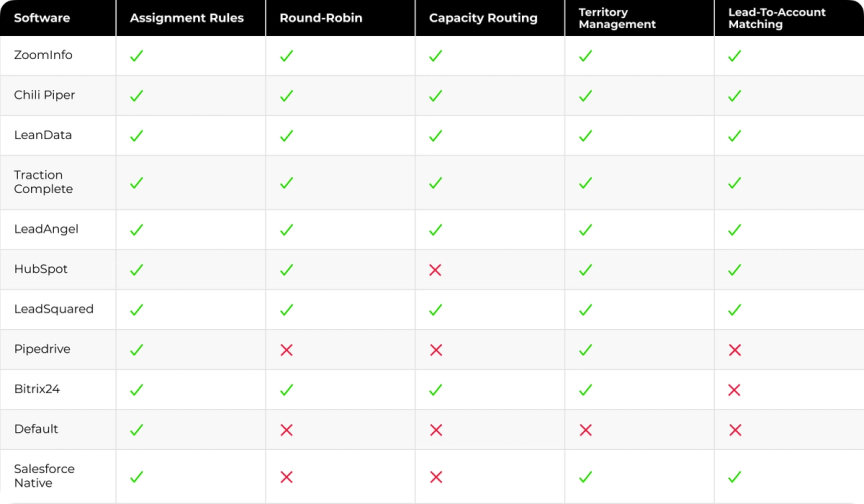
Pipedrive and Bitrix24 lack native lead-to-account matching despite handling basic routing. Default skips territory management entirely. For Salesforce lead to account matching tools specifically, LeanData and Traction Complete deliver the most complete feature sets.
How to Choose the Right Lead-to-Account Matching Software
Assess Your CRM Complexity
Start with your data, not the vendor pitch. Salesforce estimates 91% of CRM data is incomplete, which means matching logic fails when underlying records lack basic fields. Audit your account and contact data for inconsistent company naming conventions, duplicate account records, missing email domains, and outdated entries. Clean data makes matching easier. Dirty data makes even sophisticated matching logic unreliable. Gartner puts the average cost of poor data quality at around $15 million per year for a typical organization, which is the real price of skipping the audit.
Why Data Foundations Matter
Lead-to-account matching depends on more than the matching platform itself. Clean data, connected systems, and consistent routing rules all influence whether leads are matched accurately and assigned to the right accounts. At Darwin, we approach matching as part of a broader RevOps foundation, where data quality, integrations, routing, and reporting work together instead of being managed separately.
That foundation helps matching remain accurate as your CRM grows, new enrichment sources are added, and routing logic evolves. Teams spend less time correcting records and ownership issues, and more time acting on reliable account data. This is the role Darwin Flux plays: creating the conditions that allow lead-to-account matching to deliver consistent results over time.
Evaluate Matching Logic Requirements
Exact matching alone fails in any CRM where company names are entered inconsistently. Ask vendors to demonstrate how their platform handles "Acme Corp" versus "ACME Corporation" versus "Acme Inc". Territory models in enterprise B2B almost always include subsidiary relationships. A lead from a regional office may need to route to the subsidiary account owner, the parent account owner, or a named enterprise rep depending on your coverage model.
Consider Integration Capabilities
Native integrations maintain bi-directional sync, support custom field mapping, and update in real time without middleware. API-dependent integrations introduce latency, require maintenance when either platform updates its API, and create a failure point that RevOps teams end up owning. Get specifics on which CRM and MAP integrations are native and which require a connector.
Budget and ROI Considerations
Revenue teams with strong matching and routing foundations report up to 50 percent faster speed to lead and 30 percent higher conversions. Automating these processes can reduce the time Ops teams spend on manual lead triage by up to 80%.
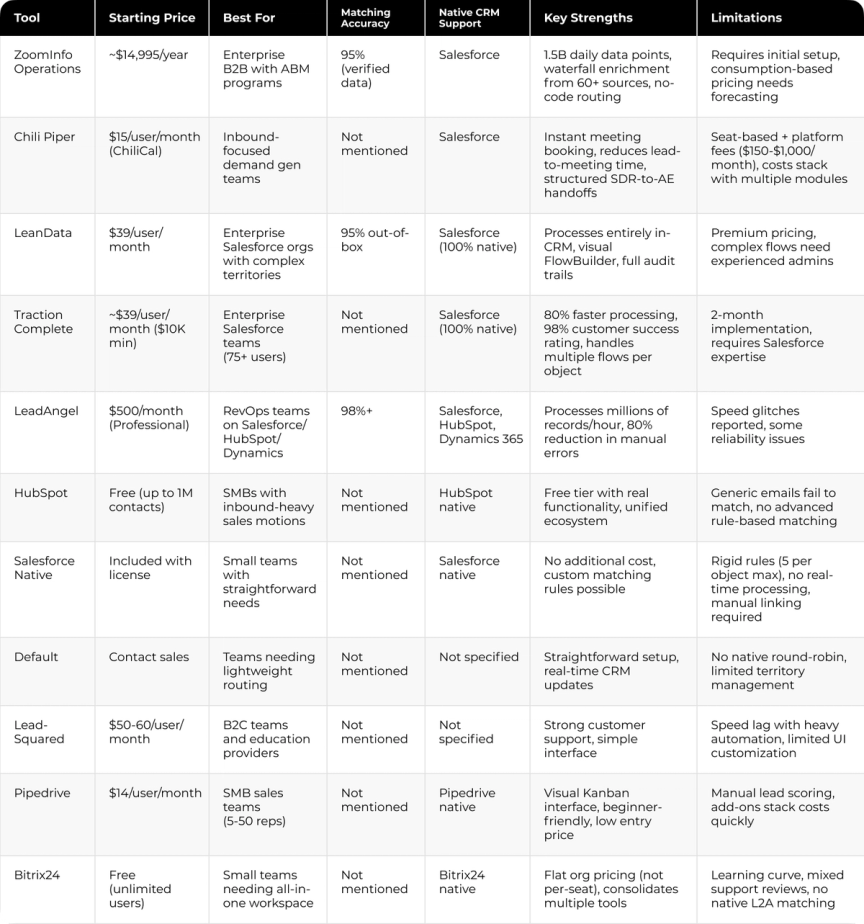
Detailed Comparison: Price, Best For, and Accuracy
Choosing a Matching Tool Is a Data Problem First
A lead-to-account matching platform can only work with the data it receives. When company records are incomplete, routing rules conflict, or reporting systems disagree, even the best matching engine produces unreliable results. Improving the technology without improving the foundation rarely solves the problem for long.
Darwin helps B2B SaaS companies strengthen that foundation. Through Darwin Flux, we evaluate CRM data, reporting logic, integrations, lead routing, and operational workflows before building the systems that keep account matching accurate as the business grows.
That approach helped Cleo solve a much bigger challenge than lead routing alone. Customer data was spread across GA4, Salesforce, and BigQuery, making reporting inconsistent and account data difficult to trust. Darwin connected those systems, rebuilt the reporting logic, improved reporting accuracy from approximately 70% to 90%, eliminated the need for a paid attribution platform, and returned two working days each month previously spent on manual reporting.
The right matching platform is an important decision. Building it on connected systems, reliable data, and governance is what allows it to deliver consistent results over time.
FAQs
Q1. What is lead-to-account matching?
It is software that links an inbound lead to the existing account it belongs to in your CRM. Salesforce and most CRMs do not make that link on their own, so a matching tool or custom code fills the gap before routing runs.
Q2. How do lead-to-account matching tools decide on a match?
They compare email domain, company name, and often geography, using fuzzy logic to catch variations like "IBM Corp" and "International Business Machines". When several accounts fit, tie-breaker rules pick one, usually favoring a match on both name and domain.
Q3. Which lead-to-account matching tool is best for Salesforce teams?
LeanData and Traction Complete run natively inside Salesforce and handle complex territories, hierarchies, and multi-object routing. ZoomInfo Operations suits teams that also want enrichment in the same platform.
Q4. How much does lead-to-account matching software cost?
Entry pricing runs from about $39 per user monthly for LeanData or Traction Complete to $500 monthly for LeadAngel, while ZoomInfo Operations starts near $14,995 per year. HubSpot includes basic matching free on every tier.
Q5. Why does matching accuracy depend on data quality?
Matching logic reads the fields already in your CRM, so inconsistent names, missing domains, and duplicate accounts break it. Salesforce estimates 91% of CRM data is incomplete, which is why cleaning data first raises match rates more than any single tool.