
Quick Answer:
HubSpot tends to work better for marketing-led teams of 20 to 150 GTM users who need attribution without heavy configuration. Salesforce gives more control over pipeline reporting and handles sales architectures that require deep customization. If your team runs both, the reporting gap comes down to data governance, not the platform you chose.
TL;DR
- Attribution speed. HubSpot can capture tracked interactions from connected assets automatically. Salesforce requires consistent Campaign Member Status updates or attribution data disappears.
- Data architecture. HubSpot default reporting model centers on four CRM objects. Salesforce uses a junction object structure that gives more flexibility but demands more governance.
- Setup effort. HubSpot attribution works natively for teams using the platform end-to-end. Salesforce Campaign Influence requires admin configuration or custom logic in most setups.
- Cost reality. HubSpot multi-touch attribution requires Marketing Hub Enterprise. Salesforce attribution can involve third-party BI tools and consultant fees of $90 to $250 per hour.
- Data quality risk. In 44% of companies, poor CRM data costs more than 10% of annual revenue. Shared definitions, clean associations, and governed reporting logic are what fix it.
When marketing pulls numbers from HubSpot and sales pulls them from Salesforce, the reports tell different stories. Leads drop between systems. Attribution credits the wrong touchpoints. Executive dashboards show conflicting pipeline figures depending on who built them.
The platform matters, but the reporting gap starts in the data architecture underneath it. The CRM you choose determines how you structure lifecycle stages, attribute campaign revenue, and connect marketing activity to closed deals. Before any dashboard gets built, those foundations have to be right.
This article breaks down how HubSpot and Salesforce handle revenue reporting so marketing leaders can evaluate which setup fits their team, and where the real gaps appear when both platforms are running at the same time.
Two Problems No CRM Solves by Default
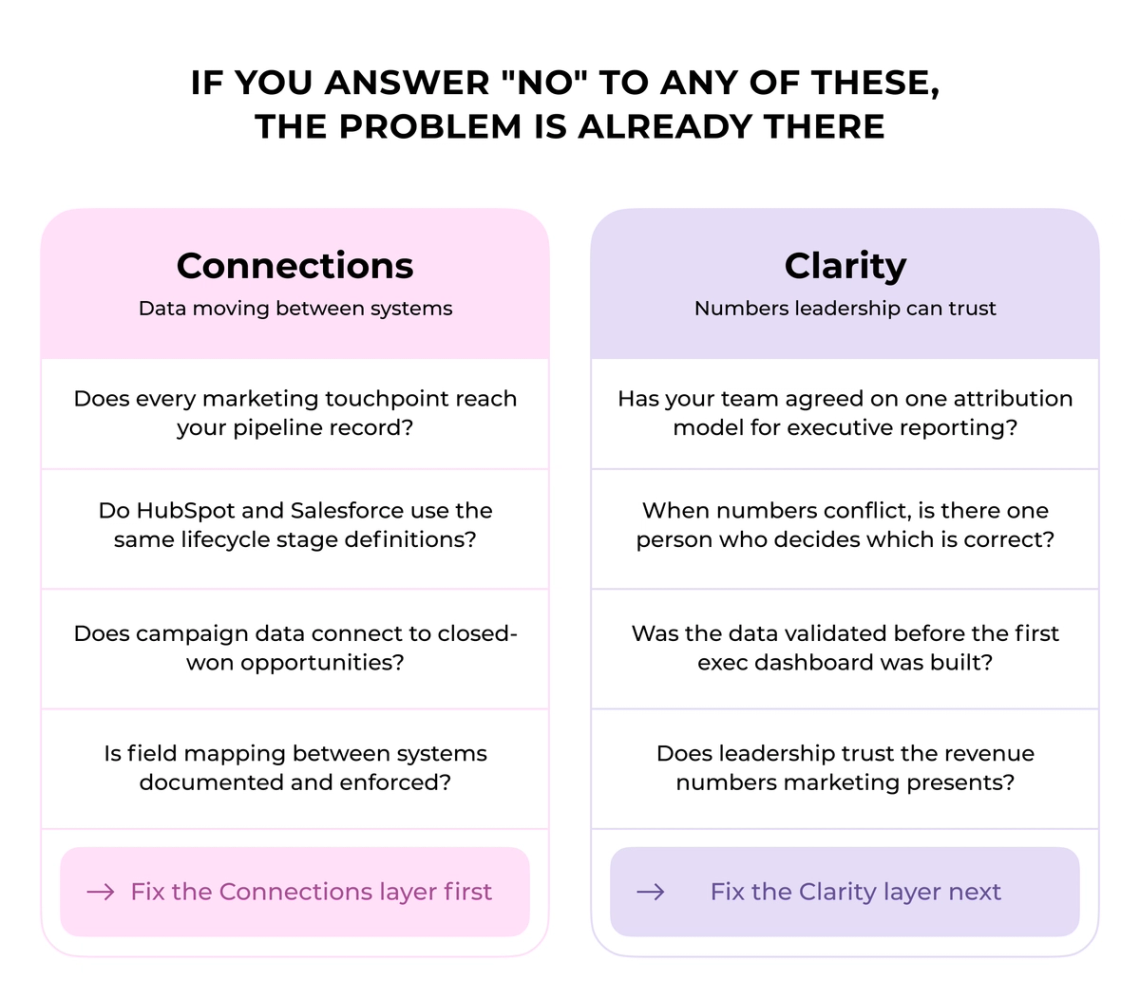
When revenue reports from HubSpot and Salesforce tell different stories, the instinct is to blame the platform. In most cases, the platform is not the issue. The issue is what happens between platforms: whether data moves cleanly from one system to another, and whether anyone has agreed on which number is the authoritative one when they conflict.
HubSpot and Salesforce and Salesforce can both get you closer to reliable revenue reporting. Neither one determines whether your lifecycle stages are consistently defined, whether attribution rules have been agreed on, or whether there is a single owner when the numbers conflict. Those decisions sit outside the platform. In Darwin Flux, the work of getting data to flow cleanly between systems is Connections. The work of making reporting trustworthy and consistent for leadership is Clarity.
Revenue Reporting Fundamentals for SaaS Marketing
Most SaaS marketing teams report on activity. Leadership wants to see revenue contribution to the pipeline, and the gap between those two things is where reporting breaks down.
What Marketing Leaders Need from Revenue Reporting
Leadership does not care how many emails went out or how much traffic landed on the site. The question is whether marketing spend is generating profitable, sustainable revenue. That shift, from documenting campaign activity to proving revenue impact, is where most reporting frameworks break down.
Executive marketing reports should track five to seven KPIs: return on marketing investment, pipeline contribution, and marketing-influenced revenue, delivered monthly with dashboard access between cycles. Marketing-sourced revenue counts only the deals where marketing originated the opportunity. Marketing-influenced revenue captures every closed deal that marketing touched at any stage of the journey.
The Difference Between Activity Metrics and Revenue Metrics
Activity metrics and revenue metrics are not interchangeable, and treating them as such is what causes executive confidence in marketing reporting to erode.
Activity metrics are immediate and easy to quantify: high email volume, more meetings booked, call volume. These measurements signal effort, but not whether deals are moving forward. The issue is signal-to-noise ratio. Activity metrics reward motion over progress, which produces bloated pipelines with low conversion rates, inconsistent qualification standards, and forecasts that drift from reality.
Revenue metrics reveal whether activity is producing revenue. Pipeline velocity, win rate, deal aging by stage, forecast accuracy, customer acquisition cost, and customer lifetime value are the business impact metrics that guide strategy and investment. Activity metrics should be treated as inputs, not indicators of success.
An executive does not need to know that a LinkedIn campaign achieved a specific click-through rate. The relevant question is whether that campaign generated qualified pipeline and at what cost. Poor attribution, the inability to connect specific touchpoints to revenue outcomes, is one of the most common reasons executives stop trusting marketing's claimed return on investment.
How CRM Choice Impacts Reporting Accuracy
The CRM platform you choose sets the ceiling for how accurately your revenue reports can reflect reality. Different lead status definitions, misaligned attribution models, and missing contact roles can produce executive-level reports that marketing and sales interpret in completely contradictory ways.
Closed-loop reporting, including unified funnel stage definitions, shared attribution rules, and a regular reconciliation process, is a prerequisite for data that leadership can trust. When your funnel covers paid social, email, organic search, and direct outreach, proving which touchpoints drove revenue becomes difficult with standard analytics tools.
HubSpot or Salesforce: Marketing Attribution Capabilities
The two platforms take fundamentally different approaches to attribution, and the difference shows up before a single report is built.
First-Touch vs Multi-Touch Attribution Models
Attribution model choice determines which parts of the marketing funnel get credit for revenue, and neither single-touch nor multi-touch models are neutral decisions.
Single-touch attribution focuses on one step in the journey and attributes each sale to that stage. First-touch gives all credit to the initial interaction, which helps evaluate top-of-funnel efforts but struggles with journeys that span multiple months and interactions. Last-touch credits only the final touchpoint before conversion, which ignores everything that happened before.
Multi-touch attribution distributes credit along the customer journey. Linear models give equal credit to every step. Time decay gives more weight to interactions closer to the final sale. U-shaped attribution weights first and last stages at 40% each, with the remaining 20% split among middle touchpoints. W-shaped focuses on first, middle, and last interactions. Full path gives equal weight to four milestones: first touch, lead creation, opportunity creation, and customer close.
"The only use for last click attribution now is to get you fired. Avoid it." – Avinash Kaushik, Digital Marketing Evangelist
How HubSpot Tracks Marketing Influence
HubSpot makes attribution setup fast because the data never leaves the platform.
HubSpot can capture tracked interactions from connected assets, including email, forms, website visits, and ad clicks, when tracking, campaign associations, and contact/deal associations are configured correctly. The platform offers seven attribution models: first-touch, last-touch, linear, U-shaped, W-shaped, time-decay, and full-path. Full model details are in HubSpot's attribution documentation. Attribution data lives inside the same system as contact records and deal pipeline, so you can filter by deal stage, close rate, or revenue without syncing data between systems.
The limitation: HubSpot attribution only captures activities logged in HubSpot. If sales reps use Salesforce sequences or log calls directly there, those touchpoints will not appear in HubSpot attribution reports. Multi-touch attribution requires Marketing Hub Enterprise. Content influence can still be undercounted if page views, campaign associations, or contact identity are not captured consistently.
How Salesforce Handles Campaign Attribution
Salesforce attribution gives more granular control but requires more operational discipline to maintain.
Salesforce offers first-touch, last-touch, and even distribution models through Customizable Campaign Influence. First-touch assigns 100% influence to the first campaign a prospect touches. Even distribution splits credit equally. Last-touch credits only the final campaign before close.
The operational requirement is Campaign Member Status. If prospects attend a webinar but no one updates their status to Attended, that touchpoint disappears from attribution. Contact Roles on opportunities determine which touchpoints get credit, so if sales reps do not add Contact Roles, attribution reports will be incomplete regardless of tracking accuracy.
Native vs Custom Attribution Setup
HubSpot and Salesforce differ most visibly in how much configuration is required before attribution starts working.
HubSpot native attribution requires zero integration overhead since everything lives in one platform. Salesforce attribution requires admin configuration, automation, or custom logic for advanced attribution use cases.
Both platforms support custom attribution models. Salesforce lets you manually adjust influence percentages in the Campaign Influence related list. HubSpot custom models let you design attribution logic that fits your reporting structure.
Reporting Speed and Accessibility
HubSpot produces attribution reports faster. Salesforce produces reports that go deeper.
HubSpot processes attribution data as records change, updating dashboards without delay. Salesforce reporting freshness depends on sync cadence, automation design, and whether data is pulled into BI tools or pre-aggregated reporting layers.
Data Architecture for Revenue Analytics
How each platform stores and connects data determines what your revenue reports can and cannot show.
How HubSpot Structures Marketing and Revenue Data
HubSpot default reporting model centers on four CRM objects, and keeping data inside one system is what makes attribution and reporting fast.
Contacts, companies, deals, and tickets connect through associations mirroring real business relationships. For teams managing recurring revenue, HubSpot offers specific deal properties including recurring revenue amount, deal type, and inactive dates that feed directly into revenue analytics. The Data Model Builder gives a visual map of how objects relate and which associations matter most.
How Salesforce Organizes Campaign and Opportunity Data
Salesforce uses a three-layer structure that gives more reporting flexibility but requires more governance to keep clean.
Salesforce treats campaigns and opportunities as separate objects that connect through a junction object called Campaign Influence. The Campaign object tracks marketing efforts, the Opportunity object represents deals in the pipeline, and Campaign Influence records document which campaigns touched which opportunities.
Customizable Campaign Influence scans active campaigns to find members who also have contact roles on open opportunities, then creates influence records based on that relationship. Influence can be assigned manually or automated through Apex triggers.
Lifecycle Stage Tracking in Each Platform
HubSpot ships lifecycle stage tracking out of the box. Salesforce requires you to build it.
HubSpot includes lifecycle stage as a native property with eight default stages: subscriber, lead, MQL, SQL, opportunity, customer, evangelist, and other. Custom stages are supported, and HubSpot generates timestamp properties automatically. The system expects contacts to move forward through stages, not backward, since lifecycle represents the furthest point reached.
Salesforce requires lifecycle stages to be built from scratch using flows. The upside is that flows allow easier forward and backward movement. The risk is that the entire logic must be engineered and maintained internally, which creates gaps if the setup is not properly tested.
Custom Objects and Revenue Segmentation
Both platforms support custom objects, but the implementation cost and tier requirements differ significantly.
HubSpot custom objects, available at the Enterprise tier, let teams define unique data structures with their own properties, associations, and pipelines. Salesforce custom objects offer similar flexibility and can sync to Account Engagement for marketing automation. For teams evaluating where CRM fits alongside a data warehouse, custom objects in either platform are relevant to how reporting layers get structured.
Dashboard Refresh: Immediate vs Batched
HubSpot and Salesforce handle data refresh differently, and for high-frequency operational use the gap is material.
HubSpot updates dashboards immediately as records change. Salesforce reporting freshness depends on sync cadence, automation design, and whether data is pre-aggregated in BI reporting layers. For executive reporting reviewed weekly, this distinction rarely affects decisions. For operational dashboards reviewed throughout the day, it can affect decision timing.
Setting Up Revenue Reporting in Each Platform
Getting revenue reporting working in HubSpot or Salesforce requires more than enabling the feature. Both platforms have prerequisite data conditions that determine whether attribution calculates correctly.
HubSpot Setup: From Campaigns to Closed Revenue
HubSpot revenue attribution depends on deal associations being created before the deal reaches closed won.
Deals must connect to influenced contacts before reaching closed won status, or attribution breaks. The deal also needs a populated amount greater than zero and must belong to a revenue pipeline with required dates including a close date within the reporting range.
Marketing Hub Professional unlocks the basic Revenue report. Enterprise gives access to the full Revenue attribution report with multi-touch models. Depending on the attribution model selected, HubSpot distributes revenue credit across eligible interactions leading up to deal close. Date ranges pull from close dates and cap at three years back.
Salesforce Setup: Connecting Marketing to Pipeline
Salesforce Campaign Influence requires a deliberate setup sequence before influence records start populating correctly.
Salesforce generates Campaign Influence records whenever a contact with an opportunity role connects as a campaign member. The setup switch must be enabled in Setup, then Auto-Association Settings control how influence records get created.
Four models come standard: Primary Campaign Source attributes 100% to the primary campaign field. First Touch credits the initial campaign. Last Touch gives everything to the final pre-close campaign. Even Distribution splits revenue among all campaigns. Account Engagement users should enable Connected Campaigns before configuring influence.
Managing Data Quality for Accurate Reports
Clean data is the prerequisite that neither HubSpot nor Salesforce can substitute for, and the cost of ignoring it is measurable.
Poor CRM data costs companies more than 10% of annual revenue in 44% of cases. Bad data drains $3.1 trillion from U.S. businesses annually. Contact records decay at 2.1% monthly, and field governance consistent data entry standards, and a regular reconciliation process are what separate reportable data from noise.
"A failed attempt to run a win/loss analysis due to dirty data, while somewhat disheartening in the moment, is a huge win. You can now let your exec team know the CRM lacks the proper foundation to even expose why they are winning and losing deals." — Kaylee Edmondson, Founder, DemandLoops
Building Executive-Ready Revenue Dashboards
Executive dashboards fail when they show too much or when the data feeding them has not been reconciled.
Executive views should show revenue versus target, pipeline coverage ratio, and forecast breakdown without clutter. HubSpot AI reporting tools let teams ask questions and generate visualizations without building reports from scratch. Salesforce executive dashboards require more configuration but offer granular field-level detail that HubSpot does not support at the same depth.
HubSpot vs Salesforce Is the Visible Choice. Reporting Architecture Is the Real Decision.
The platform decision matters less than it appears. What matters is whether the reporting architecture built on top of either platform can answer the questions leadership asks.
When HubSpot Fits the Reporting Need
HubSpot tends to be the faster path to reliable attribution when the sales process fits within its default structure.
HubSpot tends to work better when marketing velocity matters most and architectural depth is not the priority. The platform performs well for teams of 20 to 150 GTM users where fast campaign launches and self-service reporting are more valuable than deep customization.
HubSpot email builders, form creators, and social management tools require minimal training. If your marketing team needs to launch campaigns in hours, HubSpot reduces the configuration overhead that Salesforce requires.
When Salesforce Provides the Reporting Depth Required
Salesforce becomes the right platform when the sales process cannot be mapped to a standard CRM structure.
Salesforce handles field-level access rules, custom partner portals, and multi-step automations that push past what standard workflow limits allow. Revenue intelligence platforms within Salesforce apply machine learning to analyze customer behavior and sales trends at a level HubSpot does not match. When your sales process demands heavy customization or advanced CPQ configuration, Salesforce provides the architectural depth required.
When the Hybrid Setup Is the Practical Answer
Running both platforms works when boundaries are clearly defined and the integration layer is governed properly.
Many mid-market SaaS teams run both platforms with defined boundaries. HubSpot manages marketing, lead scoring, and early lifecycle stages. Salesforce handles pipeline, quoting, and revenue finalization. Data syncs between systems through integration architecture that must be governed from the start.
This works when the sales process is too customized to migrate immediately, but it requires clean field mapping, object associations, and sync rules. Without that governance layer, the hybrid setup produces the same reporting conflicts it was meant to solve.
Cost and Resource Considerations
License fees are the smallest part of the total cost difference between HubSpot and Salesforce.
HubSpot pricing is more predictable with fewer hidden expenses since most features come native to the platform. Salesforce charges per user and requires expensive add-ons. Consultant fees for Salesforce configuration range from $90 to $250 per hour. Implementation costs differ significantly. HubSpot allows self-implementation or lower-cost partner services.
Total cost of ownership should factor in admin time, partner hours, data cleanup, and ongoing report maintenance. License fees alone do not capture the full picture.
HubSpot vs Salesforce for Revenue Reporting: Side-by-Side
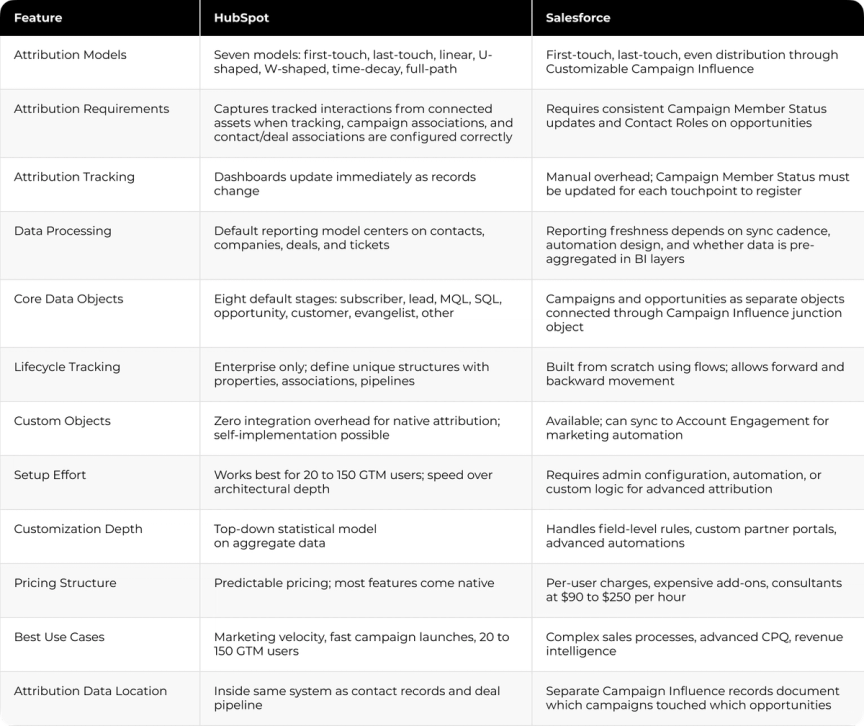
For a visual walkthrough of how HubSpot and Salesforce handle reporting and analytics in practice, this overview covers the key differences side by side.

Where Revenue Reporting Breaks Down (And What the Fix Looks Like)
The gap between a CRM purchase and reliable revenue reporting is rarely about which platform you chose. It is about what happens at the infrastructure level: how lifecycle stages are defined, how field governance is enforced, how campaign data connects to opportunity records, and whether the integration between systems holds up when the sales process changes.
Darwin works at that infrastructure level. On the Connections and Clarity pillars of the Darwin Flux methodology, the work is about making data trustworthy before any dashboard is built: standardizing attribution rules, aligning lead status definitions between marketing and sales, and ensuring that the reporting architecture reflects how your funnel operates. For teams evaluating whether their CRM reporting layer is built on clean data, the starting point is always governance, not tooling.
For Cleo Integration, Darwin connected Salesforce, GA4, and BigQuery into one reporting hub. Before the work, reporting was split between analytics tools, CRM records, and attribution platforms. After the data layer was restructured, reporting accuracy improved from approximately 70% to 90%, manual reporting time was eliminated, and the team saved $50K annually.
The question most marketing leaders face is not whether HubSpot or Salesforce is the better platform. It is whether the company has a clean reporting layer that connects CRM activity to campaign and revenue data. That layer does not come pre-built in either system.
FAQs
Q1. Which CRM works better for mid-market SaaS revenue reporting?
HubSpot tends to work better for teams of 20 to 150 GTM users who need attribution reports without heavy technical resources. Salesforce fits when sales demands deep customization and the team has resources to support it. The decision depends on whether speed or architectural depth is the priority.
Q2. Can HubSpot match Salesforce for attribution customization?
HubSpot offers seven native attribution models and is easier to configure. Salesforce provides a higher ceiling through admin configuration, automation, and custom logic for advanced attribution. HubSpot handles standard setups well. Salesforce handles more demanding revenue model requirements.
Q3. What happens when HubSpot and Salesforce run together?
Reporting conflicts are common. Marketing pulls data from HubSpot, sales from Salesforce, and the numbers do not match. The source is field mapping gaps, inconsistent lifecycle stage definitions, or sync rules that drop data between systems. Clean integration architecture and shared governance rules are what make the hybrid setup work.
Q4. How much does Salesforce attribution cost compared to HubSpot?
HubSpot multi-touch attribution requires Marketing Hub Enterprise. Salesforce attribution for demanding use cases can involve third-party BI tools and consultant fees of $90 to $250 per hour. Total cost of ownership should include admin time, implementation costs, and ongoing data maintenance. License fees alone do not capture the full picture.
Q5. What is the biggest risk with CRM revenue reporting?
Data quality. In 44% of companies, poor CRM data costs more than 10% of annual revenue. Contact records decay at 2.1% monthly. Attribution reports built on incomplete or inconsistent data produce numbers that marketing and sales interpret differently. Platform choice alone will not fix this. Shared definitions, clean associations, and governed reporting logic will.