
Quick Answer
Marketing teams should monitor four things in DMARC reports: which sources send mail under the brand domain, whether each approved sender passes aligned SPF or DKIM, how volume shifts around campaigns and whether reports keep arriving. IT or security takes over when a finding involves DNS, signing or suspected spoofing.
TL;DR
- Keep a sender register: every platform, its From domain, SPF domain, DKIM signing domain and technical contact.
- Use aggregate (rua) reports as the main evidence and keep a baseline of normal sources, volume and pass rates.
- Test alignment ahead of each campaign, compare reported sources with the register after launch and review unknown senders between sends.
- Agree who owns platforms, DNS and policy decisions before the first alert arrives.
- Tighten policy from p=none only after reports stay clean, and choose the final policy with IT based on how the domain is used and the risk to legitimate mail.
DMARC monitoring lets you catch a problem with your sending domain while it is still a line in a report. A failing platform, a forgotten vendor or a spoofing attempt often appears in aggregate reports earlier than in campaign results, and each of them can damage sender reputation.
The hard part is ownership. Marketing knows which platforms send mail, IT controls DNS and security handles spoofing, so reports can sit unread between three teams. This guide sets out what marketing should watch, who owns each fix and when an alert needs technical intervention. A full DMARC implementation sits outside its scope.
Connections and Clarity Make DMARC Reports Actionable
Two pillars of Darwin Flux do most of the work in DMARC monitoring. Connections tie each sending source to a platform, a marketing owner and a technical contact, so every finding has somewhere to go. Clarity sets shared rules for what counts as a failure, an unknown sender or an urgent alert.
What Marketing Should Monitor in DMARC Reports
Marketing should monitor which sources send mail under the brand domain, whether each approved sender passes aligned SPF or DKIM, how volume shifts around campaigns and whether reports keep arriving. A sender register and a baseline of normal results give each of these checks a point of comparison.
Keep a Sender Register for Every Platform
A sender register lists each campaign platform, automation system and other service sending mail on your behalf. For each entry, record the platform name, the From domain recipients see, the domain used for SPF, the DKIM signing domain and the technical contact. Add separate entries when one provider sends for several domains or brands. A marketing automation audit is a convenient moment to collect this list, since it already inventories connected platforms.
The From domain needs particular attention because DMARC checks alignment against that visible domain. A message can pass SPF or DKIM and still fail DMARC when the authenticated domain does not match the From domain. DMARC monitoring tools usually show this per source, with the sending IP, From domain, DMARC result and SPF and DKIM verification side by side. Ask marketing and IT contacts to confirm the register ahead of each campaign launch, so an old vendor or a new subdomain does not surface as an unknown source mid-send.
Route Aggregate Reports to a Monitoring Tool
Aggregate (rua) reports are the main evidence for DMARC monitoring. They arrive as compressed XML files, so send them to a parser or DMARC monitoring tool and keep them out of shared inboxes. A paid DMARC monitoring service handles intake and grouping, while a free option usually leaves parsing and review to your team.
Failure (ruf) reports are optional. Receiver support for them is inconsistent and they can contain personal data, so request them only for a specific diagnostic need and with a plan for handling that data. Raw report volume says little about domain health in either case; the useful signal is which sources appear and how their results change.
Record a Baseline of Normal Results
Record the normal pattern for every approved source ahead of the next campaign: observed volume, SPF alignment, DKIM alignment, DMARC result and applied policy. Keep reports with no failures in that record, because they show which platforms sent mail and which authentication path passed.
Compare source IPs, domains and pass rates over several reporting periods and note expected changes such as a scheduled campaign or a platform onboarding. An alert about an unfamiliar source then has a clear point of comparison, and IT gets specific evidence when a sender fails.
Create a DMARC Review Routine Around Campaign Sends
A campaign send needs three DMARC checkpoints: an alignment test ahead of launch, a source comparison once delivery starts and a review of unknown or missing senders between campaigns. Tying the checks to the campaign calendar gives marketing and IT a shared rhythm, and the dashboard stops being something people open only after a problem.
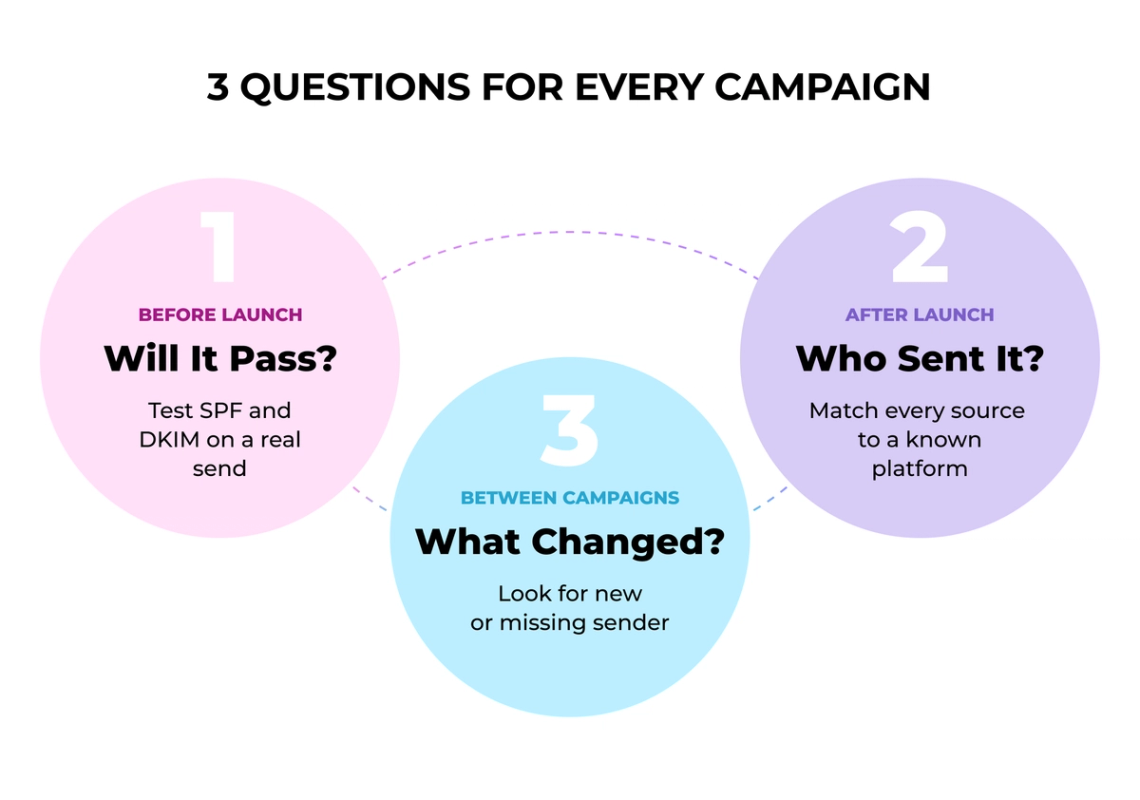
Before Launch: Test SPF and DKIM Alignment
The pre-launch check confirms that the planned message passes DMARC through at least one mechanism, SPF or DKIM, aligned with the visible From address. Send the message to test inboxes at Gmail, Outlook, Yahoo, iCloud and other major providers and read the Authentication-Results field in the headers. An SPF pass counts toward DMARC only when the envelope domain aligns with the From address, so check alignment as a separate step.
If the test shows no aligned pass, IT or the provider fixes the signing or DNS setup before the full send. Aligned DKIM is the more dependable choice, because forwarding often breaks SPF. Add these checks to your existing campaign QA checklist so they run with every launch.
After Launch: Compare Reported Sources With Expected Senders
After launch, match every reported source against the sender register and treat any new source as unconfirmed until someone identifies it. It may be a legitimate campaign system, a provider change or a configuration problem.
Watch volume alongside pass rates. A spike from an approved platform that matches the campaign schedule is expected, while a new high-volume source needs ownership confirmation. When an approved sender fails, route it to the owner listed in the register and decide afterwards whether the campaign itself needs changes.
Between Campaigns: Review Unknown Sources and Missing Reports
Between campaigns, the review shifts to unknown sources, failed authentication and senders that stop appearing. An unfamiliar source may belong to another internal team that never told marketing about its tool, or it may be spoofing, so classify it ahead of any label.
Missing reports also matter. A quiet dashboard can mean receivers saw no mail during the period, and it can also point to a broken rua address or an ingestion failure. Check that the destination still receives and parses aggregate reports, and look at report periods and reporting organizations to find gaps.
Check Inbox Placement Separately From DMARC Pass Rates
DMARC pass rates measure authentication and alignment, and inbox placement measures where mail lands. A message can pass SPF, DKIM and DMARC and still reach spam, because mailbox providers also weigh sender reputation, content, engagement and complaints.
“Spam folders are absolutely full of technically compliant but unwanted email messages.” – Al Iverson, then Industry Research and Community Engagement Lead at Valimail
Track placement with a seed list of controlled mailboxes at major providers. Send the actual campaign content and record whether each message lands in the primary inbox, a promotions tab, spam or nowhere, then set a threshold from several campaigns of your own history. When placement falls while DMARC stays healthy, investigate reputation, content or list quality and leave SPF and DKIM as they are.
Ownership and Escalation Rules for DMARC Alerts
One accountable owner coordinates DMARC monitoring, and alerts follow three escalation routes: approved sender failures, unknown senders and suspected spoofing. Every alert gets an owner, a severity level and a next action.
Name One Accountable Owner for Marketing and IT
Choose one accountable owner for the DMARC process, even though several teams contribute. Marketing owns campaign impact, the sender register, platform changes and contact with each email service provider. IT or security owns DNS access, SPF and DKIM configuration, authentication fixes and DMARC policy changes.
The owner coordinates the work and does not have to perform every technical task. That person checks the monitoring tool, assigns findings and confirms that someone verifies the next aggregate report. A marketing operations manager can hold the role with an email administrator as technical partner, and in other companies security owns the process while marketing operations handles campaign decisions. A marketing analytics governance checklist uses the same principle: one owner per decision, written down.
Document the arrangement in a short responsibility record that answers four questions:
- Who reviews DMARC monitoring alerts?
- Who confirms whether a source belongs to an approved campaign?
- Who fixes SPF, DKIM or DNS configuration?
- Who approves each policy change after p=none?
Add two columns to the sender register for each ESP, CRM, automation platform or billing system: its marketing owner and the provider’s technical contact. Update them whenever a platform is added, retired or changed.
Approved Sender Fails: Route to IT or ESP Support
An approved sender that fails goes to IT or the ESP, depending on where the change happened. If the failure follows a DNS, selector, Return-Path or message-modification change, route it to IT, and if provider settings caused it, send it to the ESP’s support contact. Keep campaign stakeholders informed, because a valid sender can be filtered or rejected when neither SPF nor DKIM aligns with the From domain.
Unknown Sender Appears: Classify It First
An unknown sender gets classified first, since an unfamiliar IP is not proof of an attack. It may belong to a marketing tool, a forgotten workflow, a forwarding service or a misconfigured vendor. Ask the marketing owner to confirm the platform, campaign and volume, then have IT or security check who owns the IP and inspect the headers. Classify the source as legitimate, misconfigured or malicious, and onboard a legitimate sender only once ownership is confirmed and SPF or DKIM alignment is in place.
DMARC Report describes the same sequence in its unknown-sender checklist: quantify the volume, check SPF and DKIM alignment, look up IP ownership and only then decide whether to onboard or block the source.
Suspected Spoofing or Sudden Delivery Loss: Escalate Urgently
Escalate urgently once classification points to abuse, for example an unknown source that sends high volume and fails both SPF and DKIM, or unknown traffic that coincides with a sudden drop in delivery. A poor reputation score or an unfamiliar IP on its own is a reason to classify faster and does not prove spoofing. Security investigates spoofing or compromise, IT checks DNS and mail infrastructure and the designated incident owner assesses whether a campaign pause is required under the agreed response process.
“When you don’t authenticate, anyone can send email as you.” – Seth Blank, former Chief Technology Officer, Valimail
Include the Domain, Source IP, Report Period and Authentication Results
Each escalation ticket should carry enough data for the next person to act at once: the domain, Header From, source IP, message count, report period, reporting organization, SPF and DKIM results, alignment status and disposition. Record the decision, DNS changes, owner and retest date in the monitoring tool, so the history survives staff changes, and agree response times for each severity level in advance.
DMARC Signals, Owners and Escalation Triggers
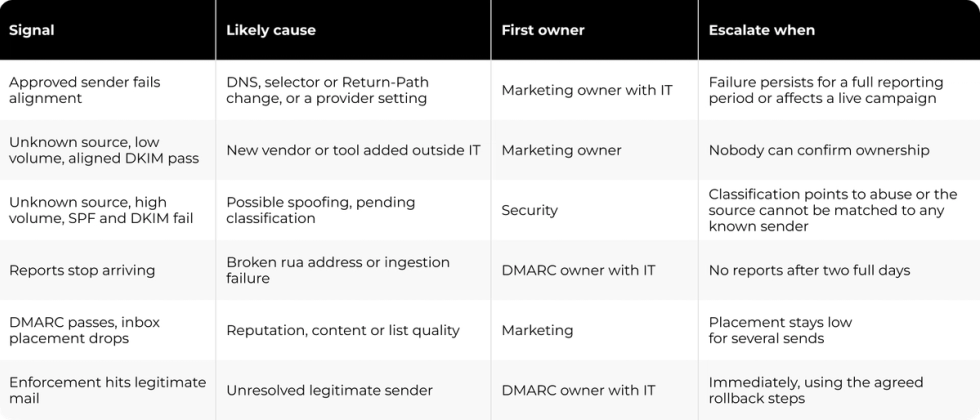
The table below maps common DMARC signals to their likely cause, first owner and escalation trigger. Use it as a starting point and adjust owners to your own team structure.
Choose a DMARC Enforcement Policy That Fits the Domain
Policy changes follow report evidence, and the final policy depends on how the domain is used. A domain that carries only marketing or transactional mail may be a candidate for p=reject, while a domain that also carries everyday staff correspondence may be better served by p=quarantine. IT and the DMARC owner make that choice together after a risk review.
Fix Legitimate Sender Failures While on p=none
Stay on p=none until reports identify every legitimate sender and show aligned SPF or DKIM for each. Fix alignment failures first, because a platform that remains unresolved can lose delivery once enforcement starts. DNSimple suggests reviewing reports for two to four weeks, and larger sender estates may need longer.
Review Delivery After Each Policy Change and Agree on Rollback Steps
Move to p=quarantine first, a policy that asks receivers to quarantine failing messages; each receiver still applies its own handling rules. Monitor reports daily, check spam folders and watch campaign delivery.
If a valid sender is quarantined, the response depends on the risk. When the sender handles low-impact mail and the fix takes hours, keep the policy in place and correct its SPF or DKIM alignment. When it carries transactional or revenue-critical mail, or the fix needs days, follow the rollback agreed in advance and return the policy to p=none until reports show the sender aligned again.
If the risk review supports p=reject, advance once quarantine results stay clean. Receivers can then reject messages that fail DMARC, so watch bounces and customer delivery complaints closely. If a legitimate campaign is affected, step back to p=quarantine first and go to p=none only when quarantine would still put critical mail at risk. Agree in advance who can change DNS, who contacts the ESP and who approves each policy change, and record the trigger, owner and retest date every time.
RFC 9989, the Standards Track specification published in May 2026 that obsoletes RFC 7489, supports this domain-by-domain approach. It states that domains whose users might post to mailing lists should not publish p=reject and that a domain on p=reject must not rely on SPF alone for a DMARC pass. It also removed the pct tag, so percentage-based rollouts such as pct=50 are no longer part of DMARC. The new t=y test mode asks receivers to apply a policy one level softer than the published one, but it is not a guaranteed rollout control while receiver support varies, as DNSimple warns.
Keep monitoring after enforcement begins, since new platforms and provider changes can reintroduce failures. Darwin’s Security & Compliance service covers domain and DNS reviews, access governance and remediation ownership for teams that want an outside review of this process.
What a Website Security Project Shows About DMARC Ownership
Monitoring routines tend to break down for the same reasons, whether the control is email authentication or website security: checks run when someone has time, alerts reach whoever happens to be available and fixes go unrecorded.
Darwin’s work for AlertMedia, an emergency communication software provider, addressed those gaps for its WordPress website. The project covered website security and did not include email authentication or DMARC. Darwin set up automated vulnerability scans every 12 hours, alerts to 5–10 key personnel, defined response ownership with a targeted 4–6 hour resolution window and monthly reporting.
Three parts of that setup apply directly to DMARC monitoring: a fixed review cadence tied to the reporting period, a named owner for each type of alert and a written record of every decision and DNS change. With those in place, each policy change rests on evidence the whole team can check.
FAQs
Q1. What should marketing teams monitor in DMARC reports?
Monitor every source sending under your domain, whether each approved sender passes aligned SPF or DKIM, volume changes around campaigns and whether reports keep arriving. Compare sources with your sender register and track inbox placement separately, since a DMARC pass does not guarantee inbox delivery.
Q2. Who should own DMARC monitoring?
One accountable owner should coordinate reviews and follow-up. Marketing manages the sender register, platform changes and campaign impact, while IT or security handles DNS, SPF and DKIM configuration and policy changes. Each sending platform also needs a named technical contact.
Q3. How often should marketing teams review DMARC reports?
Test alignment ahead of each campaign, review aggregate reports once sending starts and check for unknown or missing sources between campaigns. After each policy change, review reports daily until delivery stays stable for every approved sender.
Q4. When does a DMARC alert need IT or security?
Route approved sender failures linked to DNS, selector or Return-Path changes to IT. Escalate to security when classification points to abuse, such as an unmatched source sending high volume that fails both SPF and DKIM, or unknown traffic alongside a sudden delivery drop.
Q5. When is it safe to move past p=none?
Move past p=none once reports identify every legitimate sender and show aligned SPF or DKIM for each. Allow at least two to four weeks of reports, step to p=quarantine first and decide with IT whether p=reject fits how the domain is used.