Quick Answer:
Marketing automation guardrails are the budget alerts, QA workflows, and risk controls that stop paid campaigns from running unchecked. A single misconfiguration or removed safeguard can drain thousands in hours. This article covers how to build the three-layer system that catches errors before they become costly failures.
TL;DR:
- Budget controls. Automated threshold alerts at 50%, 75%, 90%, and 100% of spend create graduated warnings. Each level triggers different actions, from awareness to auto-pause.
- QA workflows. Pre-launch validation checks UTM parameters, pixel firing, landing page functionality, audience overlap, and bid settings before campaigns go live.
- Risk management. Fraud detection, compliance validation, and approval workflows protect budget and advertising accounts from violations that automated bidding cannot catch.
- Data foundation. Guardrails work reliably when Surface, Connections, and Clarity are in place. Automation built on broken tracking scales the errors already in the system.
- Operationalizing. Dynamic thresholds, alert fatigue prevention, UTM governance, and a single source of truth for budget data make guardrails enforceable at scale.
B2B marketing teams track campaign launch times carefully. Detection time for when a running campaign breaks is rarely defined. A pixel stops firing. A UTM parameter drifts. A budget rule runs without the safeguard that was supposed to stop it. The automation keeps optimizing. The spend keeps moving. By the time someone pulls the report, the data has been wrong for days.
That gap is where budget overspend, broken attribution, and compliance failures accumulate. More than 70% of marketers report experiencing an AI-related incident in their advertising, including off-brand content, unexpected placements, or spend that ran unchecked. Automation scales what is already in the system, including the gaps.
Guardrails are the controls that sit between automation settings and actual spend: the budget alerts that catch pacing anomalies, the QA workflows that validate configuration before launch, and the risk monitoring that flags fraud and compliance issues before they reach the account. This article covers how to build that three-part system and what each component requires to work reliably.
The guardrail system maps directly to how marketing infrastructure should be built. Momentum, the stage where automation runs, only works safely when the earlier stages are solid. Clean tracking (Surface) means alerts fire on accurate data. Connected data sources (Connections) mean QA checks have something reliable to validate against. A single source of truth (Clarity) means the number the CFO sees and the number the agency reports are the same number. Automation built on top of a weak foundation scales the mistakes in that foundation.
The Three Pillars of Marketing Automation Guardrails
Three distinct systems work together to keep paid campaigns from going sideways. Each one handles a different failure mode. Combined, they create a protection system that grows with campaign volume.
Budget Controls: Preventing Campaign Overspend
A $5,000/month campaign can exhaust its budget in a weekend if audience targeting is misconfigured. A misconfigured daily cap, an unexpectedly high conversion rate, or a sudden traffic spike can turn that budget into a $15,000 surprise. Budget controls sit between campaign settings and actual spend, monitoring pacing in real time.
These controls track how quickly allocated funds are being spent. When spend accelerates past expected rates, alerts trigger. Thresholds at multiple levels (50%, 75%, 90% of budget) each fire different actions. Some send notifications. Others pause campaigns automatically.
Budget controls prevent unintended overspend caused by configuration errors, platform glitches, or market volatility. They give teams time to investigate anomalies before the spend compounds.
Derek Gerber, Director of Growth at Power Digital Marketing, described what happens when these controls are removed. A client accidentally spent $2 million in a single weekend after the team eliminated safeguards to cut costs. The campaigns ran unchecked until Monday.

“Don’t ever treat anything in marketing like set it and forget it.” — Derek Gerber, Director of Growth at Power Digital Marketing, What Keeps Marketers Up at Night, Ep. 4
Quality Assurance: Validating Campaign Configuration
A campaign with broken tracking pixels goes live. Traffic routes to a 404 page. Geographic targeting covers the wrong region. QA workflows catch these errors before ads go live.
Campaign governance runs at multiple stages. Pre-launch validation checks UTM parameters, conversion event firing, and landing page functionality. Post-launch monitoring continues throughout the flight. When discrepancies appear between platforms (one reports 100 conversions, the CRM shows 75), the QA system flags it. A single misplaced decimal in a bid modifier can tank results for weeks. Teams that implement automated QA report 40 to 60% reductions in time spent on manual checks.
Risk Management: Blocking Fraud and Compliance Violations
Click fraud, bot traffic, and compliance violations damage campaign results and put advertising accounts at risk. AI-driven campaign optimization tools can amplify these risks when they operate without risk controls validating traffic quality and regulatory compliance before budget gets spent.
Fraudulent traffic detection monitors patterns that indicate non-human behavior: impossible click velocities, suspicious IP clusters, anomalous engagement. When detected, campaigns pause or exclude problematic sources automatically.
Compliance validation checks campaigns against platform policies and regulatory requirements before launch. Targeting restricted audiences or using prohibited language can suspend an account. Risk management workflows catch these issues at the review stage, before a violation occurs.
When these three pillars work together, the system becomes easier to monitor and control. Budget controls limit financial exposure. QA workflows maintain data accuracy. Risk management protects the advertising account.
Campaign overspend is the visible failure. Broken tracking is the quieter one. A budget spike shows up in the platform by Monday morning. A conversion event that stopped firing, a CRM sync delay, or a UTM rule that changed without review can distort reporting for weeks. By the time the CMO sees the dashboard, the team may already be making decisions from numbers no one should trust.
Budget Alert Architecture: From Detection to Auto-Pause
Budget alert systems work through a detection-to-action pipeline that monitors spend velocity, triggers notifications at predefined thresholds, and executes responses based on severity.
Pacing Variable Calculation and Monitoring Cadence
Pacing calculations compare actual cumulative spend against a planned trajectory. The formula: Expected Spent = Time Elapsed (%) x Total Budget. If a campaign has a $15,000 budget over 30 days and spend on day 15 is $8,625, the campaign is 15% over pace (expected: $7,500). Improvado's budget pacing guide covers how to calculate and act on this in real time.
As a starting point, monitoring frequency depends on budget size, bidding strategy, account maturity, and auction volatility. Accounts under $5,000 with manual bidding need daily checks. Budgets between $25,000 and $50,000 using automated bidding may require twice-daily monitoring. Above $50,000 in new accounts, real-time alerts plus twice-daily reviews become necessary. The right cadence will vary by team and platform.

Multi-Tier Alert Ladder (50/75/90/100% Thresholds)
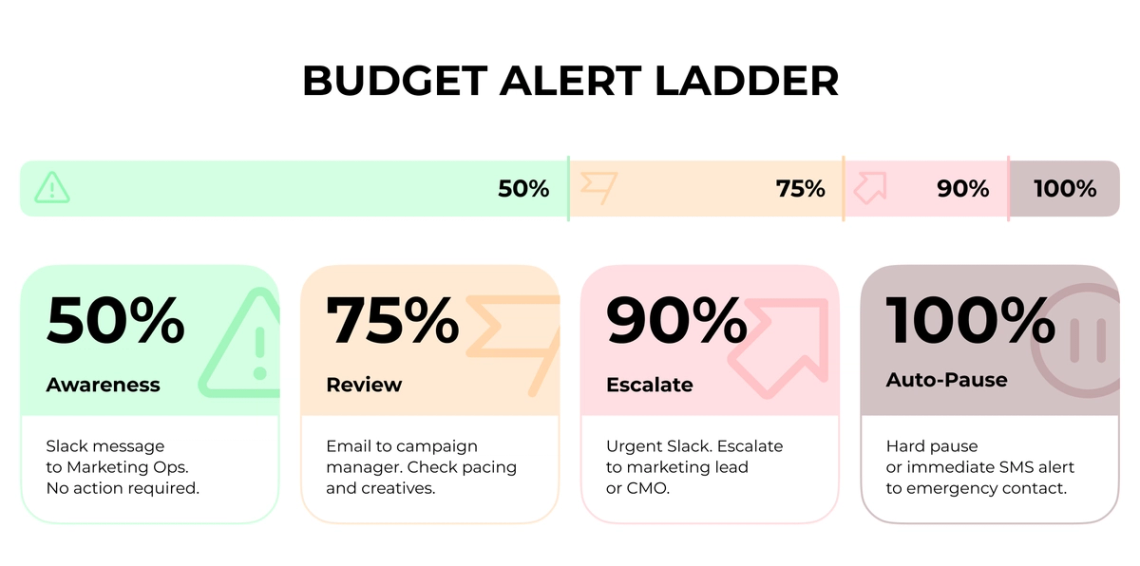
Automated budget alerts with 50/75/90/100% threshold rules create tripwires that catch overspend before it escalates. Single-threshold alerts at 100% leave no room for intervention. Multi-tier systems create graduated warnings.
Each threshold serves a distinct purpose:
- 50%. Informational Slack message to the marketing ops team. Awareness only.
- 75%. Email alert to the campaign manager plus Slack notification. Time to review pacing and pause underperforming creatives if needed.
- 90%. Urgent Slack notification with escalation to the marketing lead or CMO depending on account size.
- 100%. Hard auto-pause on the campaign, or immediate SMS and Slack alert to the emergency contact.
Acknowledgment-Required Notifications
Not all alerts require immediate action, but critical thresholds need human acknowledgment. Campaign owners receive pacing alerts, Marketing Ops receives tracking alerts, and Finance receives budget threshold notifications.
Email notifications alone depend on someone reading them before costs compound. Automated cost controls remove humans from the immediate response loop at the 90% threshold. Budget alert emails should link directly to the relevant dashboard for quick access.
Budget-of-Record: Single Source of Truth
If Finance includes VAT in Spend and an agency does not, but both call it Spend, no dashboard can solve that problem. Marketing automation guardrails require a single source of truth for budget data. Every team pulls from the same raw data, processed identically, regardless of context.
Automated ETL imports and stores data reliably and accessibly. Centrally defined shared data models force everyone through the same lens. When a CFO and a media buyer work from identical numbers derived the same way, decisions get made faster and with more confidence.
When to Auto-Pause vs Manual Review
For many B2B teams, a practical baseline for auto-pause decisions looks like this:
- Low-volume lead generation. Pause after three days with no conversions once spend reaches two to three times target CPA.
- Enterprise pipeline campaigns. Allow longer windows (seven to ten days) before pausing, given longer sales cycles and lower daily conversion volume.
- High-ticket demo request campaigns. Set CPA-based pause thresholds tied to the average deal value, not just cost per lead.
Campaigns need 15 to 30 conversions to determine statistical reliability. Pausing too early interrupts Meta's 24 to 48 hour learning phase and similar optimization windows on other platforms.
Campaign QA Automation: Validation at Every Stage
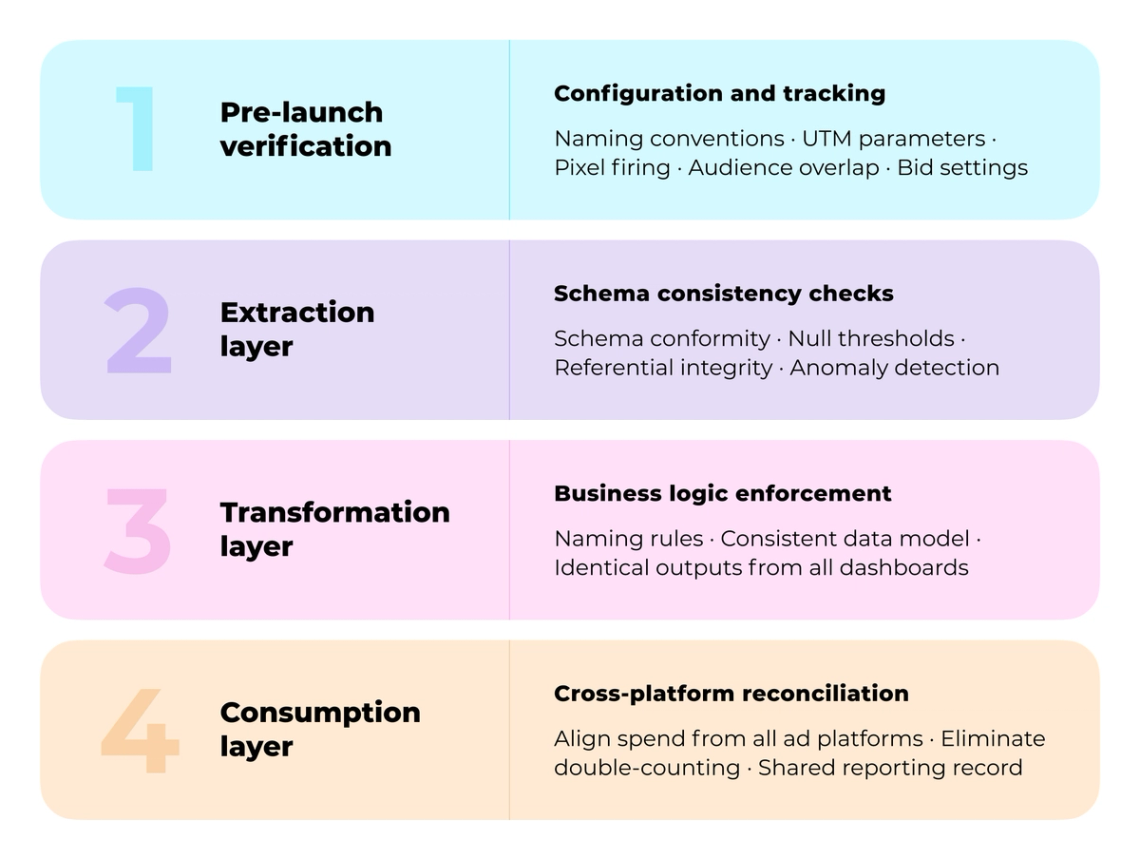
Campaign QA operates at four validation stages, each catching errors at different points in the data pipeline. Miss a check at any stage and the result is broken attribution, wasted spend, or campaigns that report success while the budget drains.
Pre-Launch Verification: Configuration and Tracking
Automated preflight testing catches what manual reviews miss. Teams that implement staged approval flows and structured canary releases tend to catch significantly more defects before campaigns go live, according to campaign QA research from Pedowitz Group. Validation scripts should crawl landing pages, emails, and ad destinations to verify tracking code presence: UTM parameters, conversion pixels, analytics tags, and event tracking implementations.
The pre-launch checklist covers:
- Naming conventions. Confirm campaign, ad group, and ad names follow the standard format. Inconsistent naming makes filtering and reporting significantly harder.
- UTM parameters. Validate that source, medium, campaign, and content UTMs are present and match documented standards. Test one link in analytics to confirm it arrives correctly.
- Pixel and conversion tracking. Verify the conversion pixel fires on the confirmation event. Use Google Tag Manager preview mode to confirm the tag triggers.
- Audience overlap. Check for duplicate or overlapping audience segments. Unmanaged overlap wastes budget showing the same user the same ad twice.
- Budget and bid settings. Validate daily budgets, bid strategies, and conversion value assignments match the approval request.
Extraction Layer: Schema Consistency Checks
Before campaign data enters production pipelines, it goes through schema validation. The most critical validation points are schema consistency, business rule enforcement (budget caps, naming conventions), and cross-platform reconciliation. This staging layer checks null thresholds, referential integrity, and anomaly detection: unexpected spend spikes, missing campaign IDs.
Schema checks verify that every field matches expected data types, lengths, and formats. When a platform sends cost as a string instead of a decimal, or when campaign IDs shift from integers to alphanumeric codes, the extraction stage blocks that corrupted data before it contaminates downstream reporting.
Transformation Layer: Business Logic Enforcement
The transformation layer bridges raw data storage and business intelligence, ensuring downstream consumers access consistent, trustworthy datasets. Business rules engines manage decision logic separately from application code, consistently calculating and applying rules in data transformations. Different dashboards return identical answers because they draw from the same foundational data model.
Consumption Layer: Cross-Platform Spend Reconciliation
Data mismatches delay reports and reduce analytics accuracy by 30%. Manual reconciliation consumes 2.25 million minutes annually in marketing teams. Cross-platform spend reconciliation aligns conversion, spend, and performance data from multiple ad platforms against first-party sources to eliminate double-counting. The shared reporting layer becomes the authoritative record.
Risk Control Workflows: Protecting Budget and Brand
Digital advertising fraud exceeds $100 billion globally in 2026, meaning roughly one in five ad dollars funds bot traffic. Risk control workflows catch these threats before they corrupt attribution data or trigger account suspensions.
Fraudulent Traffic Detection and Blocking
Invalid traffic includes clicks and impressions that do not result from genuine user interest. Google Ads' automated systems evaluate data points to determine validity, and advertisers are not charged for invalid clicks the platform detects. Platform filtering covers only part of the exposure.
Watch for specific patterns: ads getting clicked without driving conversions, clicks from locations outside the target market, high bounce rates combined with low session duration, traffic spikes at hours when the target audience is not active. Real-time blocking stops ads from being served to suspicious sources before they consume budget.
Compliance Rule Validation Before Launch
Compliance failures in regulated sectors can derail entire launch schedules. AI-assisted compliance checks can flag risky language quickly, while legal or manual review may still be needed for regulated campaigns. Coverage includes alcohol restrictions, financial promotions, pharmaceutical regulations, and platform-specific policies. Early legal involvement from campaign conception identifies red flags before production.
Approval Workflow Integration
New campaign launches and budget increases should require documented sign-off before going live:
- Stage 1. Campaign brief and targeting review: marketing manager drafts details, analytics lead reviews for tracking completeness and audience overlap.
- Stage 2. Budget and creative approval: CMO or finance stakeholder approves spend thresholds, brand lead signs off on ad copy for compliance.
- Stage 3. QA and launch authorization: ops team runs final checks on UTM parameters, pixel firing, and conversion tags before activation.
- Stage 4. Post-launch monitoring window: campaign runs under heightened alerts for the first 48 hours. Spend spikes above 30% or tracking gaps trigger automatic escalation.
Attribution Window and Conversion Tracking Integrity
Attribution accuracy is a data quality problem first and a modeling problem second. Microsoft Advertising and GA4 use different attribution models and lookback windows, causing expected discrepancies. Align attribution models and lookback windows as closely as possible between platforms. The variance should be documented and monitored. Marketing measurement systems that unify these signals help teams build reporting that holds up to executive scrutiny.
Operationalizing Guardrails: Setup, Monitoring, and Scaling
Building marketing automation guardrails requires methodical implementation in the tech stack. Start by documenting where data moves through the pipeline.
Mapping Validation Checkpoints
Trace how campaign data flows from extraction points through landing zones, transformation stages, and consumption endpoints. Each stage introduces specific failure modes requiring different validation approaches. Schema breaks at extraction affect everything downstream and demand immediate alerts.
Intelligent Threshold Configuration
Static thresholds manually adjusted lack adaptability to changing conditions. Dynamic thresholds adjust automatically based on real-time data patterns. Use percentage change rules (spend cannot exceed 130% of the seven-day moving average) or standard deviation alerts when metrics hit three or more deviations from 30-day baselines. Seasonal comparisons prevent false positives when Black Friday spend spikes appropriately.
Alert Fatigue Prevention
Marketing Ops teams can also become desensitized when alerts are redundant, low-context, or poorly prioritized. Solutions include intelligent prioritization based on impact, AI-powered automated triage, deduplication of alerts from the same event, and fine-tuning thresholds to fit the specific setup.
UTM Governance and Data Warehouse Monitoring
Lock in UTM parameters: utm_source (google, meta, linkedin), utm_medium (cpc, display, cpc_retargeting), utm_campaign (name_yyyymm), utm_content (creative_variant). Every team member uses the same format without exception.
Pull UTM data into the data warehouse daily. Set alerts for tracking breaks: if UTM values suddenly stop appearing, if conversion volume drops more than 30% with no campaign changes, or if CRM sync delays exceed 24 hours. Route these to Slack so ops teams can respond fast.
Measuring Guardrail Effectiveness
Time savings represent only 30 to 40% of total automation value. Automation can reduce recurring manual errors when checks are calibrated and reviewed. Calculate annual error savings as: (Current Errors minus Automated Errors) times Cost per Error. Measure at 30, 60, and 90 days post-deployment to understand whether thresholds are calibrated correctly.
How Darwin Builds Guardrail Systems for B2B Marketing Teams
Teams that experience budget overruns and broken tracking often have monitoring tools in place. Those tools fire on stale or disconnected data because the underlying infrastructure was built without a shared data foundation. Budget alerts pull from one source. QA checks run against tracking setups that were never validated at the source. Risk controls sit in one platform while spend decisions happen in another.
Darwin helps B2B marketing teams build the infrastructure layer behind these controls: clean tracking at the source (Surface), connected campaign data (Connections), shared attribution logic, and a single source of truth for spend (Clarity). Automation built on a weak foundation scales the errors in that foundation. Momentum, the automation layer, runs reliably when those foundations are solid.
Darwin has applied this same operating principle in adjacent marketing infrastructure work. For AlertMedia, Darwin turned recurring website risk into a managed process with 12-hour monitoring, defined escalation, four to six hour issue-resolution targets, and structured reporting. Paid campaign guardrails follow the same logic: risk becomes manageable when detection, ownership, and reporting are built into the system.
Darwin services relevant to guardrail implementation:
• Marketing Analytics and Attribution
• Tracking Infrastructure and Tag Management
• Marketing Automation and Workflow Setup
• Single Source of Truth Reporting
Teams that build guardrails on top of clean infrastructure spend less time firefighting and more time on decisions that move revenue.
FAQs
Q1. What is a marketing automation guardrail and why does it matter for paid campaigns?
A marketing automation guardrail is a control mechanism (budget threshold, QA validation check, or risk monitoring workflow) that prevents campaigns from running unchecked. Misconfigured automation can overspend budgets, serve ads to the wrong audiences, or operate on broken tracking data for days before anyone notices.
Q2. How do multi-tier budget alerts prevent campaign overspend?
Multi-tier alert systems set thresholds at 50%, 75%, 90%, and 100% of budget, each triggering different responses. The 50% alert creates awareness. The 75% mark prompts investigation. The 90% threshold initiates intervention. When 100% is reached with no prior response, the tiered system was not configured correctly.
Q3. What does pre-launch QA validation actually check?
Pre-launch QA checks UTM parameters, conversion pixel firing, landing page functionality, audience segment logic, geographic targeting settings, and exclusion lists. Each check runs automatically before the campaign goes live. Failures block progression and alert the responsible team member with specific steps to fix the issue.
Q4. How does cross-platform spend reconciliation work in practice?
Cross-platform reconciliation pulls conversion, spend, and campaign data from each ad platform and aligns it against first-party sources (usually a CRM or attribution platform). It normalizes how each platform defines conversions, eliminates double-counting, and produces a single spend record that Finance and Marketing agree on.
Q5. When should a campaign auto-pause vs trigger a manual review?
Auto-pause applies when spending crosses two to three times the target CPA without the conversions to justify it, or when pacing exceeds 115% of the expected trajectory. Manual review applies when anomalies are ambiguous: a sudden spend spike that could be a platform glitch, a seasonal event, or a legitimate shift in results.