Quick answer:
HubSpot Enterprise earns its price for scaling teams that fully use its native attribution, automation and reporting. For teams that adopt a fraction of it, the same money buys an expensive logo on the tech stack.
TL;DR
- Marketing Hub Enterprise starts at $3,600 per month; Sales Hub Enterprise runs $150 per user per month, with onboarding fees of $6,000 and $3,000.
- The features that repaid the cost after six years: multi-touch attribution, smart content, workflow automation and advanced reporting.
- Zoho CRM Enterprise costs about 73% less per seat, yet most of its advanced features arrive as paid add-ons.
- Half of HubSpot users strongly agree their CRM cost is justified, against 41% of Salesforce users.
- The value grows as your team masters the platform. Underuse it and the price stops making sense.
HubSpot Enterprise costs $1,200 per month at the low end. That is a lot of money for any business, and it stings most for growing companies watching every dollar.
Our team has used both Marketing Hub Enterprise and Sales Hub Enterprise for six years. Six years of monthly payments, feature updates and daily platform use. So when people ask whether it is worth the investment, we can give the straight answer you are looking for.
When our team first signed that contract, we had the same doubts you probably have now. Would the platform deliver enough value to justify the price tag? That question got heavier once we added the $6,000 onboarding fee for Sales Hub Enterprise. It felt like a gamble.
The sales pitch sounds great. HubSpot promises scaling companies the tools to run a clean, connected and conversion-ready revenue engine. Marketing Hub Enterprise lets you build up to 25 custom dashboards. Sales Hub Enterprise helps your reps spend less time clicking around and more time closing. Sales copy is one thing, and daily reality is another.
HubSpot growth reflects that shift from pitch to platform. They now serve over 75,000 customers across more than 120 countries worldwide, a long way from their start as a simple SMB tool. Today they offer marketing, sales, customer service, operations and content management features built to create better customer experiences.
After six years of daily use, we have formed strong opinions about what works, what falls short and whether that monthly investment pays off. If you are deciding whether to take the plunge or wondering whether to renew, this honest assessment might save you thousands of dollars and months of frustration.
Where the Real Cost of a CRM Shows Up
The price on the invoice is the easy number. The cost that decides whether HubSpot Enterprise pays off sits in how well your data, teams and reporting hold together. Darwin Flux is how we read that: Surface captures the forms, pages and conversion points where customer signals enter the system. Connections wires HubSpot to your analytics, CRM and reporting systems. Clarity turns that connected data into attribution and dashboards a team trusts. Momentum keeps the flow running as campaigns, teams and workflows scale.
Read HubSpot Enterprise through those four lenses and the worth-the-price question answers itself. A team whose data is connected and measured sees the cost justified. A team whose systems never talk pays enterprise rates for a contact database.
What Is HubSpot Enterprise and Who Is It For?
HubSpot Enterprise is the top tier of the platform. It is built for organizations that need serious customization, advanced features and the room to scale without breaking things.
What sets Enterprise apart is expanded capability in marketing, sales and service hubs while keeping the user-friendly interface HubSpot is known for. You keep power and usability together.
HubSpot's Evolution From SMB to Enterprise
HubSpot started simple. Back in 2006 they had one goal: own the inbound marketing space. Marketing automation was not part of the original product.
Then something interesting happened. A basic marketing tool grew into a full customer platform serving businesses of every size. This was strategic expansion that let them win enterprise clients while keeping their SMB roots.
That expansion held. HubSpot posted a 29% revenue CAGR from Q1 2019 to Q1 2025, with its customer base climbing from 61,000 to 258,000. What matters for your decision is not how big HubSpot grew, but that the platform kept serving enterprise needs while it did.
Ideal Business Types for HubSpot Enterprise
Enterprise works best for specific organizations. If your company fits the profile below, it will get the most out of the platform:
- Multiple brands or locations to manage
- Large sales teams with sophisticated pipelines
- Wide and varied marketing activity
- A need for custom objects and advanced reporting
- 200+ employees or enterprise-scale operations
B2B companies, e-commerce businesses and organizations in competitive markets see the biggest wins. Companies like Teamwork.com reported a 50% more effective sales team and an 11% higher win rate after switching to HubSpot Enterprise.
M Square Media booked 75% more meetings with prospects and converted 50% of those meetings to deals after implementing Sales Hub Enterprise.
Why We Chose HubSpot 6 Years Ago
Six years ago we needed a platform that could grow with us. No more switching systems every two years or wrestling with integration headaches.
Before HubSpot, our data lived everywhere. Marketing used one system, sales used another, customer service had their own. Information was scattered, reporting was a nightmare and nobody had the full picture.
The unified data approach sold us. Marketing, sales and customer service data in one place was worth paying for.
Most enterprise software falls into the same trap: heavy on capability, painful to use. HubSpot promised to keep usability while delivering enterprise features. Six years in, they held that promise.
Marketing Hub Enterprise: Features That Made a Difference
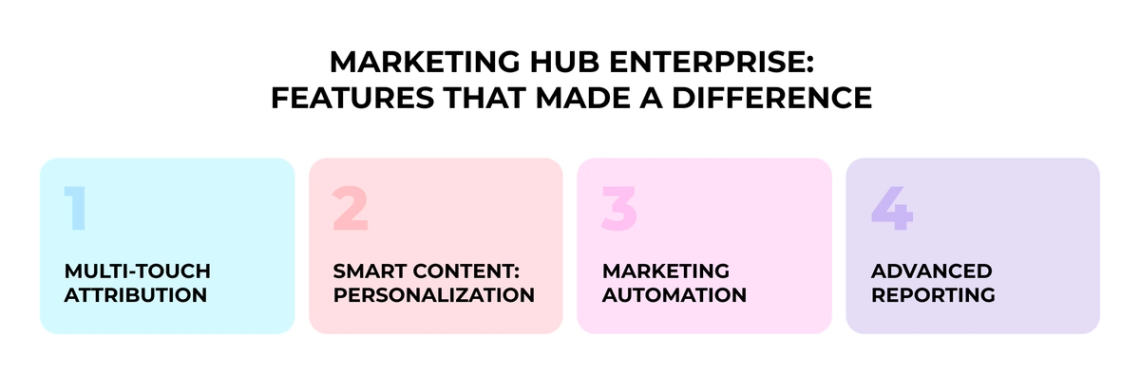
Six years of daily use taught us which features matter. These are not the demo darlings. They are the tools that changed how we work and what we can measure.
Multi-Touch Attribution: Connecting Dots to Dollars
For years we played the guessing game with marketing ROI. Which campaigns drove revenue? Which content influenced buyers? Multi-touch attribution reporting ended that mystery.
HubSpot attribution flexibility is where the value sits. You can choose from first-touch, last-touch, linear or the W-shaped model that credits first interaction, lead creation and deal creation touchpoints. Our favorite is the W-shaped model, which gives the complete picture.
As John Sculley once said, “No great marketing decisions have ever been made on qualitative data.”
That mindset pushed us to take attribution seriously, and HubSpot gave us the tools to back every campaign with quantifiable proof.
The campaigns we had written off turned out to influence deals months later. Blog posts from two years back were still moving prospects through the buying process. Without attribution reporting we would never have known.
Smart Content: Personalization That Works
Remember when personalization meant dropping a first name into a subject line? HubSpot smart content makes that look amateur.
We customize content by lifecycle stage, list membership, country and device type. Landing page conversion rates jumped once prospects saw different CTAs than existing customers.
The system targets on eight categories, including location and device type. Visitors from different regions see location-specific offers. Mobile users get streamlined forms built for smaller screens. Personalization that makes sense.
Marketing Automation: From Chaos to Clockwork
Marketing automation saved time and saved our sanity. Tasks that once took days now happen on their own.
The higher workflow limits are where Enterprise starts paying off. You get up to 1,000 automated workflows against lower tiers. We built multi-step campaigns that nurture leads with precisely timed content.
Our lead scoring system routes high-value prospects to sales the moment they cross a threshold. No manual score checking. No forgotten follow-ups. Qualified leads land where they need to be.
Advanced Reporting: Meetings That Matter
HubSpot reporting ended our weekly metric arguments. In place of debating numbers, we work from shared dashboards everyone trusts.
Enterprise users get up to 50 custom dashboards and 500 custom reports, organized by team or function. We built dedicated dashboards for executive reviews, campaign results and sales forecasting.
The visualization options make dense data simple. Bar charts for campaign comparisons. Conversion funnels to spot bottlenecks. You can share dashboards with specific teams, so everyone sees what matters to their role.
Sales Hub Enterprise: Tools That Helped Us Scale
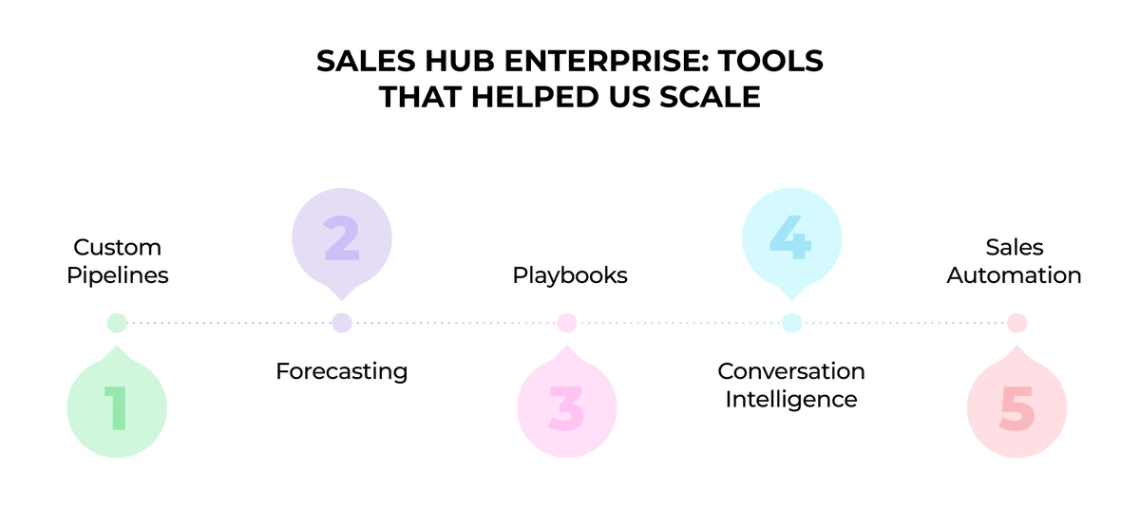
Four tools changed everything. After six years with Sales Hub Enterprise, these features reshaped how we operate.
Custom Pipelines and Forecasting Accuracy
Standard CRM pipelines are like off-the-rack suits. They fit, sort of, and never quite right.
HubSpot custom pipelines let us build exactly what we needed. Different products, different sales cycles, different customer types, each with its own pipeline. The tracking became laser-focused.
The forecasting tool solved our revenue prediction headaches. Managers review progress by deal stage or forecast category and pinpoint where reps need to focus to hit targets. No wild guesses about quarterly numbers. Accurate predictions and smarter resource allocation.
Playbooks: Training New Reps Faster
New sales rep onboarding used to be brutal. Months of shadowing, endless questions and inconsistent training.
Playbooks changed that. These interactive content cards give new team members standardized guidelines and scripts from day one.
Templates save automatically as contact properties, so data collection stays consistent for the whole team. Less manual work, more time selling.
Conversation Intelligence: Coaching With Real Data
The conversation intelligence feature gave us a real edge. It captures, transcribes and analyzes every call, delivering AI insights without anyone lifting a finger.
The search function proved the standout: you can jump to the exact moments when prospects mention competitors or raise objections, then use those clips for training. Sales managers review calls fast and deliver targeted coaching.
Sales Automation: No More Missed Follow-Ups
This might be the most valuable feature of all.
HubSpot sales automation runs personalized, multi-channel communications that adapt to prospect behavior. Nothing gets dropped or forgotten, since the system handles the follow-up itself.
The numbers landed where it counts: 76% of teams report higher win rates, 35% more closed deals and 167% better time efficiency with AI-powered tools. Our team went from chasing prospects to having prospects come to us.
HubSpot Enterprise Pricing: Is It Justified?
Let us get real about the money. The price tag makes even seasoned marketers wince. After six years of payments, we can tell you what you are getting into and whether it earns every dollar.
The Numbers You Need to Know
Sales Hub Enterprise costs $150 per user per month. Marketing Hub Enterprise starts at $3,600 monthly with 10,000 marketing contacts included. Then come the onboarding fees: $3,000 for Sales Hub Enterprise and $6,000 for Marketing Hub Enterprise.
There is more. Additional contacts for Marketing Hub Enterprise cost $100 per month for every 10,000. And the part that catches most people off guard: Enterprise requires an annual commitment, usually paid upfront. The math adds up quickly.
What Justifies These Premium Prices?
Marketing Hub Enterprise includes multi-touch revenue attribution, predictive lead scoring, custom objects and behavioral event triggering.
You also get much higher limits, up to 50 dashboards with 35 reports each against lower tiers. One surprise: about 63% of HubSpot users report that three or fewer people support their entire CRM stack.
How It Stacks Against Competitors
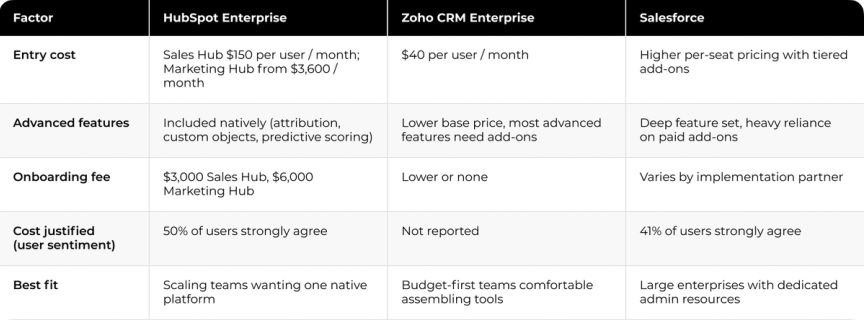
Zoho CRM Enterprise costs just $40 per user monthly, roughly 73% less than HubSpot for a 50-user team. On paper that is a wide gap.
Here is the catch. HubSpot includes most advanced features natively while competitors need extensive add-ons. The pricing structure gives you better transparency and predictability as you scale. The table below lays the three options side by side.
Six Years of ROI Analysis
The cost analysis changes completely over time. Half of HubSpot users strongly agree their CRM cost is justified, against 41% of Salesforce users.
Companies using HubSpot commonly see results within 12 months: 114% more website traffic, 129% more inbound leads and 55% more closed deals. After six years we stopped watching the monthly cost and started measuring operational efficiency, team productivity and revenue growth tied to the platform. From our experience, the cost is justified.
Real-World Use Cases: How We Use HubSpot Daily
Six years with HubSpot means thousands of hours on the platform. We built practical systems that hold up in daily work, not the flashy demos in sales decks. Here is what our operations look like.
Marketing Campaign Automation
Our marketing team runs dozens of automated workflows at once. Email sequences trigger on website behavior, form submissions or specific page views. Form automations route leads to different teams by their responses, so high-value prospects go straight to sales while others enter nurture sequences.
The campaign tools save enormous time. Follow-ups fire on customer interactions like link clicks, site visits and email opens. Our most successful sequence is a 10-email nurture campaign that produced a 39% increase in deals created after 12 months.
One thing the sales demos skip: building these workflows takes time. Expect weeks of perfecting your automation logic before real results show.
Sales Pipeline Management
Our sales team practically lives in the pipeline view. We built separate pipelines for different service offerings, each with stages that mirror the real buying journey. No forcing prospects through generic stages that miss reality.
Deals progress automatically when certain actions occur, so reps spend far less time updating records and more time selling. This contributed to 36% more closed deals within a year.
Customer Segmentation and Personalization
Segmentation changed how we communicate. We build hyper-segmented lists from multiple CRM parameters. We segment on:
- Demographics (location, company size)
- Behavior (website visits, email engagement)
- Purchase history and product usage
- Lead scoring thresholds
This targeting doubled our email open rates because contacts get only relevant information. Smart lists update automatically when contact details change, so everyone keeps receiving appropriate messaging.
Reporting and Executive Dashboards
Executive dashboards turned our weekly meetings from opinion battles into data-driven decisions. Each department keeps custom dashboards for its KPIs while leadership sees combined views spanning every team.
Building these is simple. We use the drag-and-drop editor to shape layouts and share them via Slack or email straight from HubSpot. For tougher questions we use HubSpot AI reporting to generate visual data without SQL expertise. These consolidated insights contributed to a 55% rise in closed deals. No more spreadsheet chaos or conflicting reports from separate systems.
Biggest Wins and Limitations After 6 Years
Six years is a long time on any platform. Long enough to move past the honeymoon phase and see what holds up against what just sounds good in a demo.
The impact on our business showed up in ways our team did not expect when we signed. And no platform is perfect. HubSpot Enterprise has its frustrations.
Top 3 Benefits We Experienced
The numbers hold. After one year we acquired 129% more leads, closed 36% more deals and saw a 37% jump in ticket closure rates. These wins did not fade after six months. They stuck through our entire time on the platform.
Adaptive testing turned out to be the feature we reach for most. Most A/B tools make you wait until the test ends. HubSpot ML works out conversion rates on the fly and sends traffic to the top-performing options. We improved conversion rates during the testing window while other tools would have shown half our visitors weaker pages.
The third win was multi-touch attribution that finally tied every customer interaction to revenue. For the first time in years, we could trace which blog post, email or social interaction shaped a purchase decision months later.
Where HubSpot Still Falls Short
Here is where it gets frustrating.
Contact limits are brutal. Exceed your allocated marketing contacts and you are billed for the annual amount at the next tier, with no undoing it until the next billing cycle. It is like ordering the expensive wine and paying for the whole bottle.
Storage limits bite too. You are capped at 15 million overall contacts and 1 million non-marketing contacts. Larger enterprises hit those walls faster than expected.
Customization has hard boundaries: 1,000 custom fields per object and 1,000 values per picklist property. Campaign limits of 1,000 per portal and workflow limits of 500 per portal turn into real problems as you scale.
Workarounds and Tips for New Users
One trick most people miss: buy a single Service Hub Enterprise seat. This activates many Enterprise features platform-wide without upgrading every Sales seat, which saves you thousands.
New users should start by adding test contacts, personal emails and the like, to practice without fear. Build confidence before touching real customer data.
Making the Spend Pay Off
After six years and hundreds of thousands of dollars, would we do it again? Yes. The pricing stings when you write that first check with the onboarding fee attached. Contact limits get maddening, and some feature boundaries feel arbitrary. And the impact on our business held: streamlined operations, connected data that used to sit in silos and measurable revenue growth tied to the platform. The platform also grew more valuable over time as our team mastered the tools, which few of us expected at signing.
That last point is also where most of the disappointment comes from. The teams that feel burned by enterprise CRM pricing are usually the ones whose data never got connected in the first place. The platform can only tie spend to revenue once analytics, CRM and reporting speak to each other.
Cleo rebuilt its marketing reporting foundation with Darwin by connecting analytics, CRM and reporting systems into one reliable measurement flow. The result was $50,000 saved annually on attribution tooling, less manual reporting work and marketing measurement data the team could trust. Read the full Cleo case study for the details.
That is the difference between a CRM that justifies its price and one that becomes an expensive logo on your tech stack. The question is not whether you can afford HubSpot Enterprise. It is whether your data is connected enough to prove it was worth it.
FAQs
Q1. Is HubSpot Enterprise suitable for all businesses?
HubSpot Enterprise fits larger organizations with sophisticated needs: multiple brands or locations, wide marketing activity and advanced sales teams. It is most valuable for B2B companies, e-commerce businesses and firms in competitive markets that need deep customization and room to scale.
Q2. What key features set HubSpot Enterprise apart from other tiers?
For marketing it adds multi-touch revenue attribution, custom objects, predictive lead scoring and behavioral event triggering. For sales it adds conversation intelligence, recurring revenue tracking and advanced permissions, plus more custom dashboards, reports and higher usage limits than lower tiers.
Q3. How does HubSpot Enterprise pricing compare to other CRM platforms?
HubSpot Enterprise costs more than several competitors, and it includes most advanced features natively. That can deliver better value and predictability as you scale, against systems that need extensive add-ons. Weigh total cost of ownership alongside the potential for higher efficiency and revenue growth.
Q4. What results can businesses expect from HubSpot Enterprise?
Many businesses report clear gains within the first year: more website traffic, more inbound leads and more closed deals. Long-term users often see sustained growth in lead acquisition, sales closure rates and revenue tied to the platform.
Q5. Are there limitations to be aware of with HubSpot Enterprise?
Yes. Watch for restrictions on marketing contacts, storage caps on overall and non-marketing contacts, caps on custom fields and picklist values, and limits on campaigns and workflows. Weigh these against your scale and growth projections.