
Quick Answer:
The best product analytics tools for B2B SaaS in 2026 are Amplitude, Mixpanel, PostHog, Heap, Pendo, Gainsight PX, Fullstory and Userpilot. The right choice depends on four factors: how the tool models events, whether it reports at the account level, how reliably it syncs with your CRM and warehouse, and which governance controls each plan includes.
TL;DR
- Amplitude. Cohorts, journeys, experiments and session replay in one platform, with an Accounts add-on for B2B reporting.
- Mixpanel. Self-serve funnels and retention for product managers; account reporting requires the Group Analytics add-on.
- PostHog. Analytics, replay and feature flags for engineering-led teams, with usage-based billing and an open-source option.
- Heap. Autocapture of every interaction, so teams can analyze events they never defined upfront.
- Pendo. Product analytics bundled with in-app guides, free for up to 500 monthly active users.
- Gainsight PX. Usage data that feeds customer success health scores and renewal workflows.
- Fullstory. Session-first behavioral analytics with a free plan of 30,000 sessions per month.
- Userpilot. Analytics plus onboarding flows for product and growth teams, priced by MAU from $299 per month.
This guide compares eight product analytics tools by event design, account-level analysis, integration reliability and governance. The scope is what happens after a user logs in. Website-to-CRM journey analytics is a separate category, covered in our comparison of customer journey analytics tools.
The shortlist covers tools that track in-product events for SaaS products, grouped into five types: analytics-first (Amplitude, Mixpanel, Heap), engineering suite (PostHog), adoption and guidance (Pendo, Userpilot), customer success-focused (Gainsight PX) and session-first (Fullstory). Web analytics tools such as GA4 and discontinued products are excluded. Pricing, plan limits and integrations come from each vendor's official pages.
Where Product Analytics Data Loses Trust in a B2B Stack
Product analytics data holds up in a B2B stack only when the whole path around the tool works. It starts at the Surface: do the events the product sends follow a written tracking plan, with stable names and an account ID on every event? Data quality monitoring tools help catch drift between releases. Then come the Connections: how do those events reach the CRM, the warehouse and billing? An activation score has commercial value only when sales and customer success see it next to the account record. Acquisition source also enters through the website-to-CRM path, so a break there distorts activation reports by channel, as our guides to marketing data integration tools and choosing between a CDP, data warehouse or CRM explain.
Clarity comes next: who owns the definitions of "active account," "activated" and "expansion signal," and who controls access to PII? The marketing analytics governance checklist lists the controls that keep those answers stable. Momentum closes the loop: can the team act on account-level signals? A finding pays off when it changes an onboarding step, triggers a guide for stalled accounts or alerts customer success. These four stages form the Darwin Flux methodology, and the same checks shape the tool reviews below: event design, integrations, governance and account-level reporting.
What B2B SaaS Teams Need From Product Analytics Tools
B2B SaaS teams need a product analytics tool that tracks named events inside the product, attributes them to both users and accounts and reports on activation, retention and expansion. Each requirement narrows the shortlist.
Product Analytics vs. Web and Marketing Analytics
In most setups, product analytics focuses on what identified users do after login, and web and marketing analytics focus on how visitors arrive. The categories overlap, since both can capture clicks and page views, and the practical differences sit in primary use case, event model, identity and reporting goals.
Web analytics usually counts sessions and page views from anonymous visitors on the marketing site, and the Google Analytics audit checklist covers how to keep that data clean. Marketing analytics attributes those visits to campaigns and channels. Product analytics works with named events such as "invited teammate" or "created project," tied to identified users, roles and accounts, and its reports show which in-product behavior predicts conversion, retention or upsell. Embedded analytics is a different job again: it puts dashboards in front of your customers, as our embedded analytics tools comparison explains.
Amplitude's Product Benchmark Report, a study of more than 10,600 digital products from more than 2,600 companies, shows how wide the activation gap can be. In that sample, the top 10% of products reach 21% day-one activation, compared with 5% for the median product. The sample is not limited to B2B SaaS, so treat the figures as directional.
"The last big struggle of the product development process is understanding what people want."
Spenser Skates, CEO and Co-founder, Amplitude
User and Account Tracking for B2B Products
B2B products need tracking at two levels, user and account, because buying, usage and renewal decisions happen per account. One person can belong to several workspaces, and some events, such as a failed payment or a canceled subscription, come from billing systems with no user action behind them.
A sound setup passes an account ID with every user event, ingests account-level events from billing and the CRM, and lets analysts segment by user properties, account properties or both. With user-level tracking alone, a power user in one workspace can hide a dormant account in another.
In this guide, account-level analysis means grouping user events by company and segmenting reports by account properties. Each tool is labeled native (part of the base product), paid add-on or higher tier; confirm per-account funnels, retention and CRM joins during a pilot, since vendors document them unevenly.
Reports for Activation, Retention and Expansion
Four reports answer most activation, retention and expansion questions:
- Cohort retention. Whether groups of users and accounts return over days, weeks or months.
- User journeys. The paths people take inside the product and the steps where they stall.
- Funnels. The exact onboarding or activation step where users drop off.
- Feature adoption. Which features correlate with renewal and expansion.
In the same Amplitude benchmark, median month-three retention is 3.8%, and the top 10% of products retain 18.5%. These four reports show a product team which workflow to fix first.
1. Amplitude

Amplitude is an analytics-first platform that combines behavioral cohorts, journeys, experiments and session replay in one workspace. It suits product and growth teams that want analysis and testing in the same tool.
Reusable Cohorts, Journeys and Experiments
Cohorts in Amplitude are reusable: a segment built for a retention analysis can feed an experiment or an in-app guide directly, and Journeys maps the paths users take toward a target outcome. Amplitude's published Calm example shows both steps. Cohort analysis found that users who set daily reminders retained about 3x better, and Calm then prompted some new users to set a reminder while a control group did not; the difference held in that test. Amplitude does not publish the sample size behind the result.
Group behavior analysis is available from the Plus plan. Full account-level analytics comes through the Accounts package on Growth and Enterprise, which adds group-level experimentation, account-level bucketing and B2B-focused reporting and is priced as a percentage of the platform plan.
CRM, Warehouse and PII Access Controls
Amplitude's integration catalog lists Salesforce CRM, HubSpot, Snowflake, BigQuery and Databricks. Data direction differs by integration, so confirm whether each one imports data, exports cohorts or both. For governance, Data Access Control hides PII-classified properties from users without access, and its availability varies by plan. Role-based access controls are an add-on on Growth and included on Enterprise.
Free Plan and Event-Based Tiers
The free plan includes 2 million events per month and 10,000 session replays. Plus starts at $0 with the first 2 million events free and scales up to 70 million events. Growth and Enterprise use custom event-based pricing.
Fit for Experiment-Driven Product Teams
Product-led B2B teams that run experiments and want cohorts, replay and guides connected to the same data.
2. Mixpanel

Mixpanel is an analytics-first, event-based tool built for self-serve analysis. Product managers can build funnels, retention curves and flows with no SQL and no analyst in the loop.
Account Analytics on Group Analytics
Mixpanel Account Analytics generates a profile for each account with usage, top users and retention. It runs on Group Analytics, a paid add-on. Group properties such as industry, employee count and plan can segment any report, and Revenue Analytics joins warehouse revenue data to behavior for ARR, churn and expansion metrics.
Warehouse Connectors and Lexicon
Warehouse Connectors import data from Snowflake, BigQuery, Databricks, Redshift and Postgres and come as a free add-on on paid event-based plans. Cohort sync to downstream tools requires a paid plan, and a native Salesforce CRM sync is not confirmed in Mixpanel's documentation. Lexicon acts as the data dictionary, where owners and admins can hide, block or merge events. Verified Data badges and event owners are Enterprise-only.
Published Event Pricing
The free plan covers 1 million events and 10,000 session replays per month. Growth keeps the first 1 million events free, and at 5 million monthly events the list price is $438 per month billed yearly or $613 billed monthly. Enterprise pricing is custom, and Group Analytics costs extra on both paid plans.
Fit for Self-Serve Product Managers
Product teams that want independent, self-serve analysis and can budget for the Group Analytics add-on.
3. PostHog

PostHog is an engineering suite that bundles product analytics, session replay, feature flags, experiments and error tracking under usage-based billing. It suits engineering-led teams that want one platform for product data.
Group Analytics and Self-Hosting
Autocapture records clicks and page views, and engineers add custom events through SDKs. Account-level analysis comes through group analytics, a paid add-on that supports up to five group types per project, such as company and workspace. Once enabled, it bills on all identified events in the project. PostHog also offers an open-source version for teams that want to self-host.
Managed Sources and Batch Exports
Managed sources import data from Salesforce, HubSpot, Postgres and BigQuery, and batch exports send events to Snowflake, BigQuery, Redshift, S3, Postgres and Databricks. SSO, audit logs, custom roles and project permissions sit in paid platform packages.
Monthly Free Allowances per Product
Each product has a monthly free allowance: 1 million analytics events, 5,000 session replays and 1 million feature flag requests. Pay-as-you-go keeps those allowances and bills usage above them, with billing limits per product.
Fit for Engineering-Led Teams
Engineering-led SaaS teams that want analytics, replay and feature flags under one bill and control over their data pipeline.
4. Heap

Heap is an analytics-first Contentsquare product built around autocapture. It records every interaction from day one, so teams can define events retroactively and analyze behavior they did not plan to track.
Retroactive Analysis From Autocapture
Retroactive analysis helps when a tracking plan has gaps. Account-level analysis is a higher-tier feature: account analytics and the engagement matrix are available on the Pro and Premier plans.
Heap Connect and Premier Controls
Heap Connect sends Heap data to the warehouse and is included in Premier, along with data warehouse integration, advanced user permissions and region-specific storage. Heap also lists a Salesforce integration. HubSpot support and governance controls on lower plans are not confirmed on Heap's public pages.
Session-Based Plans
Heap prices by sessions. The free plan covers up to 10,000 monthly sessions with six months of data history. Growth, Pro and Premier pricing requires a quote, and session replay is an add-on on Pro.
Fit for Teams With Tracking Gaps
Teams with an incomplete tracking plan that need answers about past behavior.
5. Pendo

Pendo is an adoption and guidance platform that combines product analytics with in-app guides, roadmaps and feedback. Product and customer success teams use it to measure adoption and prompt users inside the product.
Account Rollups and In-App Guides
Pendo tracks behavior for both visitors and accounts, so account-level analysis is native and adoption reports roll up to the customer level. In-app guides are included on every plan, which removes the need for a separate onboarding tool. Session replay is a paid add-on on Base and included on Core and Ultimate.
CRM Integrations and Data Sync
Pendo's integrations directory lists Salesforce and HubSpot under CRM, plus Snowflake, BigQuery and Redshift for data export through Pendo Data Sync. Plan requirements per integration are not published, and governance controls are not confirmed on Pendo's public pages.
Free Plan up to 500 MAU
The free plan covers up to 500 monthly active users with analytics and in-app guides. Paid plans are priced by MAU volume and feature set, and the cost per MAU decreases as volume grows.
Fit for Shared Product and CS Ownership
B2B teams where product and customer success share ownership of onboarding and adoption.
6. Gainsight PX

Gainsight PX is a customer success-focused product experience platform that links product usage to renewal workflows. It suits companies whose renewal motion depends on early warning signals at the account level.
Usage Signals for Health Scores
PX captures usage with no manual tagging, reports at the account level natively and adds no-code walkthroughs, onboarding checklists and surveys. Usage data feeds Gainsight CS health scores, so customer success managers see declining adoption ahead of renewal conversations.
CS and CRM Connections
Gainsight describes native integrations with CS and CRM systems. Warehouse connectors and governance controls are not confirmed on Gainsight's public PX pages.
Quote-Based Pricing and Free Trial
Gainsight PX pricing is available on request, and the vendor lists a free trial with no free plan.
Fit for CS-Led Renewal Teams
Customer success-led organizations that already run Gainsight CS or plan to tie product usage to health scores.
7. Fullstory

Fullstory is a session-first behavioral analytics platform. It pairs session replay with funnels, journeys, retention and conversion analysis.
Replays Behind Funnel Drop-Offs
Fullstory captures interactions automatically and lets teams open the replays behind any funnel drop-off. Account-level analysis is not confirmed on the public pricing page. In-app guides and surveys are a separate add-on to the Analytics plans.
Salesforce, BigQuery and Segment Links
Fullstory's integration directory lists Salesforce Sales Cloud, Google BigQuery and Segment. Governance controls by plan are not confirmed on the public pricing page.
Free Plan of 30,000 Sessions
Fullstory Free includes 30,000 sessions per month, 12 months of data retention, session replay and basic analytics for up to 10 users. Business, Advanced and Enterprise plans are quote-based.
Fit for Diagnosing Activation Drops
Teams that need to see the exact user experience behind a drop in activation or conversion.
8. Userpilot

Userpilot is an adoption and guidance platform that combines analytics with onboarding flows, checklists and surveys. It suits SaaS teams that want to measure adoption and act on it in the same interface.
Company Profiles and Onboarding Flows
Account-level analysis is native: every plan tracks both users and accounts and includes user and company profiles. The Growth plan adds advanced product analytics, event autocapture and session replay.
CRM Activity Sync and Compliance
Userpilot integrates with Salesforce and HubSpot, so sales teams can see a lead's in-app activity in the CRM, and with Segment for data sync. Its Data Sync feature pushes data to the warehouse, though the supported warehouses are not listed on the integrations page. Userpilot lists SOC 2 Type 2, HIPAA and GDPR compliance on all plans.
MAU-Based Plans From $299
The Starter plan costs $299 per month for up to 2,000 MAU. Growth starts at $849 per month and includes 5,000 session replays per month.
Fit for Onboarding and Growth Teams
Growth and onboarding teams at mid-size SaaS companies that want flows and analytics in one tool.
Product Analytics Tools Comparison Tables
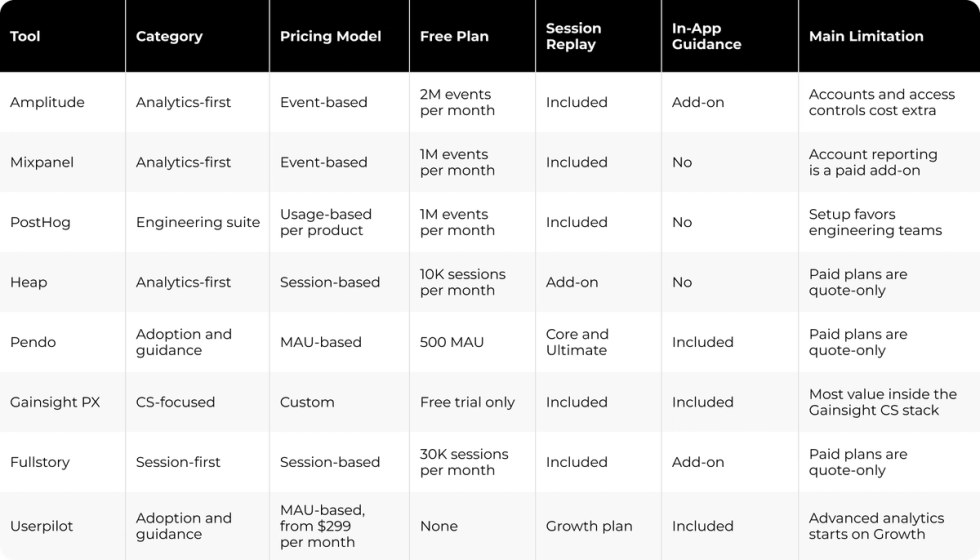
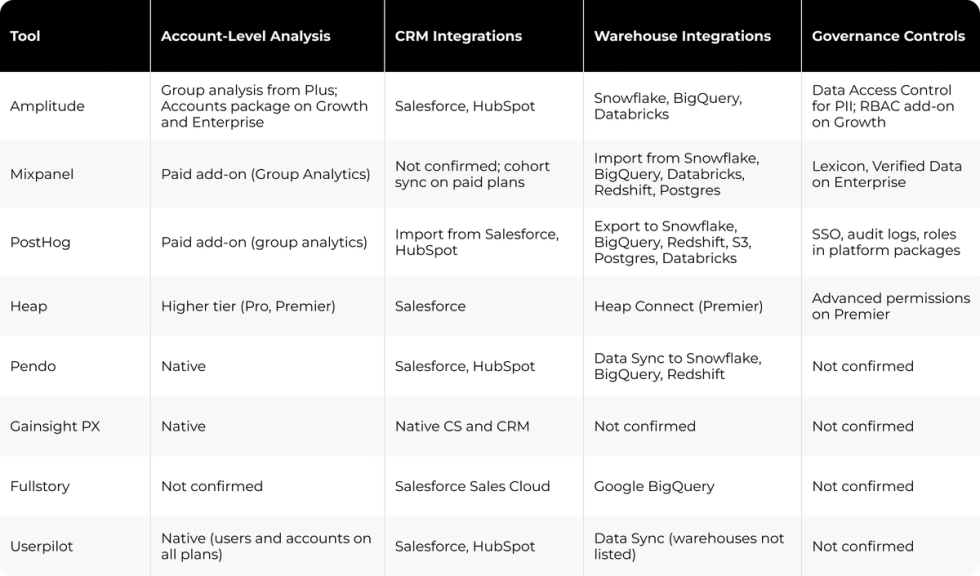
The first table compares category, pricing and bundled features. The second compares the B2B criteria from this guide: account-level analysis, integrations and governance. "Not confirmed" means the vendor's public pages do not state the capability.
Pricing, plan limits and integrations were checked on vendor pages. Confirm current terms with each vendor during procurement.
What Product Analytics Tools Cost as You Grow
Product analytics costs depend on the billing unit more than on the starting price. Events, users, sessions and add-on modules produce different invoices for the same product usage.
Each billing unit rewards a different usage pattern. Event-based billing in Mixpanel and Amplitude charges for every tracked action, so products with heavy per-user activity see costs grow fastest. MAU-based billing in Pendo and Userpilot charges per active user regardless of activity, and session-based billing in Heap and Fullstory depends on how often users return.
"It’s not a number. It’s a structure."
Ulrik Lehrskov-Schmidt, Author, The Pricing Roadmap
Free Plan Limits to Check
Free plans differ in what they cap. Mixpanel and PostHog each include 1 million events per month, Amplitude includes 2 million, Heap caps usage at 10,000 sessions and Fullstory at 30,000 sessions. Pendo's free plan stops at 500 MAU, Userpilot does not list a free plan, and Gainsight PX lists a free trial with no free plan.
Add-On Costs for Accounts, Replay and Access Controls
Account-level reporting is the first add-on B2B teams need, and several vendors price it separately. Mixpanel sells Group Analytics, PostHog bills group analytics on all identified events and Amplitude sells its Accounts package on Growth and Enterprise, on top of group behavior analysis available from Plus. Amplitude also charges for role-based access controls on Growth and for replay volume above plan limits, and Heap reserves account analytics for Pro and Premier.
To compare quotes fairly, price the modules your team will use at current volume, at 3x that volume and at 10x.
How to Test a Product Analytics Tool Before You Commit
Test a product analytics tool with your own events, one real product question and a planned exit path. A vendor demo shows the tool with ideal data, and a pilot shows how it handles yours.
Start with a small tracking plan: the events behind activation, an account ID on every event and consistent user IDs that are never reassigned to another person. Duplicate IDs merge different users and distort retention reports over time.
Next, pick one real product question, such as which onboarding step predicts a second active user in an account. Run it in the tool and check the answer against your warehouse or CRM data. Our playbook on reconciling CRM, ad platform and finance revenue numbers applies the same check to revenue data.
Then test the integrations your team depends on: CRM sync, warehouse export and the support desk. Ask vendors how they handle PII, consent and data residency, and confirm the answers in their documentation.
Finally, plan the exit. Confirm how raw events export and how historical data would move to another platform. Mixpanel publishes a project migration guide. The B2B analytics tool June announced its shutdown on July 8, 2025, ended the product on August 8, 2025 and gave customers about 30 days to export their data or move it to Amplitude.
Why Product Analytics Needs a Connected Reporting Stack
Product analytics shows what happens inside the product, and revenue decisions happen in the CRM, the warehouse and finance reports. When these systems use different definitions, product, growth and sales teams argue over whose number is right, and the analytics tool loses trust.
Darwin's closest published example is a reporting project, not a product analytics deployment, and it shows the same failure point. At Cleo, GA4, Salesforce and BigQuery data sat in separate systems, monthly reporting took two full working days and reporting accuracy was roughly 70%. Darwin built a custom reporting layer that connected the three sources in one Looker Studio hub, agreed definitions for pipeline, ROI and CAC with the team and automated the monthly output. Reporting accuracy rose to roughly 90%, the team recovered two working days each month and Cleo removed $50K in annual third-party attribution spend.
The analogy carries over to product analytics. Choose the tool for its event model and account reporting, then give equal attention to the connections and definitions that let every team read the same activation and retention numbers. Darwin's Data & Analytics Setup and Integrations & Automations services cover that connection work.
FAQs
Q1. What are the best product analytics tools for B2B SaaS?
Amplitude, Mixpanel, PostHog, Heap, Pendo, Gainsight PX, Fullstory and Userpilot lead the category in 2026. Amplitude, Mixpanel and Heap are analytics-first, PostHog fits engineering-led teams, and Pendo, Gainsight PX and Userpilot add in-app guidance.
Q2. Which product analytics tools support account-level analytics?
Pendo, Gainsight PX and Userpilot include account-level analysis in the base product. Mixpanel and PostHog sell it as a paid add-on, Amplitude offers group analysis from Plus and a paid Accounts package, and Heap reserves it for Pro and Premier.
Q3. What governance questions should buyers ask a product analytics vendor?
Ask who can approve, hide or block events, how PII is classified and restricted, which roles and SSO options each plan includes and how long data is retained. Confirm each answer in the vendor documentation, since many controls depend on the plan.
Q4. What costs should I check besides the starting price?
Check the billing unit (events, MAU or sessions) and the add-ons B2B teams need, such as account reporting, extra session replay and role-based access controls. Then price the plan at current usage, three times that usage and ten times.
Q5. How should I test a product analytics tool during a pilot?
Build a small tracking plan with consistent user and account IDs. Answer one real product question in the tool, compare the result with your warehouse or CRM data and confirm data export options in case you switch platforms later.