
Quick Answer:
The best session replay tools for SaaS in 2026 are Microsoft Clarity for free recording, PostHog, Amplitude and Mixpanel for replay inside product analytics, Sentry, LogRocket and Datadog for engineering debugging, Fullstory and Quantum Metric for enterprise behavior analysis and OpenReplay for self-hosted data control. Compare masking defaults, consent controls, event integration and retention first, then price.
TL;DR
- Free and CRO: Microsoft Clarity records sessions and heatmaps at no cost, and Hotjar adds surveys for teams that need the reason behind a drop-off.
- Product analytics: PostHog, Amplitude and Mixpanel open replays from funnels, cohorts and events, each with a monthly free allowance.
- Engineering debugging: Sentry, LogRocket and Datadog attach replays to errors, application state and backend traces.
- Enterprise analysis: Fullstory and Quantum Metric autocapture every interaction for retroactive and revenue-impact analysis.
- Self-hosted privacy: OpenReplay runs on your own infrastructure, and Smartlook customers should plan a migration ahead of the 2027 shutdown.
The free Measurement Trust Audit runs on your public pages in a real browser and works from public evidence only.
Does your replay tool start only after consent and match the sessions in analytics? The free Measurement Trust Audit checks what fires on your public pages and puts the fixes in order.
A user rage-clicks a button that will not respond, and the funnel report shows only a drop. Session replay tools fill that gap: they record clicks, scrolls, inputs and errors so product and analytics teams can watch the session behind the number.
Every recording also captures user data, so choosing session replay software is a privacy decision and a measurement decision at the same time. This comparison covers 11 session recording tools for SaaS teams and reviews each one on data masking, consent controls, event integration, retention and pricing.
Where Session Replay Fits in Your Measurement Stack
A session replay script runs on the same pages as your analytics tags, consent banner and forms, so it inherits every gap in that setup. Seen through Darwin Flux, the path has four checkpoints. On the Surface, the replay script loads next to the heatmaps and session recordings a team already runs, and masking has to hold on every page, form and embed a visitor sees. Through Connections, replay events flow into analytics, error tracking, the CRM and marketing data integration tools, and that hand-off decides whether a recording links to the right user and consent state.
Clarity comes from shared definitions: a session in Microsoft Clarity, a recording in PostHog and a replay in Sentry count different things, carry different retention rules and need one agreed meaning before anyone compares them. Momentum depends on routine, because replays pay off when a named owner reviews them each week, ships fixes and feeds the findings into the same marketing analytics the rest of the team reads.
Choose a Session Replay Tool by Team Need
Start with the job the recordings have to do, then read the two or three tools that fit it. Four needs cover nearly every SaaS team.
CRO and Web Funnels
Marketing and CRO teams that study landing pages, pricing pages and signup flows should start with Microsoft Clarity and Hotjar. Clarity costs nothing, and Hotjar pairs recordings with on-site surveys.
Product Analytics
Product teams that already work in funnels and cohorts should compare PostHog, Amplitude and Mixpanel. All three open replays from an analytics chart, so the session and the metric sit in one workspace.
Debugging and Error Context
Engineering teams that reproduce bugs should look at Sentry, LogRocket and Datadog. Each replay links to errors, console logs, network calls or backend traces.
Privacy and Self-Hosted Requirements
Regulated teams that must keep user data inside their own infrastructure should start with OpenReplay. Enterprise teams that need certified privacy controls should add Fullstory and Quantum Metric to the shortlist.
Test These Three Things Before You Roll Out Replay
Run three checks in a test session ahead of a production rollout. Each one uses a private browser window, the developer tools and fake user data, and each one catches a failure that makes recordings risky or misleading.
Recording Waits for Consent
Open the site with an EU consent state, decline tracking and watch the network tab: the replay vendor should receive no requests until the visitor opts in. GDPR and the ePrivacy rules treat session recording as optional tracking, and Clarity now enforces consent signals for the EEA, UK and Switzerland. Repeat the test after every new pixel or landing page, as the guide to testing tags before consent explains.
PII Stays Masked in a Test Session
Fill a form with fake personal data, submit it and open the recording: names, emails, card numbers and free-text fields should appear as masked characters. Sentry, Fullstory, Datadog and Mixpanel mask all text by default, while Clarity and PostHog mask sensitive inputs and let you widen the rules. Check retention in the same pass, because recordings stay a liability for as long as they are stored.
“As people become more concerned with data privacy, they’ll begin to question any collection of their information.” – Patricia Thaine, Co-Founder and CEO, Private AI
Replays Match Event, Error and User IDs
Trigger a known event and a test error, then find that session from your analytics tool and from the replay tool. The user ID, event name and timestamp should line up in both places. Use tracking QA tools to catch breaks after releases, and keep event data consistent ahead of AI summaries, as the AI data readiness checklist shows.
1. Microsoft Clarity
Microsoft Clarity is the best free session recording tool for SaaS teams that want replays and heatmaps at no cost. Microsoft sells no paid tiers, so every team gets session replays, heatmaps and unlimited seats on the same free plan.
Microsoft Clarity: Best-Fit SaaS Use Cases
Clarity fits teams that need to see why users leave a self-serve upgrade flow or abandon a pricing page. Replays show the moment a user clicks an unresponsive button, searches for buried information or hits an unexpected error. Segments, custom tags and custom user IDs let you compare users who convert with users who leave, which separates an information gap from a usability problem.
Microsoft Clarity: Session Replay Features and Integrations
Recordings run continuously, and instant heatmaps show clicks, scrolls and conversion areas. Clarity flags rage clicks and dead clicks, and its segmentation offers more than 40 filters for narrowing results to the sessions that matter. Copilot, the built-in AI assistant, summarizes recordings and heatmaps so you review fewer replays by hand. Clarity connects with GA4, Mixpanel, Adobe and Piwik PRO for analytics, supports Kameleoon, AB Tasty and Optimizely for CRO work and offers a native HubSpot integration. Mobile SDKs extend recording to iOS and Android apps.
Microsoft Clarity: Privacy Controls and GDPR Considerations
Clarity masks personally identifiable information such as input fields and numbers before data reaches Microsoft servers, and you can choose relaxed, balanced or strict masking. IP blocking keeps internal and test traffic out of reports. Since October 31, 2025, Clarity has enforced consent signals for visitors from the EEA, UK and Switzerland, so recordings for those users depend on a valid signal from your consent management platform or the Clarity Consent API.
Microsoft Clarity: Pros and Cons
Clarity is free and installs quickly through Google Tag Manager, and reviewers praise its filtering options and support. Standard recordings expire after 30 days unless you favorite or label them, and you cannot delete individual recordings on demand. Agency teams can also run into access issues when logins are shared between Microsoft and Google accounts.
Microsoft Clarity: Pricing and Recording Limits
Clarity is free on every plan. It records up to 100,000 sessions per project per day, with up to 100 live sessions viewable at one time. Standard retention is 30 days, and favorited or labeled recordings stay available for up to 13 months.
2. Hotjar
Hotjar is the best fit for teams that want session recordings and user feedback in one place. It pairs replays with on-site surveys, so you see where users click and read what they say about the page. Contentsquare acquired Hotjar in 2021, and on July 1, 2025, Hotjar merged into the Contentsquare Group. Heatmaps, recordings and surveys now sit inside Contentsquare plans.
“We built Hotjar to inspire product improvements by enabling businesses of all sizes to have empathy with their end-users.” – David Darmanin, Founder and Chairman, Hotjar
Best for: SaaS sites with enough traffic for heatmaps and recordings to show clear patterns, and CRO teams that review recordings each week. Surveys explain the reason behind drop-offs that GA4 reports cannot explain alone.
Watch out: Low-traffic sites can end up with thin data once session caps and sampling apply, and B2B teams get limited account-level identification and CRM syncing. The Contentsquare migration also changed plan names and billing, so check current limits on the Contentsquare Free, Growth, Pro and Enterprise plans.
Privacy: Load Hotjar only after a visitor opts in through your consent banner. It suppresses password fields and payment data by default, and dynamic forms can still need manual masking rules.
3. Fullstory
Fullstory is the best fit for autocapture and retroactive behavior analysis. It records every click, scroll and page visit at the DOM level, so teams can define events after the fact. SaaS products that change often benefit most, because nobody has to decide what to track ahead of each release.
Fullstory: Best-Fit SaaS Use Cases
Fullstory serves mid-market and enterprise organizations, and G2 reviewer data shows strong adoption in software, retail and financial services. Product and UX teams use it to diagnose friction, study behavior patterns and improve web and mobile experiences.
Fullstory: Session Replay Features and Integrations
Fullcapture, the autocapture engine, records clicks, form inputs and page visits and processes the data server-side in a single stream. When a team wants to track an interaction it missed last month, the data is often already there and ready to label. The Business plan adds Session Insights, Live Session Viewing, heatmaps, funnels and page flow analysis, and Advanced adds StoryAI summaries, conversion maps, retention analysis and journey mapping. Fullstory also offers an MCP server that connects its behavioral data with AI tools such as Claude, ChatGPT, Cursor and Gemini, so teams can ask about sessions in plain language.
Fullstory: Privacy Controls and GDPR Considerations
Fullstory uses a Private by Default model: text elements are masked at the source, in the user's browser, and teams unmask only what they need to see. Under GDPR, Fullstory acts as a processor for your end users' data, and its Data Processing Agreement applies under standard terms. You can discard IP addresses after processing, delete individual users in one click or through the API and export user-specific data for access requests.
Fullstory: Pros and Cons
Reviewers praise retroactive event tracking, StoryAI summaries and a friendly interface, and they also mention a learning curve. Guides and Surveys require paid add-ons, mobile setup takes more effort than web, and session-based pricing can make a highly engaged product expensive over time.
Fullstory: Pricing and Recording Limits
The free plan includes 30,000 sessions per month and 12 months of retention. Business, Advanced and Enterprise use custom, sales-led pricing.
4. Amplitude
Amplitude is the best fit for teams that want session replay inside their product analytics platform. Replay sits next to funnels and cohorts, so a team can open a session straight from the chart it already has open. Teams that already run Amplitude keep their analysis and replay in one tool.
Amplitude: Best-Fit SaaS Use Cases
Product and growth teams benefit most, along with digital marketers, because replays connect to funnels, cohorts and experiment results in the same workspace. You can open the exact session where a user dropped out of a funnel conversion chart, and User Look-Up finds a specific user's recordings by ID after a support complaint.
Amplitude: Session Replay Features and Integrations
Teams install Session Replay through the Browser SDK plugin, or through a standalone SDK when they use Segment or another analytics provider. Mobile replay covers iOS, Android and React Native, and a Flutter SDK is in early access. Amplitude AI summarizes sessions and flags error sequences and conversion barriers, and Friction Monitor ranks recurring friction issues. Filters cover cohorts, user and event properties and session duration. Amplitude skips Canvas and WebGL elements during capture.
Amplitude: Privacy Controls and GDPR Considerations
Amplitude offers three masking presets. Light masks passwords, emails and payment fields; Medium, the default, masks all form fields and text inputs; Conservative masks almost everything, including HTML text and links. CSS selector overrides control individual elements, and Session Replay connects to the User Privacy API and DSAR API for deletion and access requests. Amplitude's consent guidance asks customers to disclose replay in the privacy policy and keep it off until users consent where local law requires it.
Amplitude: Pros and Cons
AI summaries save review time, built-in privacy controls reduce extra setup and replay context stays next to analytics. The main drawbacks are the lack of an account-level view, separate sessions for each project and gaps in capturing some HTML elements.
Amplitude: Pricing and Recording Limits
Free and Plus plans each include 10,000 monthly replay sessions, Growth raises the limit to 20,000 and Enterprise includes 50,000. Growth and Enterprise customers can buy more volume as add-ons. Recordings are kept for one month by default, with extended retention of 3 to 12 months available as an add-on, and AI summaries and targeted capture are paid add-ons on Growth and Enterprise.
5. Mixpanel
Mixpanel is the best fit for product teams that want replay next to event analytics on a generous free plan. Session Replay is included on Free, Growth and Enterprise, so a team can open the replays behind a funnel or user profile in the same workspace.
Best for: Product and growth teams that already track events in Mixpanel and want replays by user, report or event in the same workspace. The Free plan includes 10,000 session replays per month, and native SDKs record iOS and Android apps.
Watch out: Replay retention is 30 days on Free and Growth and 7 to 360 days on Enterprise, and React Native replay is still in a closed beta.
Privacy: By default, Mixpanel masks all HTML text and user input text on the web, and text input fields always stay masked.
6. PostHog
PostHog is the best fit for teams that want replay, feature flags and experiments in one product. Recordings connect to analytics, flags, experiments and error tracking, so you can spot a funnel drop in your analytics dashboard and open the sessions behind it in one click.
PostHog: Best-Fit SaaS Use Cases
Engineers use PostHog to debug drop-offs with the actual session in view, and product teams open the replay behind any metric. Some teams moving off Fullstory or Hotjar pick PostHog to consolidate several tools into one platform. Mobile teams on iOS, Android, React Native or Flutter get replay with the same analytics connection as the web SDK. Marketing teams that mainly need heatmaps and enterprises that need legal-grade session reconstruction are a weaker fit.
PostHog: Session Replay Features and Integrations
Replays link to any funnel, trend or retention chart, and you can filter them by user properties, feature flags, events or cohorts. Each recording includes console logs, network requests and DOM snapshots. PostHog AI summarizes sessions, so teams spend less time watching recordings by hand, and rage-click and dead-click detection surfaces frustrated users. Feature flags support boolean and multivariate variants, percentage rollouts and JSON payloads, with the first 1,000,000 flag requests free each month.
PostHog: Privacy Controls and GDPR Considerations
PostHog masks inputs for sensitive field types by default and lets teams mask any element, including dynamic content, through CSS selectors. Network request filtering keeps sensitive payloads out of recordings. Data can be hosted in the EU, and SOC 2 reports and advanced access controls are available for enterprise customers.
PostHog: Pros and Cons
The free tier resets every month and includes 5,000 web recordings, and one platform covers analytics, flags and error tracking, so analytics, flags and errors share one data set. The SQL-driven depth creates a learning curve for non-technical teams, and usage-based billing can climb quickly when session volume grows. Some users also find recording search clunky.
PostHog: Pricing and Recording Limits
Web recordings are free for the first 5,000 each month, then cost $0.005 per recording between 5,001 and 15,000, with lower rates at higher volumes. Mobile recordings have a separate allowance of 2,500 free recordings per month and then start at $0.01 each. At 25,000 web recordings a month, replay costs about $85, and the free plan needs no credit card.
7. LogRocket
LogRocket is the best fit for frontend debugging with full application state. It pairs each replay with what the code was doing at that moment, so engineers see the user's screen and the state changes behind it together.
Best for: Frontend teams on React, Redux, Vuex or Angular that need console logs, network requests and Redux state next to each replay. Conditional Recording captures sessions only when specific triggers fire, such as checkout clicks or network failures.
Watch out: The Free plan covers 1,000 sessions per month, Team starts at $69 per month for 10,000 sessions and Professional starts at $295 per month, so costs rise quickly with volume. Some G2 reviews also report unreliable session availability.
Privacy: LogRocket masks sensitive fields such as credit card numbers before data reaches its servers, and the Enterprise plan offers self-hosted deployment for strict data residency requirements.
8. Sentry
Sentry is the best fit for linking replays to errors and traces. It started as an error-tracking tool and added replay later, so it suits teams that care more about why something failed than about a polished visual reconstruction.
Sentry: Best-Fit SaaS Use Cases
Engineering teams that already monitor errors in Sentry get the most from replay, because recordings attach directly to issues. Sentry is built for developers tracking down production bugs, and marketers looking for conversion insights will find better fits elsewhere on this list.
Sentry: Session Replay Features and Integrations
Sentry Replay reconstructs the browser DOM, so small visual differences from the original screen can appear. Each replay syncs with web vitals, console logs, network calls, errors and traces, and errors in a recorded session link to that replay automatically. Rage-click and dead-click detection flags frustrated users, and an AI summary is available for each session. Browser support covers React, Vue, Angular and Next.js plus server-rendered apps on Django, Rails and Laravel, and mobile replay is generally available for iOS, Android, React Native and Flutter. Sampling lets you record every session in testing, lower the rate in production and keep full capture for error-triggered replays.
Sentry: Privacy Controls and GDPR Considerations
Masking is strict by default: Sentry masks all text and blocks all media in the browser, and teams unmask only what they need. Replay uses session storage and sets no cookies. Sentry's Data Processing Addendum covers GDPR and CCPA, the company participates in the EU-U.S. Data Privacy Framework and customers can store data in the EU region.
Sentry: Pros and Cons
G2 reviewers rate Sentry's error tracking and debugging highly, and a smaller share of reviews mention pricing complaints and unexpected quota limits. Replay adds the most value for teams that already pay for Sentry error monitoring.
Sentry: Pricing and Recording Limits
The free Developer plan includes 50 replays per month for one user, and Team includes 50 replays as well. Team costs $26 per month and Business costs $80 per month on annual billing, and extra replay volume is billed on top of the included quota. Enterprise pricing is custom.
9. Datadog
Datadog is the best fit for SaaS teams already paying for RUM and APM. Session Replay is part of Real User Monitoring, so it adds value only when your team runs the broader Datadog monitoring stack.
Best for: SaaS teams already paying for Datadog RUM and APM that want replay next to monitors, traces and dashboards. Mobile replay covers iOS, Android, React Native and Flutter as wireframes, with Flutter support in Preview.
Watch out: Session Replay costs $2.50 per 1,000 sessions on annual billing and $3.60 on demand, on top of base RUM charges. Linking a replay to its backend trace also requires APM and separate CORS header configuration.
Privacy: The default privacy setting masks all text and inputs, and password, email and telephone fields stay masked whatever the configuration.
10. OpenReplay
OpenReplay is the best fit for self-hosted session replay and full data control. This open-source session replay and product analytics platform can run on your own infrastructure, so user data stays behind your firewall.
OpenReplay: Best-Fit SaaS Use Cases
OpenReplay suits regulated fields such as healthcare and finance. In those fields, compliance teams approve every data transfer. Engineers reproduce bugs, and product and support teams analyze drop-offs or co-browse with customers in the same platform.
OpenReplay: Session Replay Features and Integrations
The platform includes pixel-perfect replay, DevTools with console logs and network data, product analytics, co-browsing and Spot, a free Chrome extension for bug reports. Mobile recording supports iOS, Android and React Native, and OpenReplay integrates with Sentry, Datadog, Jira, Slack and Microsoft Teams.
OpenReplay: Privacy Controls and GDPR Considerations
Capture-time sanitization masks data before it reaches your servers, and Private Mode redacts all data by default, which suits banking and healthcare. Self-hosted instances keep recordings inside your own infrastructure for GDPR, HIPAA and SOC 2 programs.
OpenReplay: Pros and Cons
OpenReplay gives you full data ownership and open-source flexibility. Its mobile analytics are more limited than in the commercial leaders, and self-hosting needs engineering time to set up and maintain.
OpenReplay: Pricing and Recording Limits
The open-source edition is free to self-host on your own servers or cloud. Dedicated, a single-tenant instance that OpenReplay manages on AWS, Google Cloud or Azure, starts at $199 per month and is billed hourly. Enterprise covers large self-hosted deployments with custom pricing.
11. Quantum Metric
Quantum Metric is the best fit for enterprise friction analysis tied to business impact. It sits at the opposite end of the market to lightweight recorders and focuses on one question: how much revenue a given friction point costs.
Best for: Large B2C organizations in retail, financial services, travel, healthcare and telecom. UX, product, engineering and CX teams work from the same data, Felix AI estimates the business effect of each anomaly, and teams that map full journeys can pair it with customer journey analytics tools.
Watch out: Pricing is custom and quoted per deal, and TrustRadius reviewers report a steep learning curve. Smaller teams that need lightweight replay will find the platform larger than necessary.
Privacy: Quantum Metric encrypts data on the device with RSA 2048 and AES-256 ahead of transmission, blocks or pseudonymizes PII automatically and holds SOC 2, HITRUST and ISO 27001 certifications.
Session Replay Tools Comparison Table
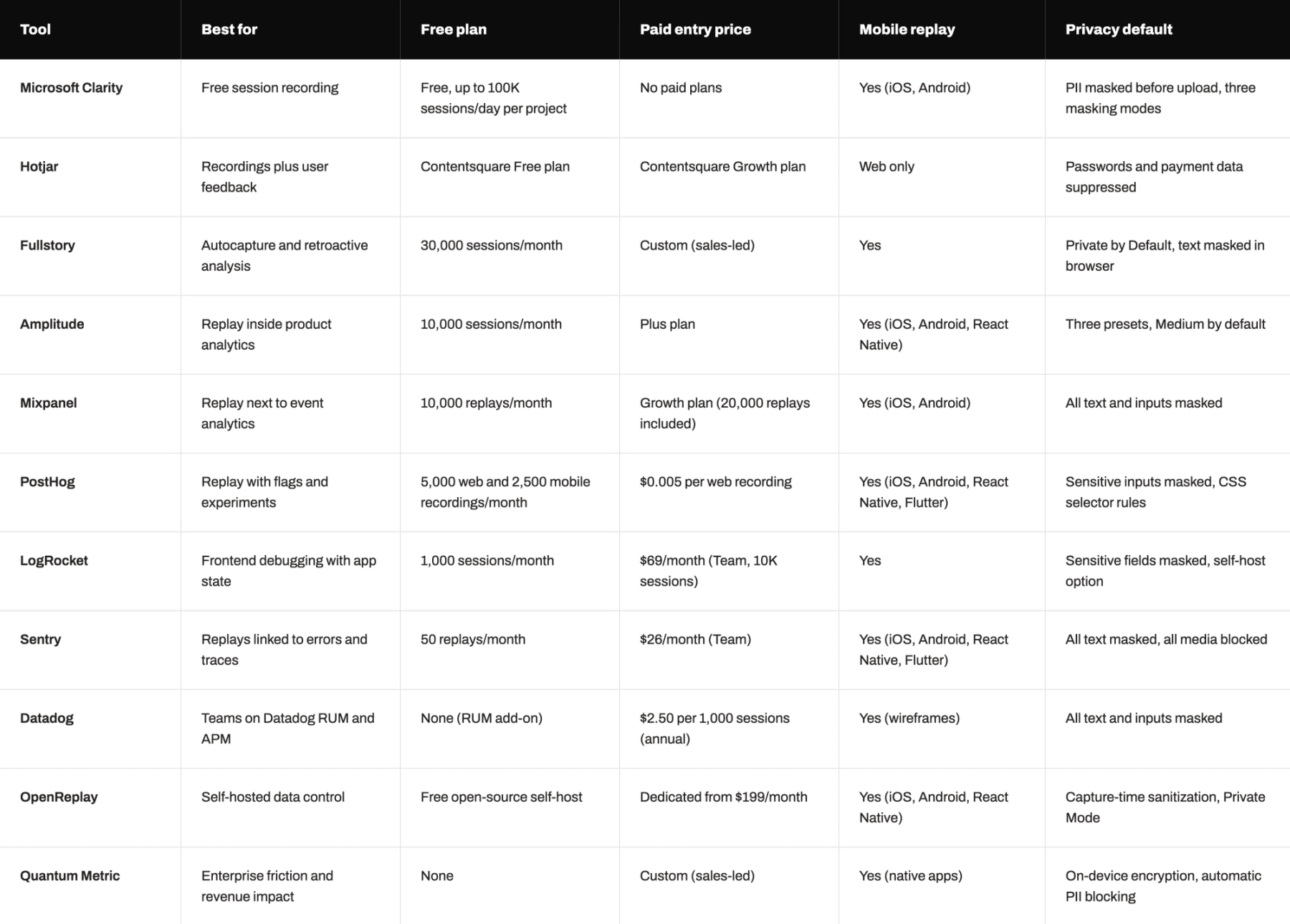
The table compares the 11 tools on free plan limits, entry pricing, mobile replay and default privacy settings, and sales-led plans are marked as custom.
Pricing and availability checked November 5, 2026. Verify sales-led plans before purchase.
Picked a tool and still unsure your tracking will feed it clean data? The free Measurement Trust Audit shows where your website signals stop being trustworthy and what to fix first.
Smartlook Migration Note
Smartlook is out of this ranking because it no longer sells new subscriptions. Cisco’s end-of-life notice lists May 31, 2026 as the end-of-sale date and August 31, 2026 as the last renewal date, and paid subscriptions end by August 31, 2027. Smartlook will decommission the platform on September 30, 2027 and delete the remaining data.
Current customers should export the recordings and event data they need through the Smartlook APIs and pick a replacement from the list above. Teams with mobile apps should compare the SDK coverage of PostHog, Sentry and Amplitude first.
Why Session Replay Helps Only When the Tracking Behind It Holds Up
Picking the right tool is only the first step: replay becomes useful when consent, user IDs and events agree with the rest of the stack. If the consent banner loads replay ahead of an opt-in, recordings create privacy risk, and if event names differ between replay, analytics and the CRM, the session you watch tells a different story from the number in the report. These gaps tend to surface late, during a compliance request or a budget review, and these seven signs of broken marketing data show where that drift usually starts.
Darwin worked on the reporting side of this problem with Cleo, a provider of ecosystem integration software. Cleo’s marketing data sat in GA4, Salesforce and BigQuery, and the team paid for third-party attribution tools to bridge the gaps. Darwin built a custom reporting connector that fed all three sources into one Looker Studio hub. Reporting accuracy reached 90%, up from about 70%, the team got back two reporting days per month and the $50K annual attribution spend went to zero.
Session replay follows the same rule. The tool you pick matters less than whether its events, consent state and user identifiers line up with the rest of the stack, and teams that check that alignment first get replays they can act on and measurement they can defend.
Want proof that your replays, consent banner and reports agree? The free Measurement Trust Audit traces your public signal path and shows which fix to make first.
FAQs
Q1. What are the best session replay tools for SaaS in 2026?
Microsoft Clarity leads for free recording, and PostHog, Amplitude and Mixpanel lead for replay inside product analytics. Sentry, LogRocket and Datadog suit engineering debugging. Fullstory and Quantum Metric fit enterprise behavior analysis, and OpenReplay fits teams that need self-hosted data control.
Q2. Is session replay GDPR compliant?
Session replay can run under GDPR when EU visitors opt in first and sensitive fields stay masked. Short retention and per-user deletion close the remaining gaps. The vendor supplies these controls, and your consent banner, privacy notice and configuration decide whether the full setup complies.
Q3. Which session replay tools have a free plan?
Microsoft Clarity is free on every plan, and Fullstory includes 30,000 sessions a month. Amplitude and Mixpanel each include 10,000 replays, PostHog 5,000 web recordings and LogRocket 1,000 sessions. OpenReplay is free to self-host, and the Sentry Developer plan includes 50 replays.
Q4. Which session replay tools support mobile apps?
PostHog, Sentry, Amplitude, Mixpanel, LogRocket, Datadog, Fullstory, Quantum Metric and OpenReplay all record native mobile sessions. PostHog, Sentry and Datadog also support Flutter, and Datadog keeps its Flutter replay in Preview. Microsoft Clarity offers mobile SDKs for iOS and Android apps.
Q5. Which session replay tool lets teams keep data on their own servers?
OpenReplay offers a free open-source edition that runs on your own servers or cloud, with capture-time masking and a Private Mode that redacts all data. LogRocket offers self-hosted deployment on its Enterprise plan for teams with strict data residency requirements.