
Quick Answer
CMS validation can confirm that an AI-generated draft uses supported blocks, fields, and settings. It cannot confirm that the page structure serves the visitor's task.
A page family is a group of pages that serve the same visitor task and share a recognizable composition. A reference page is one published page from that family that an assistant can study for section order, supporting content, and the primary CTA.
For a marketing team, the cost of a wrong page family is a draft that needs rebuilding and another round of review for its message, proof, and CTA. Passing validation does not remove that work.
TL;DR
- A technically valid AI-generated page can still use the wrong page family. DARWIN encountered this during a Drupal page-generation test.
- Choosing the right reference starts with the visitor's task, audience, and primary CTA, followed by a review of comparable published pages.
- In a skill-only test, the assistant selected the expected published reference after the team introduced source-backed page-family guidance.
- DARWIN's custom Drupal MCP server gives the assistant access to current CMS context for preparing native, editable drafts.
- Human editors remain responsible for reviewing the message, claims, structure, and publication decision.
The Test That Exposed the Wrong Page Family
The first AI-generated draft passed Drupal validation and rendered correctly. It used native CMS blocks, fields, and the existing editor. Its composition followed a generic landing-page structure: a hero, five interchangeable text sections, a stats block, a list, and a quote.
For this brief, the team needed a page for trading partners. An existing published partner page provided a more relevant reference. It featured a two-column opening, alternating illustrated sections, a four-card trust grid, transaction support, and a closing CTA.
The reference page followed a sequence that helped visitors understand the partnership and available transaction support before being asked to request a demo.
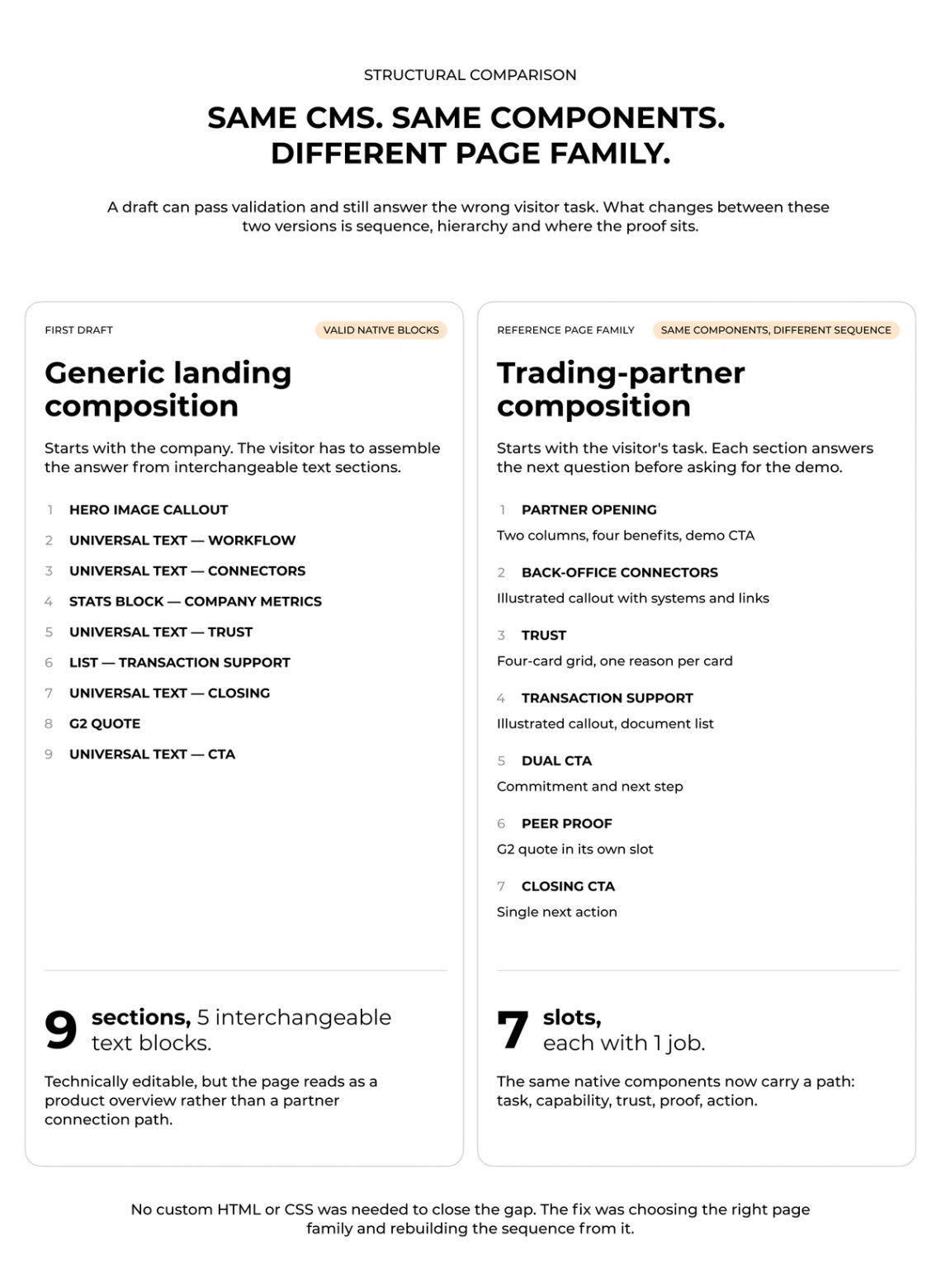
The team then reviewed 14 compositions covering 12 landing-page families. In a fresh skill-only test, the assistant selected the expected published partner-page reference without being given the answer.
That result did not prove that every future brief will be interpreted correctly. It showed that source-backed page-family guidance could steer the choice of composition.
Before introducing AI-assisted CMS authoring, teams can use an AI readiness assessment to identify gaps in their content workflows, data, ownership, and review controls.
A Component Library Does Not Decide What a Page Is For
A component library tells an assistant what it can build. A schema tells it which configurations are supported. Neither tells it what the visitor came to do.
That distinction matters because the same components can support many page types. A hero, proof block, image, text section, and CTA can appear on a webinar page, a product page, a customer story, or a partner page. The components may be correct in every case. Their order, emphasis, supporting content, and CTA should change with the job of the page.
Our guide to design-system documentation for AI page builders covers how teams can document components so AI tools use them consistently. That documentation gives an assistant a controlled vocabulary. Page-family evidence determines the composition it should study.
Without page-family context, an assistant can assemble familiar blocks into a plausible sequence that does not give the visitor the information or next step they need. Repeated at scale, that can also add to the design debt on a B2B marketing website.
A partner page may need a different opening, credibility structure, proof, and CTA from a campaign landing page, even when both use the same CMS content type. The right reference page makes those differences concrete.
Start With the Visitor's Task
A brief should give an assistant enough information to identify the page family before it starts composing blocks. Three questions are a practical starting point:
- What does the visitor need to do on this page?
- Who is the page for?
- What is the primary CTA?
For a webinar page, the visitor may need enough context to decide whether to register. For a customer story, they may need evidence that a comparable organization solved a similar problem. For a partner page, they may need to understand the relationship, relevance, and next step.
These questions turn a content brief into a structural decision.
They also reveal when the brief is too vague. If the request says “create a page about our partner” without naming the audience, purpose, or desired action, the assistant should ask a follow-up question. It should not guess its way into a generic landing page.
This is the same readiness problem that appears in other AI workflows. Marketing data readiness for AI agents starts with current, governed context. CMS authoring needs the same discipline.
“A page family is defined by the decision it helps a visitor make, not by the components it contain“The difference was not styling but sequence: the reference page answered the visitor's task before asking for the demo.” – Gregory Potemkin, AI Engineer, Darwin
How to Choose the Right Page Family
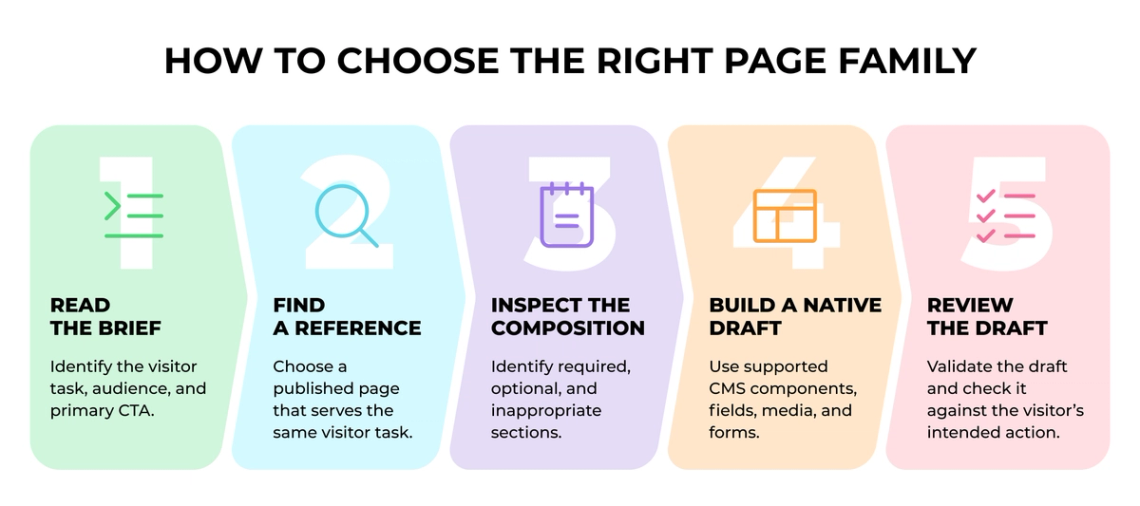
The following five steps outline how an AI assistant can select a suitable page family and prepare a CMS draft for editorial review.
1. Read the Brief for Its Decision Signals
Identify the visitor task, audience, page purpose, and primary CTA. These signals determine the page family under consideration. If the brief names a topic but does not name the visitor decision or desired action, it is not ready to guide the structure.
2. Find a Published Page With the Same Job
Choose a reference page that serves the same purpose. Familiar blocks or an up-to-date visual style are not enough. Compare the visitor decision, what the page puts first, and the role of the CTA. The reference then gives evidence about section order, component variants, media, proof, and CTA placement.
3. Inspect the Composition
Look past the headline and visual style. Ask what the page asks the visitor to understand first, what evidence it provides before the CTA, and which sections are essential. Mark sections that are required, optional, or inappropriate, so a familiar layout does not become an automatic template.
4. Build a Native Draft
Use the CMS's supported fields, components, media, links, and form references. Resolve those references from the connected CMS rather than carrying them over from an unrelated campaign. The goal is an editable draft that the marketing and web teams can inspect in the system they already use.
5. Review the Draft Against the Visitor's Job
Technical validation should happen before the draft is saved. Editorial review should then test whether the page makes sense for its audience and intended action. A page can be valid in the CMS and still need a different reference, a different proof sequence, or a clearer CTA. Our QA checklist for AI-built landing pages covers the broader pre-launch checks that follow.
Why DARWIN Built a Custom MCP Server for Drupal
DARWIN built a custom MCP server for Drupal so the assistant could query current CMS context while it prepared an editable draft. MCP, or Model Context Protocol, lets an AI assistant use defined tools inside another system. The companion CMS skill instructs the assistant to research the site first, select a native structure, validate the draft, and return it for review.
The server could inspect accessible published pages, read content and component schemas, find approved media and form references, validate a proposed composition, and create native drafts. This matters because a static list of templates can drift from the site. Current components, forms, and media can be part of the available context.
Live context does not make automation autonomous. The workflow prepared drafts for human review; it did not publish independently. Drupal permissions applied to the connected user, and controls around revisions and editor testing remained essential when the assistant created or updated a draft.
The Marketer’s Role in AI-Assisted Page Creation
The value of MCP integration is that an AI assistant can make informed decisions about page structure when it has access to sufficient data.
Marketers can focus on developing content ideas, defining what a new page needs to communicate, and providing the information the assistant needs to work with. Once the draft is generated, their responsibility is to review the result and verify its accuracy.
A Practical Starting Point for Your CMS
You do not need to map every page on the site before testing AI authoring. Start with the recurring page types that create the most work.
For each one, give the assistant enough context to identify:
- the visitor task;
- the audience;
- the primary CTA;
- one or two reliable published references;
- the sections that are required, optional, or inappropriate;
- the reviewer responsible for approving the draft.
This gives editors a shared standard for deciding whether a draft fits the site.
Teams that want to turn this approach into a working CMS workflow can explore Integrations & Automations.
FAQs
Q1. Can AI use approved CMS blocks and still build the wrong page?
Yes. A draft can use valid components and settings while following a structure that does not fit the visitor's task, audience, or primary CTA.
Q2. What is a page family?
A page family is a group of pages that serve the same visitor task and share a similar structure. It gives a team a practical reference for section order, proof, media, and calls to action.
Q3. How should an AI assistant choose a reference page?
It should start with the brief's purpose, audience, and CTA. It should then inspect published pages that solve the same visitor problem before preparing a draft.
Q4. Why does an AI assistant need access to a live CMS?
A live CMS can provide current pages, schemas, components, media, and form references. This reduces reliance on static instructions that can become outdated as the site changes.
Q5. Does page-family selection replace editorial review?
No. It gives the assistant a stronger basis for preparing a draft. Editors still review the page's message, claims, structure, and readiness for publication.