Quick Answer:
Website quality assurance for AI-built landing pages is a pre-launch review that checks technical health, content accuracy, and conversion setup before a page goes live. AI page builders ship a working page in minutes, but they leave gaps a marketing team has to catch by hand: fabricated statistics, generic copy, bloated code, broken tracking. A repeatable checklist turns that review into a foundation you run the same way on every launch.
TL;DR
AI-built landing pages need a different QA pass than hand-built ones because AI introduces its own failure modes: invented proof, code bloat, and off-brand voice.
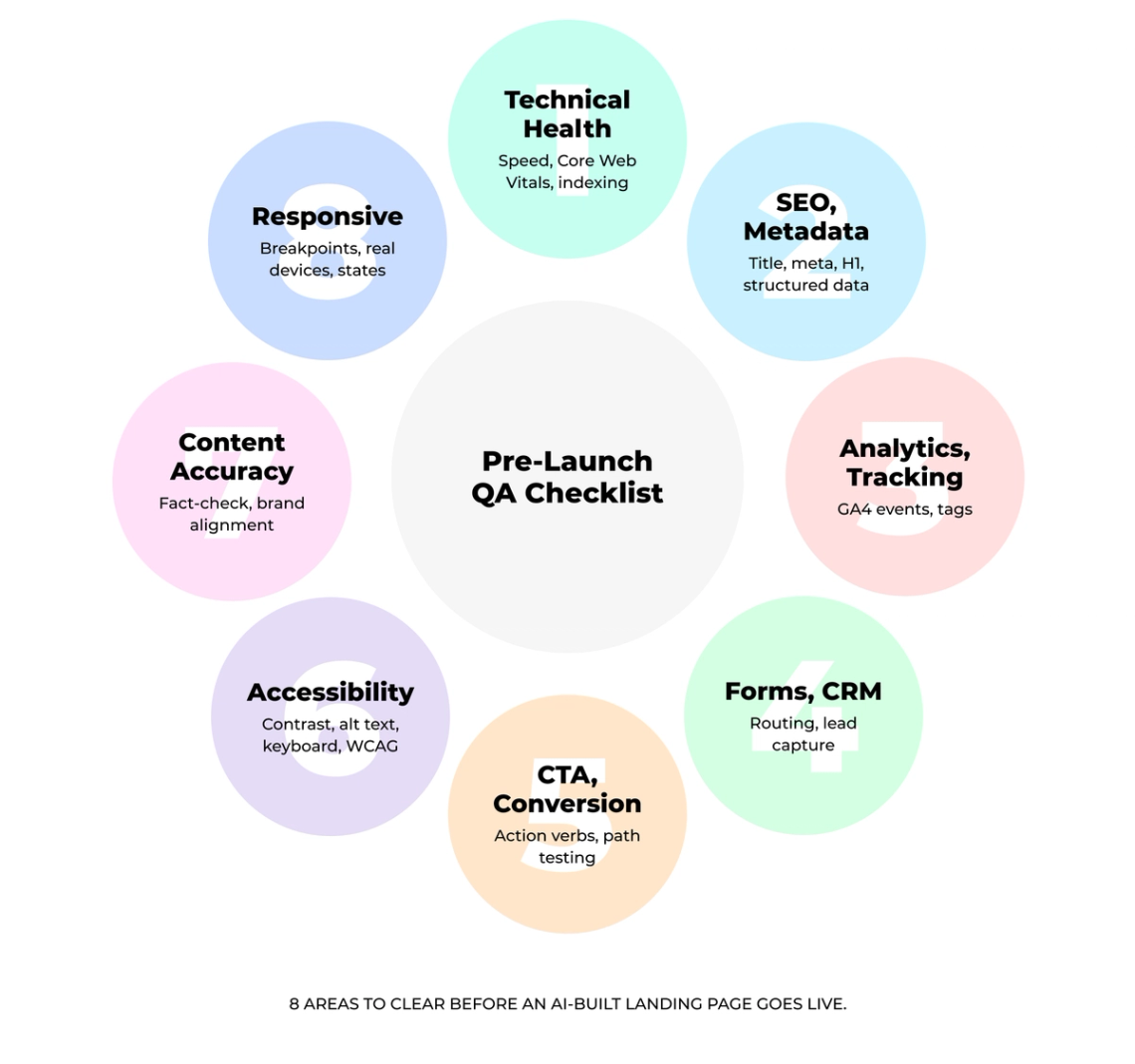
- A pre-launch checklist covers eight areas: technical health, responsive states, forms and CRM routing, content accuracy, CTAs, accessibility, SEO metadata, and analytics.
- Automated tools catch mechanical errors fast. Fabricated claims and brand voice still need a human reviewer.
- Assign QA ownership by function so the right person checks what they own, then approve the page for launch.
- Verify every AI-generated statistic against an original source. Remove any number you cannot confirm.
AI builds a landing page in minutes. The catch is that an AI-built page now has to pass two tests, not one. It has to convert humans, and it has to stay readable to the AI search engines that summarize your content before anyone clicks through. Miss either, and the speed you gained on the build disappears into rework after launch.
This guide gives marketing teams a practical pre-launch checklist for AI-built landing pages: what to check, how to catch the mistakes AI generates most often, and where automated tools stop and human review has to start.
A repeatable QA standard for pages you did not hand-build
A one-off review does not scale to a weekly publishing cadence. What marketing teams need is a standard that survives every launch, and that is the thinking behind Darwin's Darwin Flux approach. Surface means the buyer-facing page is protected from the errors AI slips in. Connections keeps forms, CRM routing, and tracking wired correctly so a lead never falls through. Clarity turns a subjective judgment call into a pass/fail standard the whole team can apply the same way. Momentum is what lets campaigns ship quickly, because a repeatable QA pass removes the production defects that would otherwise slow the next launch down.
Why AI-built landing pages need different quality assurance
AI generates a landing page differently than a designer or developer would, and that difference creates failure modes standard QA was never built to catch. A checklist written for hand-built pages assumes a person weighed each choice deliberately. On an AI-built page, many of those choices came from a template and a model, so they need a second look.
Common AI landing page issues marketing teams miss
AI page builders pull from patterns learned on millions of sites, so your page ends up sounding and looking like everyone else's. The same purple gradient, the same Inter font, the same four cards in a perfect grid. Unless you provide verified proof and customer language, a model may fill the gaps with generic or unsupported claims: invented testimonials, made-up statistics, and vague filler like "built for modern teams."
These hallucinations carry real cost. Two US lawyers admitted they submitted a brief containing cases fabricated by AI, and their firm warned that unverified AI claims can lead to court sanctions, professional discipline, or termination (Stratton Craig). A landing page is not a court filing, but damaged credibility with a prospect is its own kind of expensive.
The technical side carries risk too. AI engines inject unnecessary inline CSS, redundant JavaScript, and unoptimized styling libraries. That code bloat slows the page, on mobile most of all, and when the underlying code lacks clean architecture, developers often cannot patch it and have to start over.
Security is another blind spot. Depending on how it is implemented, AI-generated code can skip proper input validation and open the door to cross-site scripting or SQL injection. Have a developer review any page that collects customer data before it goes live. One more gap most teams overlook: AI-generated designs adapt poorly to real user behavior, because the conversion edge lives in human inputs like voice-of-customer language from real sales calls, genuine outcomes, and the specific objections your prospects raise.
Why standard website QA is not enough for AI-generated pages
A standard QA checklist covers functional testing on every browser and device. That is useful groundwork, and it stops short of what an AI-built page needs. This checklist adds a verification layer for AI-generated content on top of the functional pass.
You cross-reference AI-written headlines and benefit statements against customer interview transcripts, support tickets, and real review language, which is how you catch hallucinated testimonials and fabricated statistics before they go public. You inspect the code for the bloat AI introduces, test AI-generated forms for security holes, and confirm the page uses your specific customer language. Quality assurance for AI-built pages requires human fact-checking that standard QA skips. Treat AI as the scaffold and make sure the building is sound before anyone moves in.
The complete pre-launch website quality assurance checklist
Your website quality assurance checklist needs to catch problems before a visitor ever sees them. These eight areas cover the technical, content, and conversion checks that matter most on an AI-built page.
Technical health and Core Web Vitals
Speed decides whether a visitor stays long enough to convert. Google formalizes this through Core Web Vitals, which are part of Google's broader page experience guidance. Three thresholds matter: LCP ≤ 2.5s, INP ≤ 200ms, and CLS ≤ 0.1. Before launch, check them in a lab tool like Lighthouse or PageSpeed Insights, since a new page has no real-user data yet. After launch, validate against field data from the Chrome User Experience Report, where the pass mark sits at the 75th percentile of real users.
Run PageSpeed Insights on mobile and desktop separately, since results diverge between the two. For faster loading, compress images and serve them in WebP, and defer non-critical JavaScript. For stable layout, set explicit width and height on every image and video. Confirm Google can reach the page: no stray noindex tag, a robots.txt that is not blocking, and canonical tags pointing to the right URL.
- Pre-launch: check LCP ≤ 2.5s, INP ≤ 200ms, CLS ≤ 0.1 in Lighthouse or PageSpeed Insights.
- Post-launch: confirm the same thresholds in field data (CrUX) at the 75th percentile of real users.
- Run PageSpeed Insights on mobile and desktop separately.
- Confirm no stray noindex tag, robots.txt is not blocking, canonicals are correct.
Responsive design and component states
Mobile traffic makes responsive behavior a launch requirement, not a nicety. Test at mobile (375px), tablet (768px), and desktop (1280px and up) breakpoints. Emulators do not fully replicate real conditions, so verify on actual iPhone and Android devices.
Check every component state, well past the default view: hover, focus, active, disabled, error, and loading. Confirm buttons are large enough for a thumb tap, forms do not force horizontal scrolling, and images scale cleanly. Verify border radius, border width, and box-shadow match your design tokens, and that animations use the right duration and easing.
- Test at 375px, 768px, and 1280px+ on real iOS and Android devices.
- Check hover, focus, active, disabled, error, and loading states.
- Confirm thumb-friendly tap targets and no horizontal scroll.
Forms, CRM routing, and lead capture
Forms generate leads, so a broken form drains revenue directly. Test every field, every validation rule, every error message, and every submission path. Each additional field can add friction, so keep only the fields you need.
Confirm the data routes to your CRM correctly, confirmation emails send immediately, and error messages read clearly when something goes wrong. Use hidden fields to capture UTM parameters, referral source, and timestamp, so the visitor fills in nothing extra. If the form uses conditional logic, test every branch.
- Submit every field and validation path; confirm clear error states.
- Verify the lead routes to the CRM and the confirmation email sends.
- Capture UTM, referral, and timestamp via hidden fields.
AI-generated content accuracy and brand alignment
AI does not understand your content. It predicts probable text from training data, which means any specific claim, statistic, or quoted figure on the page could be fabricated outright. Treat every number as unverified until you have checked it against the source yourself.
Check figures against original sources, not blogs that repeat them: government sites, research institutions, primary documents. If AI cites a study, open the source and use Ctrl+F to confirm the claim really appears there. When you cannot validate a statistic after checking multiple trusted sources, cut it. Then confirm names are spelled correctly in every instance, job titles match public profiles, and the voice reads like your brand, with no generic business speak.
- Trace every statistic and quote to an original source; cut what you cannot verify.
- Confirm names, job titles, and spellings against public profiles.
CTA and conversion path validation
A call to action earns its place through specificity. "Submit" is not a CTA. Action verbs like "Get," "Start," or "Book" give the visitor a reason to click, and copy, color, size, and placement are all worth testing once the page is live. Map the path a visitor takes to complete the action, then walk it yourself: submit a test form, click every CTA, and reduce friction by asking for the minimum information needed.
- Walk the full path from entry point to completed action.
- Replace vague labels with an action verb; submit a test conversion.
Accessibility checks
Accessibility widens reach and protects you from compliance risk at the same time. Meet WCAG standards on the basics: clear contrast between text and background, descriptive alt text on every meaningful image, captions or a transcript depending on the type of video content, and a layout that works with keyboard navigation and screen readers. On an AI-built page, alt text is often missing or auto-generated into something meaningless, so this is a frequent gap. Decorative images are the exception: they take an empty alt attribute on purpose, which is correct and expected.
- Check contrast, descriptive alt text on meaningful images, captions or transcript by content type, keyboard navigation.
- Confirm decorative images carry an empty alt attribute on purpose.
SEO and metadata validation
Place your primary keyword near the front of the title tag, keep it concise, and avoid truncation in search results. Write a meta description that reads naturally and stays short enough to display in full. Use one H1 with the primary keyword, then H2s and H3s with semantic variations. Add structured data so search engines can classify the page, which makes it eligible for rich results, though it does not guarantee them. Once published, submit the URL for indexing in Google Search Console.
- Primary keyword near the front of a concise title that avoids truncation.
- Meta description short enough to show in full; one H1; structured data added.
- Structure key answers clearly, keep factual claims sourceable, and use descriptive headings so important information stays intact when it is extracted.
Analytics and tracking validation
Broken tracking is a silent failure: you think you are optimizing while feeding bad data into your bidding and reporting. Configure Google Analytics 4 events for your conversions, set up the data streams, and verify every tag fires correctly using DebugView. Tracking codes get stripped during site updates and go unnoticed for days, so confirm installation on every page before launch, not after you have spent budget wondering why the numbers look off.
- Configure GA4 events and verify each tag fires in DebugView.
- Confirm tracking is installed on every page, the landing page included.
Automated vs. manual QA for AI-built landing pages
Automated tools and human review do different jobs, and knowing where one ends and the other begins keeps your QA both fast and reliable. Tools clear the mechanical errors in seconds so your team spends its attention on the judgment calls that need a person. The table below maps the split.
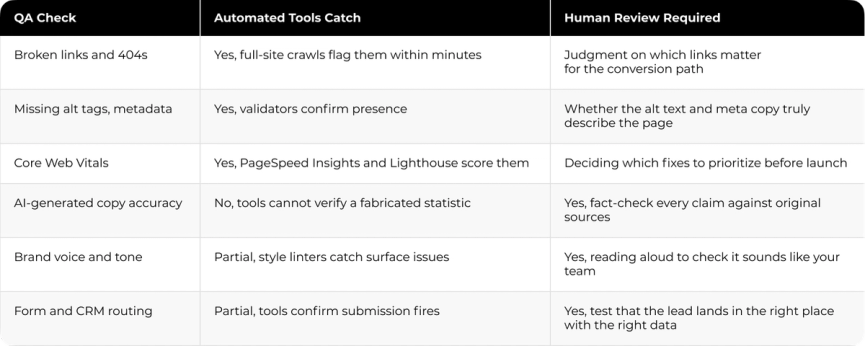
The same pattern runs through the whole checklist: automation confirms that something exists and fires, while a human confirms that it is correct, on-brand, and true. A crawler tells you the testimonial link works. Only a person can tell you the testimonial itself was invented by AI.
How marketing teams should run pre-launch QA
Running QA on an AI-built page goes past ticking boxes on a checklist. It is a short, repeatable process that catches what tools miss while keeping your launch timeline intact. Five steps get you there.
Assign ownership by function
Different people should check different parts, so the right owner reviews what they know best.
• Campaign owner: offer, audience, and message match.
• Copywriter: headline, body copy, and proof points.
• Designer: visual hierarchy, mobile layout, and accessibility basics.
• Paid media: final URLs, UTMs, and tracking templates.
• Marketing ops: forms, CRM routing, and automations.
• Analytics: events, conversions, and reporting.
This setup is not a committee. It means one accountable owner per area, because one person approving everything is how obvious issues survive to launch day.
Run automated checks first
Start with automated scans before anyone reviews by hand. Run the page through validators that catch broken links, missing alt tags, and accessibility issues, and let those tools flag the mechanical problems fast. The goal at this stage is not perfection. You are filtering out the errors a script should catch so manual review does not waste time on them.
Complete manual content and UX review
Now the human pass. Check that the content is accurate, on-brand, and fit for your audience, and read the AI-generated sections aloud to hear whether they sound like your team. Use a pre-publish checklist covering accuracy, brand voice, SEO, links, images, and formatting so everyone works from the same scope. This is where you catch factual errors and the generic phrasing AI defaults to.
Test the full lead and conversion flow
Walk the page the way a visitor will. Trace the path from entry point to completed action, submit test forms, and click every CTA to confirm a real lead lands in the right place with the right data. Back up the offer with proof points a visitor can trust, and remove any step that adds friction and no value.
Approve the page for launch
Close with a clear sign-off. Confirm each owner has checked their area, resolve anything still open, and get formal approval before the page goes live. A named owner and a recorded sign-off turn QA from a scramble into a standard you can repeat on the next launch.
Common AI landing page issues marketing teams miss
AI produces remarkably similar problems from one page to the next. Use these as red flags during review. Each one maps to a check you have already run, so treat this as a fast second scan, not a fresh pass.
- Off-brand voice: hedging words and a neutral, balanced tone where your brand takes a position. Read sections aloud to catch it.
- Fabricated claims: plausible-looking statistics, testimonials, or citations with no traceable source. Any claim without one comes off the page.
- Broken links and CTAs: dead destinations or a CTA that goes nowhere. Also watch for mixed-content warnings in the console.
- Mobile breakage: layouts that require zooming, stack poorly, or load slowly on a real phone.
- Missing tracking: codes stripped during updates, or self-referral errors that misreport the traffic source.
- Heavy assets: oversized images and unnecessary JavaScript that AI tends to over-include, dragging load times up.
What to measure after launch
Post-launch measurement confirms the page shipped clean, so keep it focused on launch quality, not open-ended optimization. Watch page speed continuously and run a technical SEO audit to catch crawl issues before they compound. Track form submission rates and the conversion path to see where visitors drop off, and review the analytics weekly through the first month, then ease to a monthly cadence. Expect a little turbulence in the first days after any launch, and confirm the numbers settle where the pre-launch checks predicted.
Where QA standards turn into launch confidence
Marketing teams keep hitting the same wall: AI lets them publish pages faster than design and engineering can review them, and quality quietly slips. The fix is not slowing down. It is a QA standard that ships with the page, so speed and quality stop competing.
Agility Recovery, a disaster-recovery provider, ran into a version of this on an aging platform with security gaps, slow load times, and accessibility that no longer met modern standards. Darwin led the upgrade to Drupal 10, resolving the security vulnerabilities, rebuilding on accessibility-first Olivero and Claro themes, and tightening the front end. Site speed improved by 10–15% and positive brand perception rose by 20%. The pattern that made it work is the same one behind a good QA checklist: a repeatable standard applied before anything reaches a user.
An AI-built page is only as strong as the review it passes through. Build that review once, run it every time, and the pages that used to create rework start shipping clean.
FAQs
Q1. Why do AI-built landing pages need a different QA approach?
AI introduces failure modes that hand-built pages do not have: fabricated statistics and testimonials, code bloat that slows the page, security gaps in generated forms, and generic copy that misses your brand voice. Standard QA checks function on every browser and device but assumes a human made deliberate choices. On an AI-built page, many choices come from a template and a model, so the review has to add content verification on top of the functional pass.
Q2. Why do AI-generated landing pages often look alike?
AI page builders select from pre-built templates and populate them with AI-written text and stock visuals, and skip designing anything unique. The result is a recurring pattern: purple gradient backgrounds, Inter fonts, and grid-based card layouts that make many AI-built pages look nearly identical from one brand to the next.
Q3. What page load target should I aim for?
Aim to pass Core Web Vitals: LCP ≤ 2.5s, INP ≤ 200ms, and CLS ≤ 0.1. Before launch, check these in a lab tool like Lighthouse or PageSpeed Insights, since a new page has no field data yet, then validate against real-user data from the Chrome User Experience Report after launch. Core Web Vitals are part of Google's broader page experience guidance, so clearing them gives visitors a smoother experience and a stronger technical foundation.
Q4. How does mobile traffic change QA priorities?
For landing-page traffic that arrives on mobile, responsive behavior becomes a launch requirement. Mobile visitors abandon a page faster when it is hard to use, so test responsive designs on real Android and iOS devices, verify layouts do not require zooming, and confirm fast load times on mobile networks before launch.
Q5. How do I confirm AI-generated content is accurate?
Check every specific claim, statistic, and quoted figure against original sources such as government sites and research institutions, not blogs that repeat them. Open any cited study and use Ctrl+F to confirm the claim appears in context. If you cannot validate a number after checking multiple trusted sources, remove it.