Quick Answer
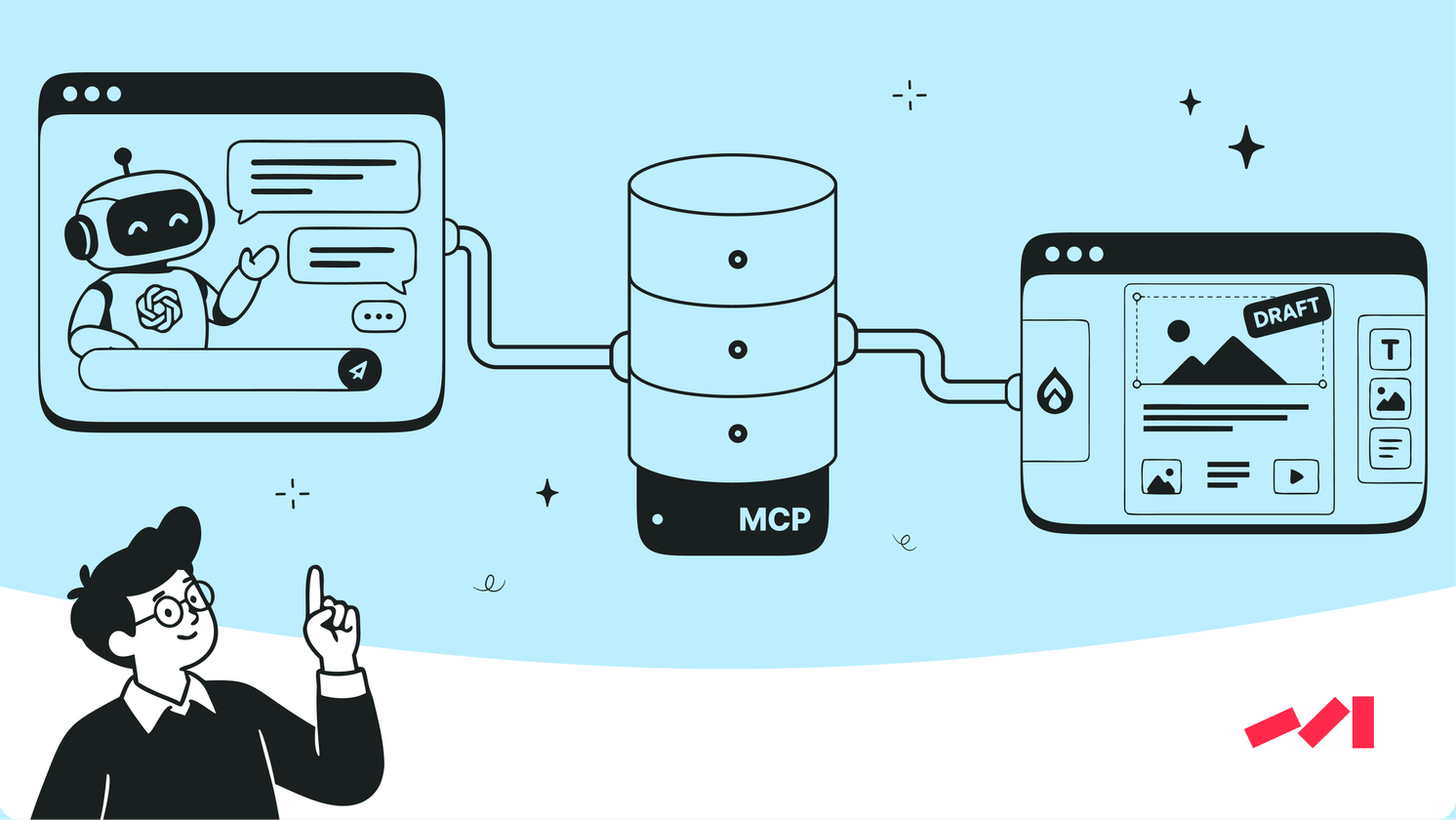
AI-generated pages can pass CMS validation and still be wrong because validation only checks blocks and settings. Choosing the right page family depends on the site’s published pages. For one client, we connected ChatGPT to Drupal through MCP on a test site: the assistant researches existing pages and creates editable, unpublished drafts from native components, with no manual HTML transfer.
TL;DR
• A valid page can still be the wrong page. Our first partner-page draft passed Drupal validation and followed a generic landing-page family.
• Published pages define page families. We reviewed 14 compositions for 12 landing-page families. In a fresh test without a suggested reference, the revised skill selected that existing partner page as the reference.
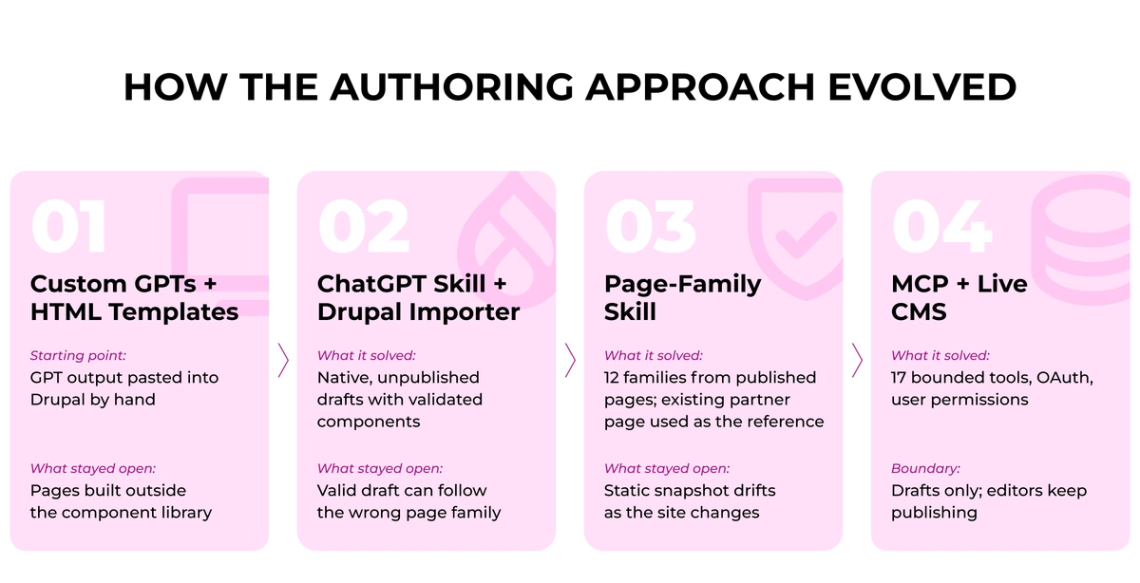
• Static guidance drifts with the site. The offline skill worked from a snapshot, so every change to forms, media or components meant a skill update. We built an MCP server for Drupal and moved research into the live CMS.
• Write access is narrow by design. Users sign in through Drupal with OAuth, existing permissions apply and the assistant writes only drafts, so publishing stays with editors.
• The integration is on a test site. Documented checks include native draft creation, editor roundtrips, revision protection and Drupal authentication.
A page can render correctly, use supported blocks and satisfy its schema with a composition built for a different purpose. For teams using AI to assemble complete pages, the question is how the system decides which page structure belongs to the request.
The Architectural Requirements of AI Page Generation
A component catalogue lists available building blocks and their attributes, and our guide to design-system documentation for AI page builders covers how to document it. A schema checks whether a configuration is valid. Choosing the page family takes a third source. A page family is a group of pages that do the same job and share a section order, so a webinar page and a customer story can use the same components and still be built differently.
ChatGPT-to-Drupal Integration and Native Draft Generation
We worked with a B2B software client whose marketing team manages landing pages, webinars, case studies and blog content in Drupal. The site uses custom components for the Drupal Gutenberg editor, and its existing authoring process involved custom GPTs and HTML templates that marketers transferred into Drupal manually. Pages built that way sit outside the component library, which is how design debt on B2B marketing websites builds up.
To bring generated content into the existing editor, we used a ChatGPT skill containing the site's component references and page-generation instructions. It produced a page plan in Drupal's native format. A custom Drupal importer checked that plan and then created an unpublished draft that marketers could open and edit in the CMS.
The importer verified that the proposed components and attributes were supported. The next test raised a different question: whether a valid draft also followed the right page family.
Why Drupal Validation Cannot Confirm the Right Page Structure
We saw the gap in a draft of a new partner page. It used the client’s native Gutenberg components, passed Drupal validation and rendered correctly. Its composition followed a generic landing-page sequence of promise, credibility, offer and call to action. An existing partner page on the client's site was the more appropriate precedent for that content, so the draft was valid in Drupal and belonged to the wrong page family.
A valid draft with an unsuitable composition opens in the editor and can look complete. The discrepancy becomes clear when an editor compares its composition with the page type the site uses for that content.
"Components are vocabulary, not grammar." – Gregory Potemkin, AI Engineer, Darwin
How Published Pages Inform AI Page-Family Selection
We rebuilt the skill around page families taken from the client's published pages. Those pages already showed which sections each page type used and in what order, and they had passed the client's own publishing process. The team reviewed 14 compositions for 12 landing-page families and added a case-study adapter.
Page purpose, intended audience and call to action guided the choice of family, and a published page with the same purpose set the section order and component variants. In a fresh skill-only test without a suggested reference, the workflow selected the existing partner page for the new one.
Further tests found gaps. A broad family label could produce a page that was too short or picked a weaker hero than the closest existing example. Media selection needed image inspection along with filenames. We added more specific variants and media-role guidance.
This improved page-family selection. The guidance itself lived outside Drupal, so the skill needed updates each time components, forms or media changed. The same problem appears with data, as our article on marketing data readiness for AI agents explains. That maintenance problem led us to connect the assistant to the CMS itself, where it could inspect current pages and references ahead of composing a draft.
How We Built a Custom MCP Server to Connect ChatGPT to Drupal
We built a custom MCP server as a Drupal module in PHP, because the client’s site had no MCP server ChatGPT could connect to. MCP, the Model Context Protocol, is an open standard that lets an AI assistant use tools inside another system. We added OAuth so each user signs in with their own Drupal account and paired the server with a companion CMS skill that tells ChatGPT how to work with the site’s pages and components. The server gives ChatGPT a narrow set of tools: find pages and components, look up media and forms, validate a composition and save a draft. Our first version ran as a separate Node process, and moving it into Drupal kept it within the site’s existing hosting.
Every call runs under the signed-in user’s Drupal permissions, so the assistant can do only what that user is allowed to do. Authors request and revise drafts from ChatGPT, and the assistant can read back manual edits made in the Drupal editor.
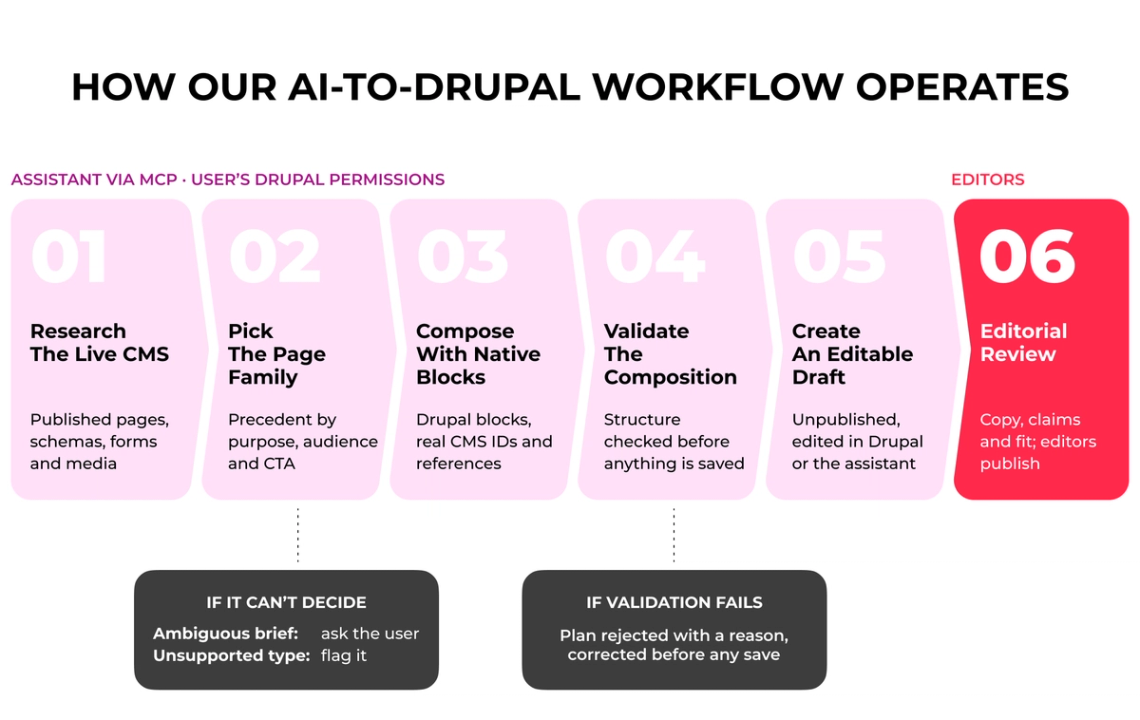
How Our AI-to-Drupal Workflow Operates
- Research the live CMS. The assistant retrieves published pages, component schemas, forms and media through permission-scoped MCP tools.
- Identify the page family. It picks a published precedent by page purpose, audience and CTA. If the brief is ambiguous, it should ask for clarification, and unsupported page types are flagged.
- Compose with native components. It uses supported Drupal blocks and pulls IDs and references for media, links, buttons and forms from the CMS.
- Validate the composition. The integration checks the proposed structure before any draft is saved.
- Create an editable draft. Editors review it in Drupal and continue in the CMS or through the assistant.
- Complete editorial review. Editors check the copy, claims and fit of the page and decide on publication.
Testing Draft Creation, Permissions and Revision Safety
We tested the MCP-connected workflow on a Drupal test site, including native draft creation and editing, editor roundtrips, rejection of outdated revisions, duplicate-request protection and permission-scoped access. An authoring test also surfaced invalid plans that were rejected ahead of saving. We corrected the writable schema guidance and retested. A marketing automation audit applies the same kind of checks to other AI workflows ahead of launch. For teams planning similar controls, our guide to AI agent audit logs covers what to record for each automated action.
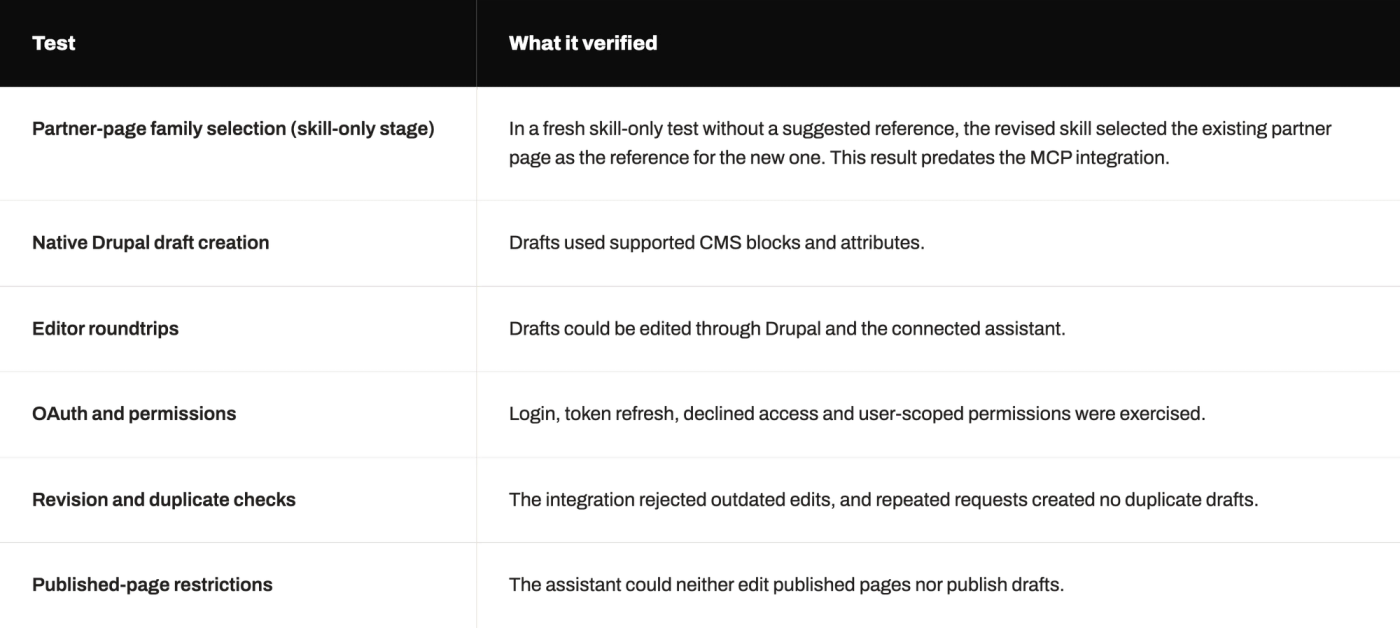
What We Tested
The tests covered six parts of the workflow, and each one passed. The page-family test ran at the skill-only stage, before the MCP integration. The other five checks ran on the Drupal test site.
During a client working session on the test site, a marketing representative from the client connected the integration with his own account, generated a webinar-page draft from supplied content, reviewed its preview and requested a form change. The session demonstrated draft generation and review through the connected workflow on the test site. Further deployment and component review remained under discussion.
Validation confirms that a draft is buildable. Editors decide whether the page is right and ready to publish, and our QA checklist for AI-built landing pages covers that review.
What Live CMS Context Changes for AI Authoring
The partner-page test exposed a distinction I now consider essential in AI-assisted CMS work: a valid structure is one condition for a useful page. The workflow also needs to select the right family, use references that exist in the current CMS and leave editorial decisions with the people responsible for the site. Live CMS access helps with the first two, because the assistant checks current pages and references before it composes a draft.
The integration remains on a test site. Production rollout and measurable page results sit outside what our tests covered.
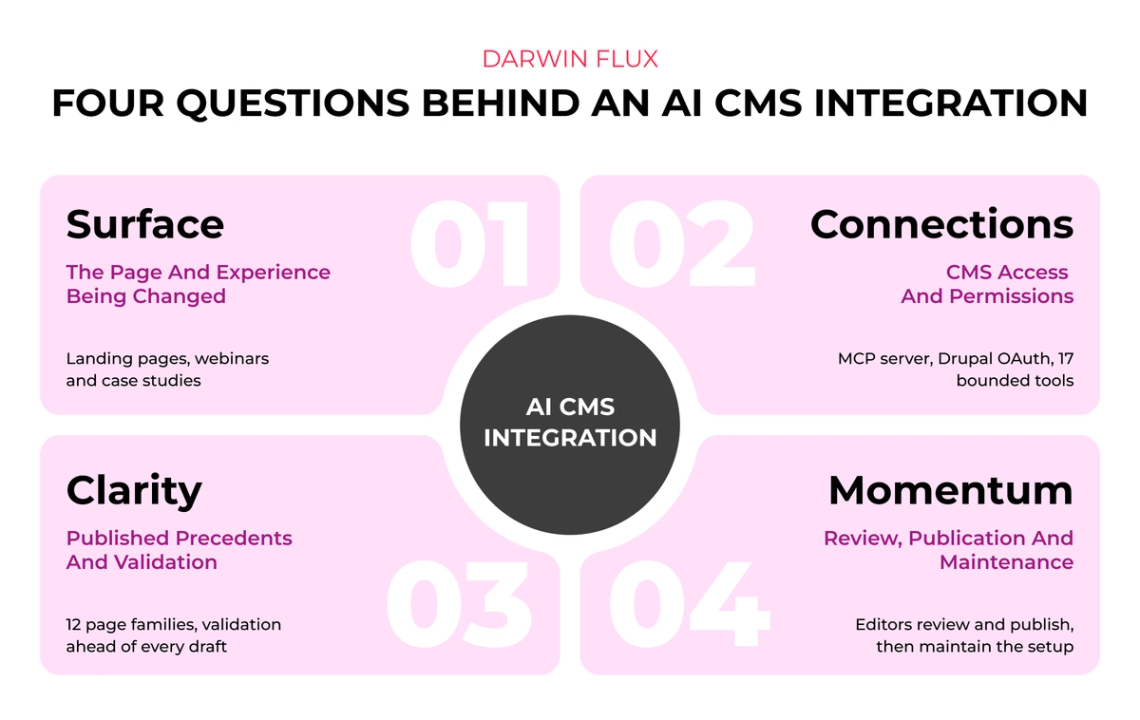
The same engineering decisions map to the four Darwin Flux questions. Surface identifies the page and experience being changed. Connections defines CMS access and permissions. Clarity establishes the published precedents and validation evidence. Momentum assigns review, publication and ongoing maintenance.
What This Means for a Marketing Team
The AI assistant creates a native, editable Drupal draft. It uses the site’s own components, forms and media, so anyone with the right Drupal access can open it in the editor and keep working on it. The HTML pages marketers used to paste in sat outside the component library and added to the site’s design debt.
New pages also follow the ones already there. When we tested a new partner page, the assistant used the partner page already published on the client’s site as its reference.
Existing Drupal access controls stay in place, and the team still decides what gets published. During a client working session, a marketing representative generated a webinar-page draft, reviewed its preview and requested a form change.
How Should a Marketing Team Prepare Its CMS for AI Page Generation?
Start with the site you already have. Before you connect an assistant, go through these five decisions with your team. An AI readiness assessment for marketing is one structured way to run that review:
- Inventory your page families. List the page types your team builds again and again: webinar pages, customer stories, case studies, campaign landing pages. A component list alone does not tell the assistant which page to build.
- Pick a precedent for each family. For each family, choose the published page you would show a new writer as the example to follow. That page gives the assistant a real section order.
- Limit writes to drafts. Let the assistant create and update unpublished drafts only. Published pages and the publish button stay with your team.
- Set a validation gate. Check every proposed page composition against the CMS rules before it is saved. If it fails, the check should say why.
- Name a reviewer. Decide who checks the copy, claims and layout, and who presses publish. Agree on the names before the first draft arrives.
The available components define what the assistant can build. Published examples and editorial rules establish what it should build.
Main Lesson
AI-generated CMS pages need access to the site's real content, page structures and component configurations. This context helps the model select appropriate layouts and generate drafts that follow established CMS conventions.
Read the full case study on how a B2B integration software company connected ChatGPT to Drupal.
FAQs
Q1. Can ChatGPT create pages directly in Drupal?
In a test environment, yes. Through an MCP connection it researches existing pages and creates unpublished, editable drafts. A person still reviews and publishes.
Q2. Why not give ChatGPT HTML templates?
Templates do not tell it which fields, components, media and forms the CMS uses, so a page can look right but sit outside the editor and shared components.
Q3. Can it publish or edit live pages?
No. It can read accessible published pages as research, and it can only create or update drafts.
Q4. How is access controlled?
Each user signs in through their own Drupal account with OAuth, and existing Drupal permissions apply.
Q5. What does a team need before connecting ChatGPT to its CMS?
A list of its page families, a published example for each, draft-only access, a validation step and a named reviewer.