Quick Answer
AI content governance for CMS pages defines which actions an AI assistant may take and who owns each decision. A safe default limits AI to approved CMS content and unpublished drafts, with people retaining control over permissions, editorial approval and publication.
TL;DR
- Decide what to delegate first.The first question is which CMS actions a team will hand to AI.
- Draft-only is the default.AI creates and updates unpublished drafts, and live pages, publication and permissions stay with people.
- Every gate has a named owner.Each gate needs a person who can approve or stop the next step.
- Validation is not approval.A draft can pass every CMS check and still carry a wrong claim or the wrong offer.
- Set the rules before access.A short checklist covers read scope, write scope, escalation triggers and rollback.
A marketer asks an AI assistant for a webinar registration page, and soon a draft sits in the CMS with the right blocks and a sign-up form. The harder question is who decides that this page goes live, and on what evidence.
Governance Decisions to Make Before AI Gets CMS Access
Four decisions come before an AI assistant touches the CMS, and they follow the four pillars of Darwin Flux. Surface and Connections define what the assistant reads and whose CMS account, roles and OAuth scopes it works through. Clarity gives each gate a named owner, and Momentum extends the workflow to new page types once it works on webinar pages, with ownership, review and measurement in place.
AI Permission Matrix for CMS Authoring
An AI assistant should get the narrowest set of CMS actions that lets it research and draft pages. The matrix below is a recommended default to map onto a team's own CMS roles.
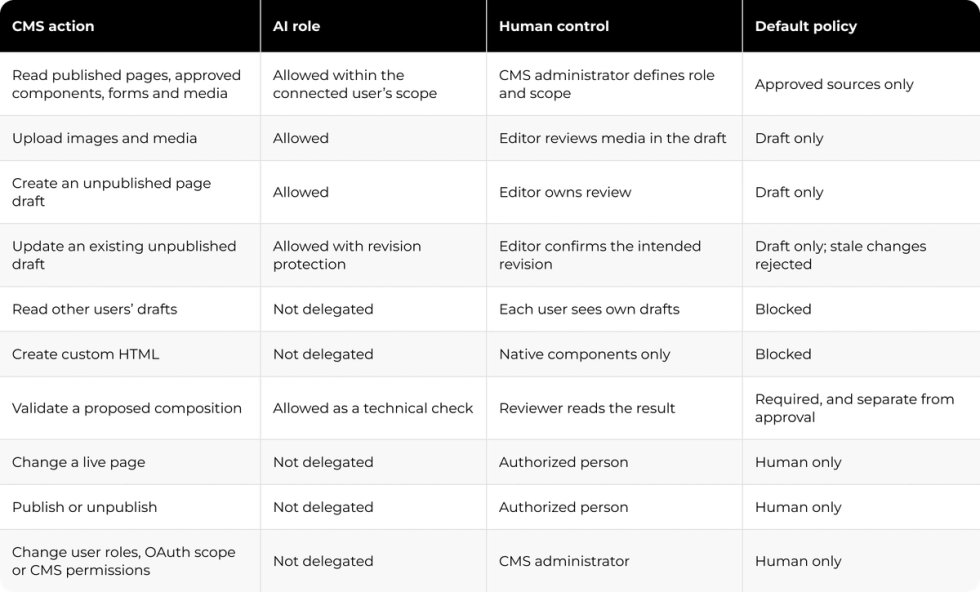
For the webinar page, the assistant can study existing pages, upload images, draft and revise. Custom HTML stays blocked, so every page is built from native components, and the assistant's own roles and OAuth scopes stay outside its tool set.
"I'd want to know what the agent can access and why, and whether those permissions disappear when the work is finished." – Michael Scott, CISO, Immuta
Roles and Responsibilities in AI-Assisted CMS Publishing
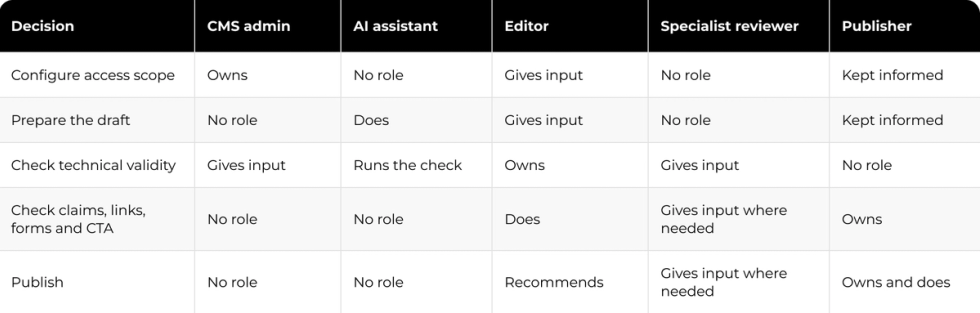
Roles in AI-assisted CMS publishing work when each decision has one owner, and a small team may give several roles to one person.
Technical Validation and Human Approval of AI-Generated Pages
Technical validation confirms that a draft can exist in the CMS, and publication approval confirms that the page should go live. Validation checks the composition ahead of any save, and when a plan fails, the assistant comes back to the requester with a question. Revision protection separately rejects stale edits. On the webinar page, validation checks that the blocks are supported, while the choice of form, the date, the speakers and the offer stay human decisions.
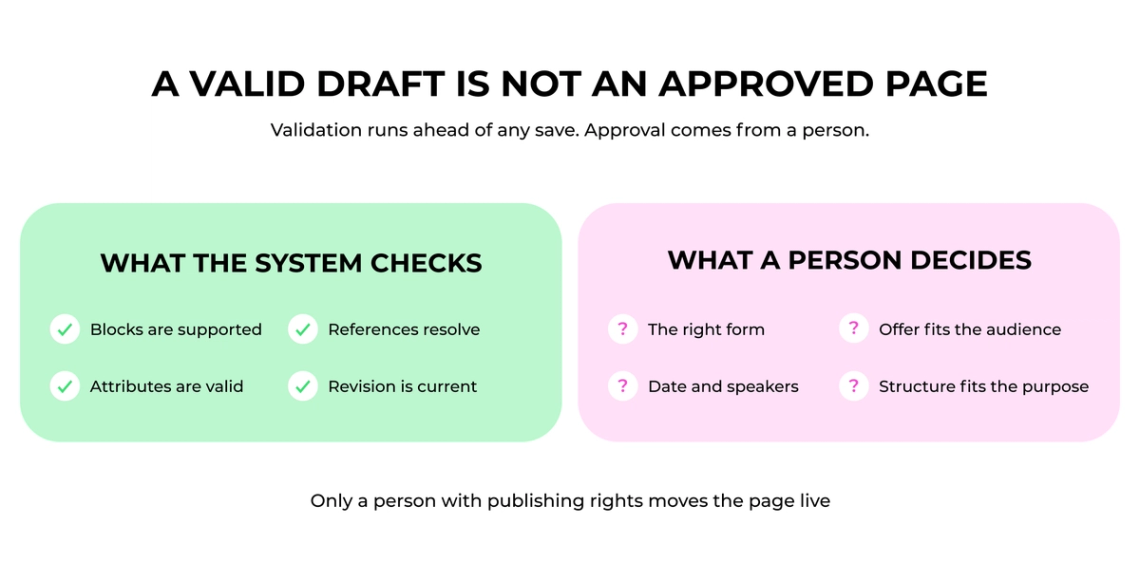
Validation rules also depend on clear design-system documentation for AI page builders, so the assistant uses supported components and attributes.
A valid page can still follow the wrong structure for its job, and our article on why page families beat templatesshows how to judge page fit.
AI Content Approval Workflow for CMS Pages
An approval workflow for AI-created CMS pages has seven gates, each with a decision, its evidence and someone who can stop the next step.
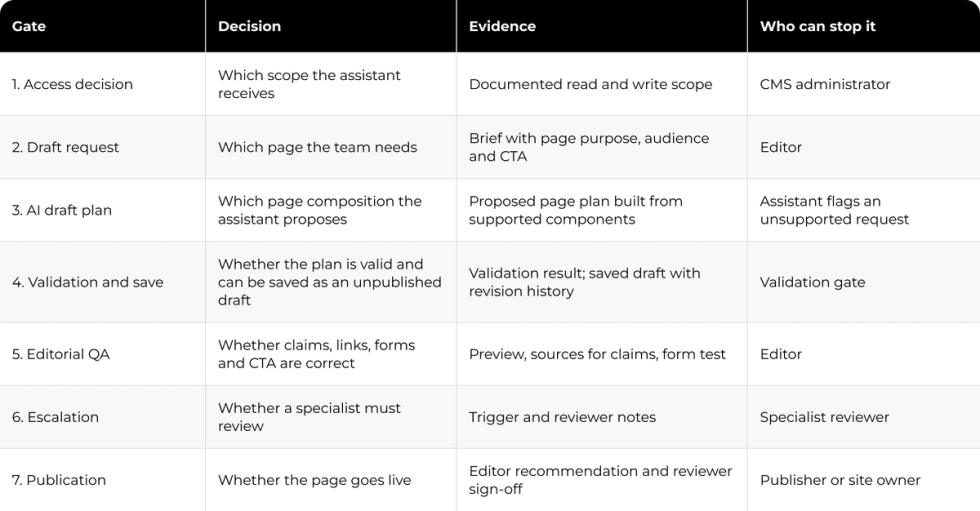
Gate 5 carries the most weight for the webinar page: the editor checks the date, speakers and where registrations go, using a pre-launch QA checklist for AI-built landing pages. The editor also checks each claim against its source, one of the fixes in our guide to getting AI content generation right.
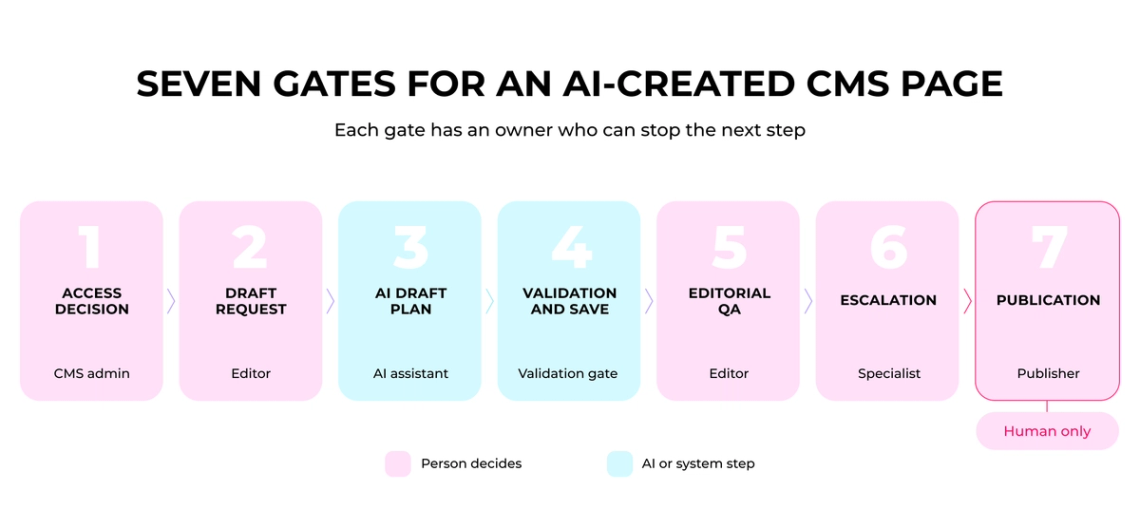
Regulated claims, new page types, sensitive data and ambiguous briefs go to a specialist, and a rejected plan or unsupported request ends in a question to the requester. Our guide to EU AI Act Article 50 for marketing teams explains when disclosure needs a compliance review, and workflows that touch sensitive information may need a separate Security & Compliance review before their scope grows.
"The brands that can show their work will win the trust game. The ones that can't will be left managing the fallout." – Jennifer Griffin Smith, Chief Market Officer, Acquia
Human Control Over AI-Generated Content Publication
Human control over publication matters because the publish button is the moment a company accepts responsibility for what a page says, and AI agent audit logscan record who published and when.
"We keep the assistant on drafts so that nobody accidentally publishes a page that has not been reviewed." – Gregory Potemkin, AI Engineer, Darwin
AI Content Governance Checklist Before CMS Integration
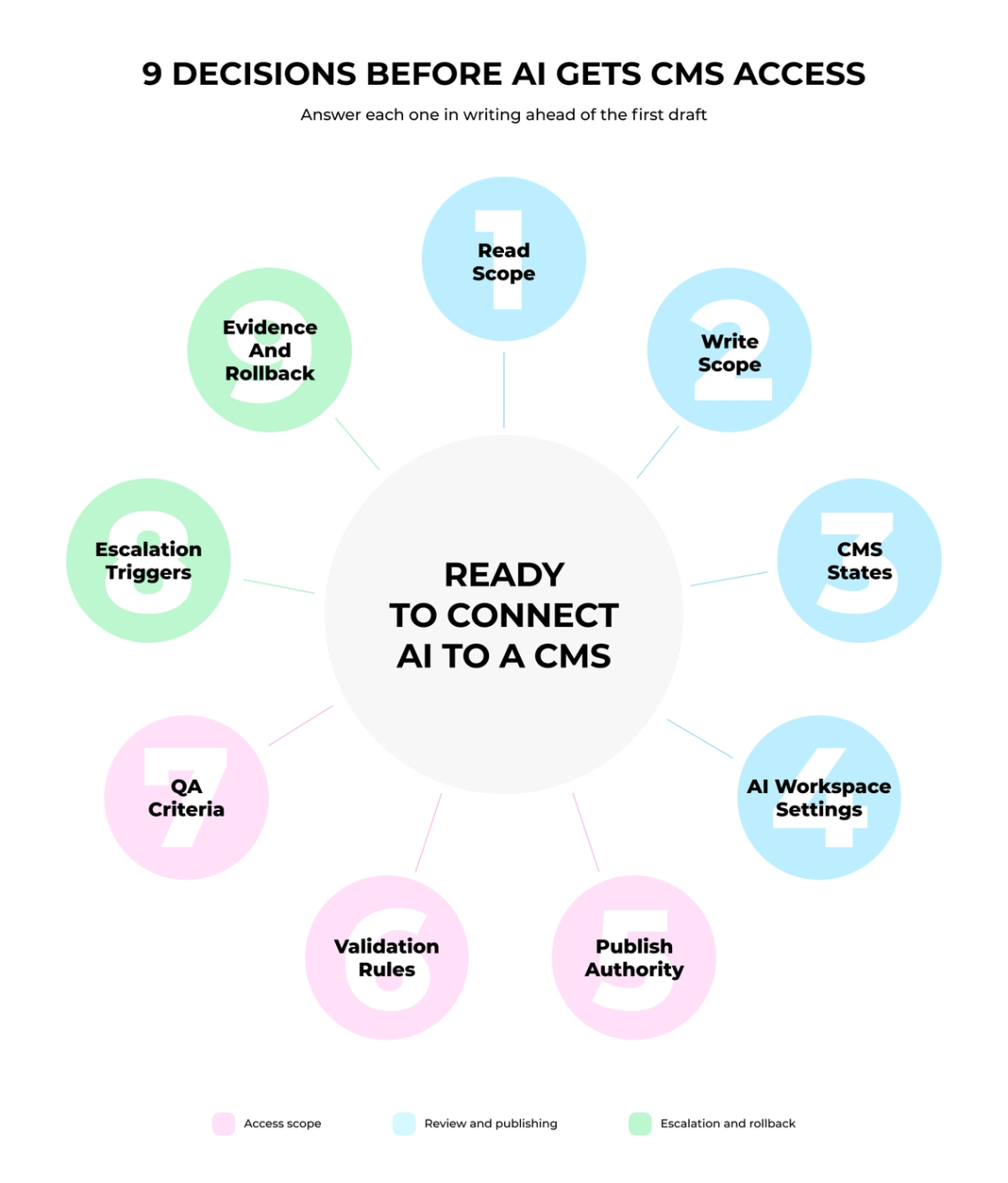
A team is ready to connect AI to a CMS once it can answer nine questions in writing, and the same answers decide when the workflow can extend to the next page type.
- Read scope.Sources the assistant may and may not read.
- Write scope.New drafts only, or updates to existing drafts too.
- CMS states.Which content states the assistant may create or modify.
- AI workspace settings.Whether the company AI workspace allows custom connectors, and who approves them.
- Publish authority.Who publishes, with a named fallback owner.
- Validation rules.What the gate checks and what a failure blocks.
- QA criteria.Claim evidence, links, forms, CTA, brand and page purpose.
- Escalation triggers.Regulated claims, sensitive data, new page types and ambiguous briefs.
- Evidence and rollback.The record kept for each approval and the way to revert a change.
A marketing automation audit applies the same discipline to other AI workflows, and marketing data readiness for AI agents covers analytics and CRM data.
Draft-Only AI Access in a Client Drupal Project
In a client Drupal project, ChatGPT worked on a test site with draft-only access. The B2B software client had moved HTML from custom GPTs into Drupal by hand, outside its component library. We connected ChatGPT so that each user signs in through Drupal with OAuth, existing permissions apply and the assistant writes only unpublished drafts. Darwin configured access and OAuth, and the client's team reviewed the drafts and owned the publish decision. In a working session, a marketing representative from the client generated a webinar-page draft with his own account. The requested form did not exist on the test site, so the assistant flagged it in the chat and the marketer picked another form there.
The test workflow created drafts inside Drupal, and publishing rights stayed with the same people. Teams planning a similar connection can start with Integrations & Automations or the AI Readiness & Enablement assessment.
FAQs
Q1. Can AI publish pages in a CMS on its own?
Yes, if the CMS and its permissions allow it. For pages with offers, forms or claims, a safer default limits AI to drafts and leaves publication to an authorized person.
Q2. What is draft-only CMS access for AI?
In a draft-only workflow, the assistant's CMS role allows creating and updating unpublished drafts and excludes live-page edits and publishing.
Q3. Who should approve AI-generated CMS pages?
An editor checks the content, a specialist reviews regulated claims and the publisher decides on release.
Q4. Is CMS validation enough to approve an AI-generated page?
No. Validation checks the page composition, and a person still checks accuracy, page fit and the offer.
Q5. What governance rules should teams set before they grant AI CMS access?
Read and write scope, publish authority with a fallback owner, validation rules, QA criteria, escalation triggers and a rollback path.