
Quick Answer:
A Google Analytics audit finds the configuration errors that corrupt attribution before those errors reach your reports. The twelve most damaging ones fall into a few groups: inconsistent UTM tagging, broken cross-domain and referral setup, duplicate or missing conversion events, and session or lookback settings that split a single journey. Each error has a clear symptom, a business consequence, and a fix you can verify once GA4 processing completes, usually within 24 to 48 hours. Run it on a schedule and your measurement foundation stays reliable.
TL;DR
- Twelve GA4 tracking errors quietly break attribution and inflate or hide conversions.
- The worst offenders: inconsistent UTM naming, broken cross-domain tracking, payment-processor referrals, and duplicate events.
- Every error has a symptom you can spot, a business consequence, and a fix you can verify in 24 to 48 hours.
- Compare GA4 numbers against your CRM and payment processor to size the gap before you fix anything.
- Run the checklist on a schedule, because tracking breaks every time the site changes.
A marketing team cuts budget from a channel that looks weak in GA4. Three months later the CRM shows that same channel drove the quarter's best pipeline. The reports were not lying on purpose. They were built on tracking that fragmented one customer journey into several mislabeled sessions, and the decision followed the broken data straight into wasted spend.
This checklist walks through twelve tracking errors that produce exactly that outcome. For each one you get the symptom, the business consequence, the fix, and the check that confirms it worked.
Trustworthy Signals Are the Real Fix Behind Every Tracking Error
Every error below fits one of four levels. Most break Surface, the raw web signals at the point of capture: the UTMs, the events, the session boundaries. A few break Connections, where those signals join the CRM and ad platforms, which is where cross-domain gaps and payment referrals cut the link between a click and a sale. Both failures corrupt Clarity, the attribution a team defends in a budget meeting, and both recur without Momentum, the discipline of re-checking after every redesign and campaign. Reading each error by layer shows whether the real problem is capture, join, or reporting. Darwin Flux is that map.
1. Inconsistent UTM Naming
Inconsistent UTM naming is a common attribution break, and it happens whenever two people tag the same channel differently, so GA4 counts one source as several.
Problem
Inconsistent UTM naming fragments one channel into many. Your team tags a campaign utm_source=Facebook. Someone else tags a similar effort utm_source=facebook. GA4 reads these as two separate sources, and what should be one unified channel splits across multiple rows in your acquisition reports.
Case sensitivity hits every parameter, and typos compound it. One person tags paid-social while another writes social-cpc for the same channel. Accidental capitals, underscores where hyphens belong, and variants such as google-ads versus search-ads all create permanent fragmentation, and GA4 gives you no way to correct values after collection.
Business Impact
Fragmented parameters block accurate aggregation, so a campaign tagged utm_medium=Social lands in Unassigned and never matches GA4's lowercase channel grouping. A single effort split between LinkedIn and linkedin reads as two weak sources when it was one strong channel. Budget decisions then rest on channel numbers that understate the winners.
How to Fix
• Create a centralized UTM governance document the whole team can reach.
• Enforce lowercase and hyphens on every parameter, and define exact source and medium values in a shared builder.
• Automate URL creation with a builder that enforces the convention so no one hand-types a tag.
How to Verify
Validate every UTM-tagged URL before launch, and confirm the values appear as expected in acquisition reports within 24 hours. Run a monthly review of tagged links to catch drift early.
2. Broken Cross-Domain Setup
Broken cross-domain tracking splits one visitor into two when the linker parameter fails to carry the Client ID between your sites, and the fix is to share one Measurement ID and preserve that parameter end to end.
Problem
Cross-domain tracking fails when the _gl parameter does not reach your destination URLs. That parameter carries the Client ID between domains so GA4 recognizes the same person on both sites. When it goes missing, each domain treats the visitor as brand new.
A self-referral gives it away: your own domain appears as a traffic source for your checkout domain, which hides the marketing channel that truly brought the visitor in. Redirects strip the parameter, JavaScript that calls event.stopPropagation() interrupts it, and form submissions drop it because the linker does not attach on submit.
Business Impact
One customer journey splits into several sessions, which drags engagement down and pushes conversion rates low. The paid click that started the journey gets zero credit when the purchase completes on a separate checkout domain, so direct traffic and self-referrals absorb the credit and paid channels look weaker than they are.
How to Fix
• Configure cross-domain tracking in your data stream settings and add every domain that shares user sessions, using the same Measurement ID on each.
• Confirm redirects preserve the _gl parameter, and add custom implementation for forms that redirect across domains.
• Remove any script that stops event propagation, since the linker relies on click events reaching the document node.
How to Verify
Click from source to destination domain and confirm the _gl parameter appears in the URL on landing. Compare the _ga cookie across both sites; it should match when tracking works.
3. Payment Processor Referrals
Payment-processor referrals steal conversion credit from your real channels whenever checkout routes through an external gateway domain, and excluding those domains restores the original source.
Problem
Your acquisition reports show Stripe, PayPal, or Razorpay as top sources for conversions. That is your analytics misreading where customers came from. A visitor clicks your Google Ad, checks out through PayPal's domain, and lands back on your thank-you page, and GA4 logs a referral from paypal.com and forgets the original paid click.
Many third-party processors on an external domain can create this break. Stripe, Razorpay, PayU, Cashfree, and 3D Secure pages route checkout off your domain, and where they do, GA4 can treat the return as a fresh session from a new source.
Business Impact
Conversions land under the payment gateway, and the campaign that earned them gets nothing. Paid channels underperform on paper, ROAS drops even when sales hold steady, and funnels show fake drop-offs at the payment step. Every budget decision on that data funds the wrong channels.
How to Fix
• Add your payment gateways to the unwanted referral list in your data stream settings, matching the exact domain with no protocols or subdomains.
• Never add your own primary domain, since excluding it turns all self-navigation into direct traffic and destroys attribution.
How to Verify
Run a complete test checkout and confirm the original source and medium stay attributed through the whole flow. Watch DebugView to confirm session continuity holds and the processor never shows as the source.
4. Enhanced Measurement Gaps
Enhanced Measurement covers less than its name suggests, so several engagement signals go uncaptured until you move the important ones into Google Tag Manager.
Problem
Enhanced Measurement promises automatic tracking of scrolls, downloads, video, outbound clicks, site search, and forms. For a large share of your content it quietly does not deliver.
Video fires only for YouTube embeds with the JavaScript API enabled, so Vimeo and HTML5 players record nothing. File download tracking truncates long URLs and only catches a fixed extension list. Form tracking brings false positives from newsletter widgets and search bars, and it misses AJAX forms in Contact Form 7 and Gravity Forms. Cloaked affiliate links read as internal navigation, so those outbound clicks never register.
Business Impact
Engagement data comes back incomplete at the exact points that show intent. Video that drives traffic looks inert, download metrics show a fraction of real clicks, and form conversion tracking inflates or undercounts depending on setup, so the behavior signals feeding attribution are wrong.
How to Fix
• Disable the Enhanced Measurement features that do not fit and move to Google Tag Manager with triggers matched to your site.
• Build GTM triggers for full-filename downloads, platform-specific video, and per-form tracking with proper AJAX handling.
• Register every custom parameter as a dimension so it appears in reports.
How to Verify
Test each interaction type by hand in DebugView, then wait 24 to 48 hours to confirm the data reaches standard reports.
5. Duplicate Conversion Tracking
Duplicate tracking inflates events and revenue when GA4 loads through more than one path, and the fix is to collapse tracking to a single method with deduplicated conversions.
Problem
Duplicate tracking makes everything look better than it is. Install GA4 through Google Tag Manager, then hardcode the same measurement ID into the site header, and every page view fires twice. One documented case recorded roughly twice as many purchase events in GA4 as real transactions in the payment processor, and the double-counting ran for months before anyone noticed.
Migrations trigger it, and so does any second team adding tracking without checking what already exists. Two GTM containers load on the same pages, server-side and client-side both send the same events, and thank-you page reloads fire the conversion again.
Business Impact
Conversion counts and revenue inflate, and because higher numbers feel like success, teams question them less than they should. Sessions per user rise, bounce rates fall unrealistically, and one purchase registering several times makes ROAS math meaningless.
How to Fix
• Search your page source for the measurement ID and remove any hardcoded GA4 snippet so GTM is the single tracking path.
• Turn off automatic tracking for events you handle manually, and delete redundant Create Event rules.
• Pass unique transaction IDs with every purchase so GA4 deduplicates, and set conversion counting correctly for the event type: once per session for repeatable non-transactional actions, once per event where each occurrence is a real conversion.
How to Verify
Run a test purchase in DebugView and confirm exactly one purchase event fires. Reload the thank-you page and confirm no extra conversion appears.
6. Missing Conversion Points
Conversions go missing when a case mismatch, a consent gap, or the 30-event cap stops a key event from registering, which is why GA4 lead counts drift below the CRM.
Problem
The event fires, you marked it as a key event, and the conversion count stays at zero. Event names are case-sensitive, so a tag firing Generate_Lead against a key event named generate_lead never matches, and each side looks correct when reviewed alone.
Consent mode opens another gap. When users decline analytics consent, the event may not send at all, or it sends cookieless and gets modeled, never tied to a user. GA4 also caps key events at 30 per property, and past that limit new key events fail silently.
Business Impact
Form submissions, demo requests, and trial signups happen and never register as conversions. For B2B teams the gap is wide, because GA4 records lead events but cannot tell you which leads became customers. When key events do not register, you cannot tell which channels drive pipeline, and the CRM becomes the only source that knows.
How to Fix
• Confirm the event fires in the Events report, then confirm the key event toggle is on and the name matches exactly for case.
• Review consent decline rates in your CMP, and check that no data filter is excluding traffic that carries conversions.
• Audit the key event list and remove ones no longer relevant so you stay under the 30-event cap.
How to Verify
Wait at least 48 hours after marking a key event, then pull total lead events from GA4 and compare against new leads in your CRM for the same period. The comparison shows whether the gap is technical or configurational.
Most teams do not have one tracking issue.
They usually have several interacting problems that compound each other, which is why a measurement audit evaluates the whole tracking architecture, not just individual tags.
7. Unregistered Custom Parameters
Custom parameters stay invisible in reports until you register them as dimensions, and registration never applies to data collected before that point.
Problem
You send a custom parameter such as product_category with every product click, DebugView shows it firing, and it never appears in an Exploration. GA4 collects the data and treats it as invisible until you register it, because a raw parameter becomes a usable dimension only after registration.
Business Impact
Rich behavioral data never reaches Explorations or standard reports, and registration does not apply to past events, so everything collected before you register the dimension reads as permanently missing.
How to Fix
• Register the parameter under Custom Definitions with the exact name and correct scope of Event, User, or Item.
• Watch the quota of 50 event-scoped, 25 user-scoped, and 10 item-scoped dimensions on standard properties.
How to Verify
Wait 24 to 48 hours, then check Explorations. The dimension populates going forward, and past data stays unavailable.
8. Non-Conversion Key Events
Marking engagement events as key events buries your real conversions in noise, so the fix is to reserve key-event status for genuine business outcomes.
Problem
Marking everything as a key event stops the totals from meaning anything. GA4 caps key events at 30 per property, and a property near that cap shows a wall of conversion columns that no one can read. Linking Google Ads with Ads Personalization auto-marks engagement events such as session_start and view_item as key events, and none of those represent a business outcome.
Business Impact
Conversion totals stop matching business results, and executives lose trust in the numbers because no one can explain what is being counted.
How to Fix
• Remove key event status from engagement signals such as page_view and session_start.
• Keep the total to a handful of events that represent genuinely distinct business outcomes, and set non-transactional counting to once per session.
How to Verify
Compare key event counts against your CRM or backend to confirm they match real outcomes.
9. Default Session Timeout
The default 30-minute session timeout over-reports Direct traffic for considered B2B purchases, and extending the window keeps a single decision in one attributed session.
Problem
Someone clicks your paid ad, leaves the tab open, and returns after the default 30-minute timeout. GA4 opens a fresh session with no page reload to carry the referral, so the original Paid Search attribution disappears, source becomes (direct), and medium reads (not set).
For considered B2B purchases, where people research over hours and days, the default window splits a single decision into several disconnected sessions.
Business Impact
Direct traffic inflates while paid channels underperform on paper, and conversions get credited to the wrong source when a user times out between the first click and the purchase.
How to Fix
• Extend the session timeout in your data stream tag settings from the 30-minute default toward the maximum of 7 hours 55 minutes, matched to how long your buyers really deliberate.
• Adjust engaged-session timing only if your engagement definition needs it.
How to Verify
Monitor the Direct traffic share weekly after the change. A steady decline in (direct) / (not set) sessions confirms the fix.
10. Untracked Form and CTA Handoff to CRM
The form-to-CRM handoff is a common point where B2B attribution breaks, because the lead reaches the CRM without the GA4 source that would tell marketing which channel earned it.
Problem
For B2B, the conversion that matters is a form fill or demo request that becomes a lead in the CRM, and that handoff is a point where tracking can break. The form submits through an embedded widget or a third-party tool such as HubSpot or Marketo, the confirmation loads on a subdomain or external domain, and GA4 either misses the event or attributes it to the wrong session.
Even when the form event fires, the lead usually reaches the CRM without the GA4 session identifier attached. The click that generated the lead and the lead record in the CRM then live in two systems with no key that joins them.
Business Impact
Leads arrive in the CRM with no channel attached, so channel reporting shows demand it cannot source. Marketing optimizes spend against form counts in GA4 while sales works pipeline in the CRM, and because the two never reconcile, budget decisions rest on incomplete demand data. The gap stays invisible until GA4 leads and CRM leads are counted side by side, which is why the reconciliation belongs in every B2B audit.
How to Fix
• Fire a dedicated form-submission event on genuine success, not on a newsletter widget or a page load, and confirm it survives any redirect to a confirmation domain.
• Capture the GA4 client ID or a session identifier with the lead and pass it into the CRM so the record carries its source.
• For offline or sales-qualified stages, send an offline conversion back to GA4 or the ad platform so the closing stages credit the original click.
How to Verify
Submit a real form and confirm the event fires once with the right source, then confirm the resulting CRM record carries that source. Reconcile GA4 lead events against new CRM leads for the same period and confirm the counts and channels agree.
11. Missing Landing-Page Tags
Untagged landing pages destroy first-touch attribution by starting sessions with no page_view, so closing real coverage gaps is the fix once you rule out false flags.
Problem
Tag Diagnostics flags pages where the Google Tag or GTM snippet is missing. An untagged page does not record its own entry, so when a visitor lands there first and only reaches a tagged page later, tracking starts mid-journey and the true first touch is already lost.
Not every flag is real. Low-traffic pages get marked untagged when the tag is fine, and redirects, trailing slashes, and capitalization variants make one page appear several times.
Business Impact
First-touch attribution breaks, because the entry that carried the source went unrecorded and tracking only begins once the visitor reaches a tagged page. The audit then cannot tell which campaigns drove those site entries.
How to Fix
• Open the Tag Coverage summary, install the tag on genuinely untagged pages, and verify flagged pages with Tag Assistant.
• Skip irrelevant URLs such as PDF files and admin panels.
How to Verify
Confirm tags fire with Tag Assistant across browsers and devices, and wait 24 to 48 hours for Tag Coverage to update.
12. Short Lookback Windows
A lookback window shorter than your sales cycle drops early-funnel touches from the credited path, and for long B2B cycles GA4 alone cannot carry full-path attribution.
Problem
GA4 attribution uses a lookback window that decides how far back a conversion can credit a touchpoint, defaulting to 30 days for acquisition and 90 for other conversions. For a B2B sale that closes over four or five months, that window drops the first ad click, the webinar, and every early touch out of the credited path.
The danger is that the reports still populate. Early-funnel channels look weaker than they are, and last-touch channels absorb the credit that earlier work earned.
Business Impact
Attribution skews toward the end of the funnel, long-cycle B2B channels underperform on paper, and budget drifts toward closing channels while the sources that start pipeline lose funding. The data stays internally consistent and still points the wrong way.
How to Fix
• Set the acquisition and conversion lookback windows to the longest option that covers your median sales cycle, confirmed against the CRM, not assumed.
• Where the sales cycle runs longer than the longest GA4 window, treat GA4 as a directional signal and keep first-touch and full-path attribution in the CRM or warehouse. GA4 does not replace CRM or warehouse attribution for long B2B cycles.
How to Verify
Rebuild a conversion path report after the change and confirm early-funnel channels now receive credit. Compare channel credit against CRM-sourced pipeline for the same cohort.
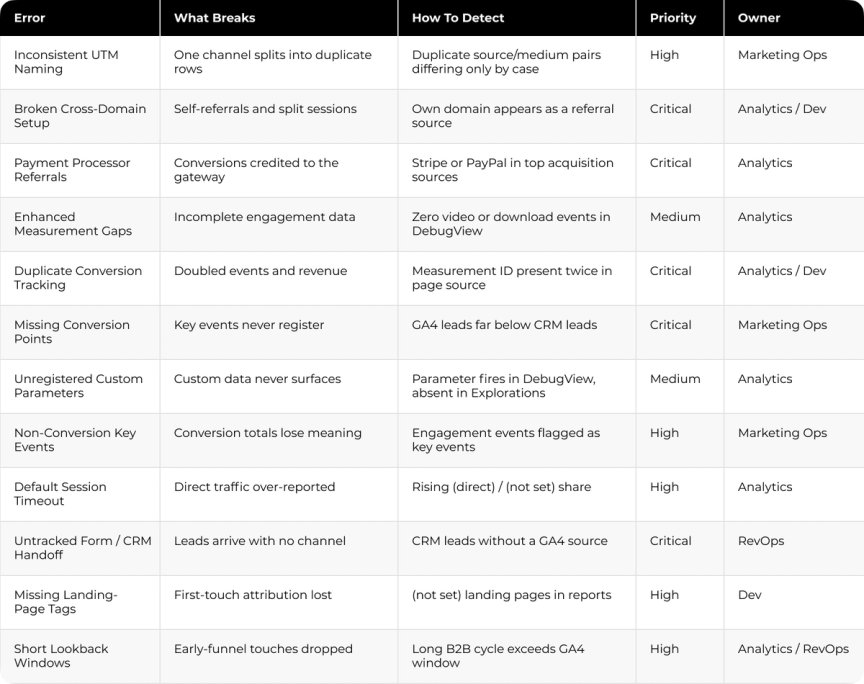
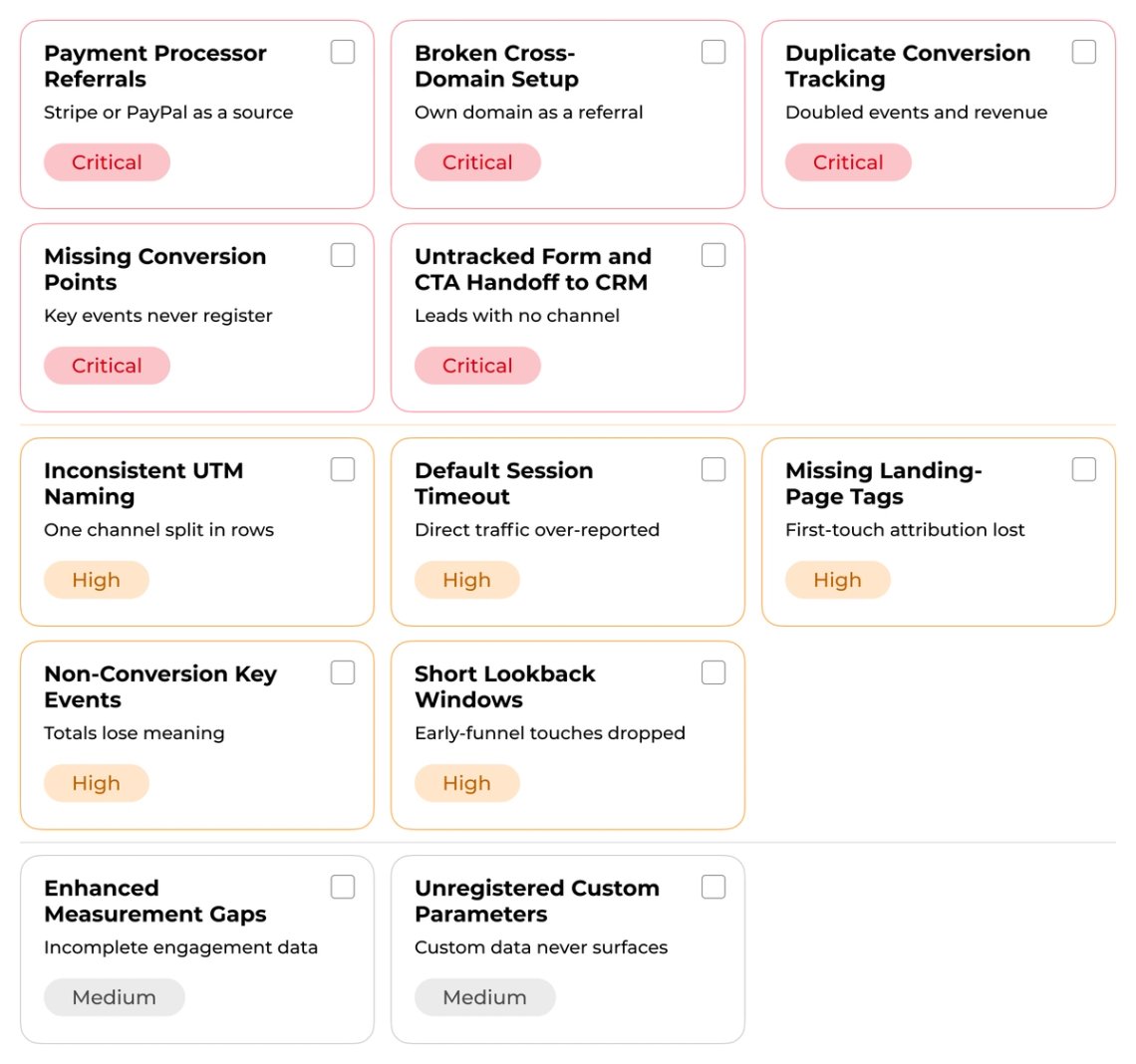
Comparison Table
Why this matters for SEO and AI search
SEO and GEO put your brand in front of buyers, and GA4 decides whether your team can connect that reach to pipeline. The channels bring people in, and the tracking layer is what proves those people turned into revenue.
When organic landing pages, AI referrals, CTA clicks, and the CRM handoff are not tracked correctly, SEO and GEO read as a traffic report and not a measurable growth channel. The same twelve fixes that protect paid attribution are what let organic and AI search earn credit for the pipeline they start.
Turning a Broken GA4 Audit into Reporting You Can Defend
Every error on this list produces the same executive moment: a number no one can explain, and a budget decision stalled while two dashboards argue. The fix is rarely a single toggle. It is the disciplined work of tracing each signal from capture through to the report, which is the measurement audit Darwin runs for B2B teams.
Cleo came to Darwin with reporting the team could not trust across GA4, Salesforce, BigQuery, and Looker Studio. Each system counted conversions on its own logic, so the four sources never agreed and the team rebuilt numbers by hand every month. Darwin traced each metric back to its source, defined one shared set of conversion and revenue definitions, and rebuilt the pipeline into BigQuery so every tool read from the same joined data. Reporting accuracy moved from 70 to 90 percent, the team recovered around two days a month previously lost to manual reconciliation, and the account saved close to 50,000 dollars a year.
The lesson holds for every account here. Clean signals produce connected data, connected data produces defensible attribution, and defensible attribution is what lets a marketing leader stand behind a spend decision in the room. That is the outcome a Marketing Measurement & Attribution Audit is built to deliver.
FAQs
Q1. How do I verify that my Google Analytics events are tracking correctly?
Use GA4 DebugView to watch events fire in real time, and the Tag Assistant extension as a second check. After any change, wait 24 to 48 hours for the data to settle in standard reports.
Q2. Which UTM parameters are essential for accurate campaign tracking in GA4?
Three: utm_source for the platform, utm_medium for the channel, and utm_campaign for the campaign name. All three must be present and consistently formatted for attribution to hold.
Q3. Why does GA4 show no revenue even though purchase events are firing?
Revenue needs transaction_id, value, and currency, all correctly formatted. Currency must use three-letter ISO codes, values must be plain numbers, and the event must be named purchase.
Q4. How do I stop payment processors from appearing as traffic sources?
Add the processor domains to the unwanted referral list in your data stream settings. Conversions then credit the original marketing source, and the change takes 24 to 48 hours.
Q5. Why do GA4 lead numbers not match our CRM?
Usually the form event misfires or the lead reaches the CRM without a GA4 source attached. Fire a clean submission event and pass the client ID into the CRM so both systems share one key.