Quick Answer:
A full marketing resource management (MRM) platform makes sense when capacity, budgets, assets, approvals and campaign planning are hard to coordinate in separate tools. Teams with a narrower problem often need a project management tool, a resource scheduler, a DAM or better integrations between the tools they already have. The 11 tools below cover all of these operating models, and the comparison table maps each one to the problem it solves best.
TL;DR
- Marketing resource management (MRM) software puts people, budgets, assets and workflows in one system, so capacity conflicts and budget overruns show up early.
- Published entry prices start at $4.16 per person per month (Resource Guru, annual billing) and $7 per scheduled person (Float); Kantata, Bynder, Brandfolder and Lytho sell on custom quotes.
- Seat rules change the real cost: Wrike sells seats in groups, Scoro requires five users and Productive requires three.
- Check first whether you need a full MRM platform or a narrower tool for scheduling, assets or integrations.
Coordination takes a large share of a marketing team’s week. Adobe research found that marketers spend only 19% of their time on the high-value work they were hired to do, while meetings and status updates absorb a large share of the rest.
Marketing resource management software addresses that gap. It puts capacity, budgets, assets and approvals in one place, so double bookings and budget overruns surface before they derail a launch.
This guide compares 11 MRM and MRM-adjacent tools for mid-market teams in 2026, including work management, resource scheduling, professional services automation (PSA), DAM and creative workflow products. Each entry draws on public product, pricing and help pages checked in October 2026 and covers the operating model, published entry price, seat minimums, integrations and implementation constraints. Each “Best for” label names a documented use case, and the order of the list is not a ranking.
MRM vs. Project Management vs. Marketing Automation vs. DAM
The quickest way to decide whether you need MRM is to name the problem you are trying to solve. Each category below solves a different one:
- Tasks, deadlines and ownership: a project or work management tool.
- Lead nurturing and campaign execution: a marketing automation platform.
- Assets, versions and brand governance: a digital asset management (DAM) platform.
- Capacity, budgets, approvals and cross-team planning together: an MRM platform.
- Existing tools that work but stay disconnected: integrations and workflow automation between them. A good next read is our guide to marketing data integration tools for reliable B2B reporting
The 11 tools in this guide follow different operating models. Wrike and Smartsheet are work management platforms, Float and Resource Guru are resource schedulers, Productive, Teamwork.com, Kantata and Scoro are professional services automation (PSA) or agency platforms, Bynder and Brandfolder are DAMs, and Lytho is a creative workflow platform. Several of them cover parts of MRM, and none of them replaces every category at once, so match the model to your main problem first.
What Has to Work Before an MRM Tool Pays Off
An MRM tool pays off when four conditions are in place, and Darwin groups them into the four pillars of Darwin Flux: Surface, Connections, Clarity and Momentum.
Surface means the team can see where capacity, budget and approved assets sit today. A scheduling tool cannot fix bookings that live in private spreadsheets, so the first step is getting every person, project and booking into one view.
Connections cover the links between the MRM tool and the CRM, finance and DAM systems around it. When budget data stays in accounting software and campaign data stays in the CRM, utilization reports describe only half of the picture. If the main problem is data moving between CRM, finance and DAM systems, it is an integration task, and Darwin’s integrations and automations service covers that layer.
Clarity is a shared definition of capacity, utilization and billable time. Two managers who count hours differently will read the same dashboard and reach opposite conclusions.
Momentum keeps the system in use after launch through intake forms, approval paths and automations that make the tool the default place where work starts. The 11 tools below differ mainly in which of these four pillars they handle best.
When Mid-Market Teams Need Marketing Resource Management
A mid-market team may need an MRM system when informal coordination stops working. The signals are operational: recurring manual booking conflicts, assets nobody can locate, budget changes missing from campaign plans and approval delays that hold up launches.
Budget pressure makes the problem harder to absorb. In the Gartner 2026 CMO Spend Survey, CMOs reported allocating 15.3% of marketing budgets to AI, yet only 30% said they were ready to scale those capabilities.
“CMOs are being asked to deliver growth, efficiency and transformation without meaningful budget expansion.” – Ewan McIntyre, VP Analyst and Chief of Research, Gartner
The Resource Management Challenge for Growing Marketing Teams
The main challenge for growing teams is that dependencies multiply faster than headcount. Parallel campaigns for several products or regions compete for the same designers, video editors and approvers, and one late asset can delay several launches at once.
Without a shared schedule, the same specialist gets booked for three campaigns in one week and nobody notices until deadlines slip. A spreadsheet can record bookings, but it cannot flag conflicts, account for time off or compare planned work with logged hours.
Key Benefits of MRM Software for Mid-Market Organizations
The main benefit of MRM software is one view of campaigns, owners, deadlines and capacity. Leaders can see which projects are at risk and where people are overbooked, and nobody has to chase status updates in three different tools.
Budget tracking also moves closer to execution. Planned spend, logged hours and approved changes sit side by side, so finance and marketing work from the same numbers.
Standard workflow automation shortens handoffs too. Intake forms capture the brief once, approval paths route assets to brand, legal and compliance in a fixed order, and external agencies work in shared workspaces in place of email attachments. AI agents add value later, once intake, ownership and data governance are stable, which is the sequence Darwin’s AI readiness and enablement service follows.
Common Pain Points MRM Tools Solve
MRM tools solve four recurring pain points: scattered assets, unstructured approvals, hidden capacity limits and budgets disconnected from delivery.
Teams recreate files that already exist because approved versions sit in personal folders and email threads. Approvals stall and launches slip when brand, legal and compliance reviews have no defined order or launch checklist, and only 26% of B2B marketers say their organization has the right technology to manage content, according to the Content Marketing Institute.
Some of these symptoms point to a data problem. When reports disagree because tracking or source data is unreliable, the fix lies with data quality monitoring tools for marketing operations, which is a separate decision from capacity management.
1. Wrike: Best for Marketing Work Management

Wrike is a strong all-round option for marketing teams that want project management, proofing and resource planning in one platform. The company has built work management software since 2006, and its Business plan covers request intake, approvals and workload planning for teams of 5 to 200 users.
Key Features
Wrike keeps creative briefs, design files and campaign tracking in one workspace with Gantt charts, Kanban boards and dashboards. Workload charts, effort allocation and time tracking start on the Business plan, as do file proofing for images and video, guest approvals and the Adobe Creative Cloud extension, according to the Wrike plan comparison.
Wrike lists more than 400 integrations with tools such as Slack, Google Drive and Salesforce. Some advanced connectors need paid add-ons: Wrike Integrate, Wrike Sync and Wrike Whiteboard cost extra on Business and Pinnacle and come included with Apex.
AI features such as Wrike Copilot and agents are part of the Business plan and above. Usage quotas for these AI actions took effect on April 1, 2026, and extra action packs are available for purchase.
Pricing
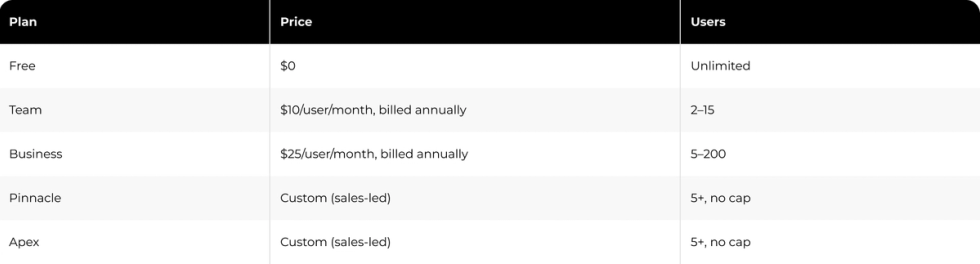
Seats come in groups of five up to 30 seats, groups of 10 from 30 to 100 seats and groups of 25 above 100 seats, so a 101-person team pays for 125 seats, per Wrike pricing. Business and higher plans are annual-only, and Vendr data shows that Wrike deals commonly close 10 to 25% below list price.
Pros and Cons
Pros: Proofing, approvals and dynamic request forms are built into the Business plan. AI features come included with defined monthly quotas, and the Workload view shows who has room for more work.
Cons: The Business plan is sold only with annual billing, and seat groups above 100 users leave teams paying for unused licenses. Two-step verification and SAML single sign-on require the Pinnacle or Apex plan.
2. Productive: Best for Agency Resource Planning

Productive is the best fit for agencies and professional services teams that need resource planning tied to budgets and profit. Projects, budgets, time tracking and forecasting live in one system, so nobody reconciles hours and invoices in separate spreadsheets.
Key Features
The resource planner shows availability, approved time off and bookings for each person, and tentative bookings reserve capacity for deals that have not closed yet. Budget phases split long engagements into stages, and time approvals let managers mark hours as billable or non-billable ahead of invoicing.
The Scenario Builder models different budget and staffing options for a deal or project, and it is available on the Ultimate plan, according to the Productive help center. The Reports Library includes more than 50 agency report templates covering utilization, profitability and forecasts.
Native integrations include Slack, Xero, QuickBooks and Google Calendar, with HubSpot on the Ultimate plan. An open API and Zapier connect the remaining tools.
Pricing

All plans require at least three seats, and companies with 50 or more users qualify for a volume discount on Professional and Ultimate, according to the Productive pricing page.
Pros and Cons
Pros: Resource planning connects directly to budgets and margins. Tentative bookings and placeholders support planning for pipeline deals, and native accounting integrations remove manual invoice exports.
Cons: The Scenario Builder and HubSpot integration require the Ultimate plan. Every person included in forecasts needs a paid seat, and some reviewers find the mobile app less complete than the desktop version.
3. Teamwork.com: Best for Workload and Capacity Management

Teamwork.com suits client services teams that need workload planning tied to billable utilization and profit. It connects the Workload Planner, time tracking and budgets, so managers see both who is busy and whether the work pays.
Key Features
The Workload Planner shows who has capacity based on estimated hours, working schedules, holidays and time off. Time logged against tasks feeds utilization reports that separate billable and non-billable hours.
Planning tentative work, scheduling resources by role or skill and tracking financial budgets belong to the Optimize plan, according to Teamwork.com pricing. Accelerate covers workload planning, live capacity, time budgets and retainers.
Customer results here come from a vendor case study, so treat them as one customer’s experience. Consulting firm Beyond the Chaos reports an ROI above 1,000% and four times the revenue after adopting the platform, according to its Teamwork.com customer story.
Pricing
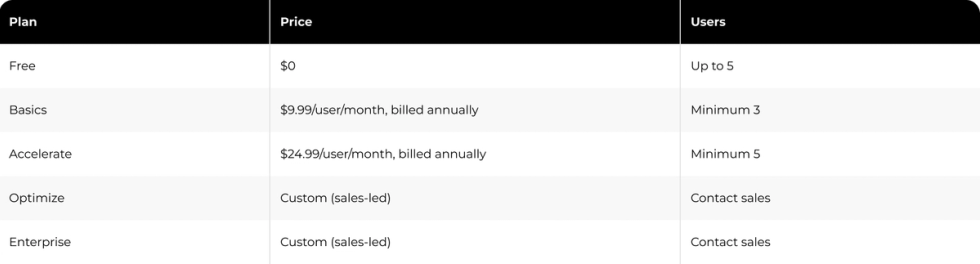
Paid plans include a 14-day free trial. Every plan includes two-factor authentication and SOC 2 compliance, and TeamworkAI is included in paid plans for an introductory period ahead of usage-based credits.
Pros and Cons
Pros: Billable utilization is built into workload views. Two-factor authentication and SOC 2 compliance come with every plan, and client users and collaborators join for free.
Cons: Tentative planning and financial budgets require Optimize, which has no public price. Accelerate needs at least five seats, and reviewers report a learning curve with the larger feature set.
4. Float: Best for Visual Team Scheduling

Float is the best pick for teams that plan around people and want a fast visual schedule. The interface is a timeline of who is working on what and when, built for resource managers at agencies and studios.
Key Features
The schedule shows each person’s bookings, time off and on-schedule capacity, with color coding by project or client. Skills and tags, departments and roles help managers find the right person for a task, and placeholders hold capacity for roles that are not filled yet.
The Pro plan adds time tracking with prefilled timesheets, project cost estimates, client rate cards and live dashboards for budget burn and margins. Customized access permissions on Pro are listed as coming soon on the Float pricing page, so teams with strict access rules should confirm current options with sales.
Pricing

Float charges only for people added to the schedule, and anyone else can join as a free guest who views the schedule. The free trial runs for 30 days on the Pro plan and needs no credit card.
Pros and Cons
Pros: The visual schedule is quick for new users to learn. Teams pay only for the people they schedule, and mobile app access comes with every plan.
Cons: Time tracking and cost estimates require the Pro plan. Custom access permissions are still listed as coming soon, and larger programs may need more project management depth than Float offers.
5. Kantata: Best for Skills-Based Resource Matching

Kantata is built for larger professional services organizations that staff projects by skill, seniority and cost. It puts a skills library at the center of resourcing, so managers match people to work on more than availability alone.
Key Features
Administrators can create up to 5,000 skills per account and assign up to 200 skills to each user, according to the Kantata API documentation. Proficiency levels can be updated as people gain experience.
Resource recommendations rank candidates against weighted skill criteria and show the cost impact of each choice. The Resource Center filters people by project, date and skill combination, and saved views remove repeat searches for recurring needs.
Kantata also works as a professional services automation (PSA) platform that ties project tracking to revenue and margin. A Salesforce-native version, Kantata SX, serves teams that run delivery inside Salesforce.
Pricing
Kantata does not publish prices, and contracts are custom and sales-led. Third-party reviews report a 50-seat minimum, which Kantata does not confirm publicly; if accurate, it places Kantata at the upper end of the mid-market.
Pros and Cons
Pros: Skills matching works well when several projects compete for the same experts. Financial controls tie staffing decisions to margin, and a Salesforce-native edition is available.
Cons: There is no public pricing, and a 50-seat minimum reported by third parties rules out smaller teams. Reviewers mention slow load times and long support response times, so plan for a formal training period.
6. Scoro: Best for Consolidated Marketing Operations

Scoro suits agencies and consultancies that want projects, resourcing, sales and billing in one system. It is built from eight apps that work alone or together, so teams pay for the parts of the workflow they run in Scoro.
Key Features
The eight apps are Do (tasks), Deliver (projects), Track (time and cost), Resource (capacity planning), Sell (CRM and pipeline), Estimate (quotes and budgets), Spend (bills and expenses) and Invoice (billing). The minimum combination is two apps, according to the Scoro pricing page.
ELI, the Scoro AI assistant, answers plain-language questions about live data, such as who is overbooked next month or which projects are losing margin. The Standard platform includes 80 AI credits per user per month.
Global consultancy DGA Group raised utilization by 20% and project profitability by 33% compared with the previous year after moving to Scoro, according to a Scoro customer story; vendor-published results like this do not predict outcomes for other teams. Scoro Software is ISO 27001 certified and supports two-step verification.
Pricing
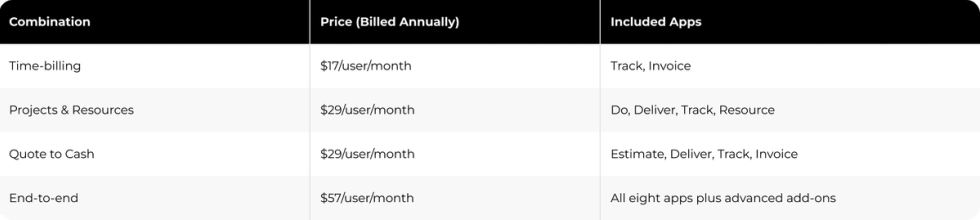
Every combination requires at least five users, and annual billing gives a 13 to 17% discount depending on currency and combination.
Pros and Cons
Pros: Modular pricing means teams pay only for the apps they use. Financial reporting connects directly to delivery, and ELI answers operational questions in plain language.
Cons: The five-seat minimum raises the entry cost for small teams. Setup takes longer when a team runs many apps, and extras and some integrations cost more.
7. Smartsheet: Best for Budget and Utilization Tracking

Smartsheet fits teams that already think in spreadsheets and want budget and workload tracking with little retraining. The grid interface feels familiar, and dashboards, forms and automations sit on top of it.
Key Features
Business and Enterprise plans include workload tracking for availability and overallocation, timeline view, baselines and proofing for images and video. The Enterprise plan adds scenario planning and portfolios.
Capacity planning, time tracking, skill-based assignments and resource reporting come from Resource Management by Smartsheet, a paid add-on for Business and Enterprise plans, according to the Smartsheet Resource Management page. The add-on handles time budgets, fee budgets and expense tracking for project financials.
Smartsheet connects with Microsoft 365, Google Workspace, Slack and nearly 100 other tools. Some connectors, including DocuSign and HubSpot, are available only on Enterprise.
Pricing

Premium add-ons such as Resource Management, Dynamic View and Data Shuttle cost extra, according to Smartsheet pricing.
Pros and Cons
Pros: The spreadsheet interface keeps adoption fast for finance and operations teams. Workload tracking comes with the Business plan, and the integration catalog is wide.
Cons: Resource Management is a separate paid add-on. The Pro plan caps teams at 10 members, and stacked add-ons make the total cost harder to forecast.
8. Bynder: Best for Brand Asset Governance

Bynder is a digital asset management (DAM) platform for brands that need tight control over how assets are used. It acts as the system of record for approved logos, imagery and guidelines, so regional offices and agencies work from current files.
Key Features
Assets carry metadata and tags that define approved channels and usage, and expiration dates stop outdated content from circulating. AI search supports face recognition, image similarity, natural language queries and text-in-image search.
Brand guidelines live next to the assets themselves. Studio lets non-designers produce on-brand content from locked templates, Asset Workflow handles briefing, proofing and approvals, and permissions control who sees restricted assets.
Pricing
Bynder sells on custom, sales-led quotes. Buyers should budget separately for implementation services in the first year.
Pros and Cons
Pros: Brand governance and guideline management are its main focus. AI search finds assets by face, similarity or text, and templates support on-brand self-service content.
Cons: There is no public pricing. Reviewers mention hard-to-manage filters and slow large-file uploads, and capacity planning sits outside its focus, so most teams pair it with a scheduling tool.
9. Resource Guru: Best for Lightweight Resource Scheduling

Resource Guru is one of the simplest options for teams that need to see who is available, book them and avoid double bookings. It covers scheduling, leave and basic project planning with little setup.
Key Features
Bookings live on a drag-and-drop calendar that shows availability and utilization. Clash management flags conflicts at the moment of booking, and approved leave updates availability automatically.
Timesheets prefilled from scheduled work are available on the Blackbelt and Master plans, according to Resource Guru. Resource Guru is SOC 2 Type II compliant and reports that more than 60,000 people in over 100 countries are scheduled in the tool.
Pricing
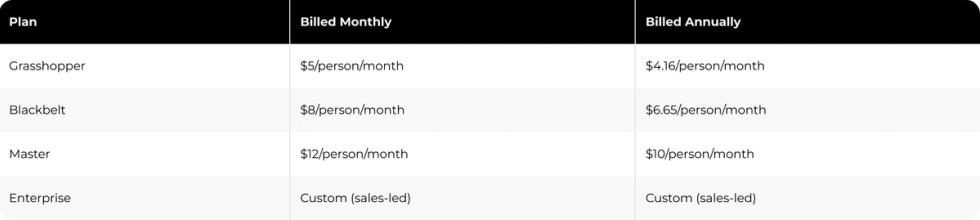
Annual billing equals two months free, and non-human resources such as meeting rooms and equipment are billed separately. The free trial lasts 30 days, according to Resource Guru pricing.
Pros and Cons
Pros: Setup is fast and the visual calendar needs little training. Clash detection catches double bookings at the moment they happen, and leave and project bookings share one calendar.
Cons: Reporting stays basic compared with analytics-focused platforms. There is no native mobile app, so mobile access runs through the browser, and timesheets require Blackbelt or higher.
10. Lytho: Best for Creative Production Workflows

Lytho suits in-house creative teams, especially in regulated industries, that need intake, review and approval in one workflow. It connects requests, proofing and asset management, so feedback stops living in chat threads and email chains.
Key Features
Templated intake forms capture project type, channel, audience, deadline and compliance requirements up front. Work auto-assigns by content type or skill set, and compliance-specific fields route regulated content to the right reviewers from the first submission.
Browser-based proofing tracks versions and feedback, and AI screening checks content for brand and regulatory issues during review. In a vendor-run Lytho customer survey, 82% of customers reported higher content output year over year.
Pricing

Tempo templates, AI Teammates and the Lytho Chrome Extension are sold as add-ons, according to the Lytho pricing page.
Pros and Cons
Pros: Compliance checks are built into intake and approvals. Structured briefs cut incomplete requests, and AI screening catches brand issues during review.
Cons: There is no public pricing. Some users find the interface clunky, and full feature adoption takes time.
11. Brandfolder: Best for DAM-First Teams
Brandfolder is the pick for DAM-first teams that want detailed asset analytics. Its Brand Intelligence features track which assets get downloaded and shared, down to individual share links, so teams know which collateral earns its place.
Key Features
Assets are organized in sections, collections and labels, with AI auto-tagging and in-document text search. Content Automation lets non-designers create on-brand variants from locked templates.
Share links support expiry dates, embed codes and download presets, and a CDN serves embedded assets on websites. Guest users are free and unlimited on every plan, which suits brands with many outside partners, and Brandfolder is also sold as a Smartsheet add-on.
Pricing
Brandfolder sells Premium and Enterprise plans on custom, sales-led quotes, and evaluation runs through a demo. There is no free trial.
Pros and Cons
Pros: Usage analytics go down to individual assets and share links. Unlimited free guests suit large partner networks, and CDN-backed sharing keeps embedded assets fast.
Cons: There is no public pricing or trial. Metadata depth trails some category leaders, and one IPTC round-trip test by PhotoLib preserved 76% of fields.
Marketing Resource Management Software Comparison: Features, Pricing and Best Fit
The right MRM tool depends on which of four areas creates the most friction for your team: people, budgets, assets or workflows.
Capabilities Comparison by Category
Each tool is strongest in one of those areas. Wrike and Teamwork.com focus on workload balancing, and Kantata focuses on skills-based matching. Productive and Scoro tie resourcing to financials, Bynder and Brandfolder focus on brand governance, Lytho covers creative approvals, and Float and Resource Guru keep scheduling simple.
Pricing Models for Mid-Market Budgets
Per-user monthly pricing dominates this category. Published entry plans start at $4.16 per person (Resource Guru, annual), $7 per scheduled person (Float) and $9 to $10 per user (Smartsheet, Teamwork.com, Wrike and Productive), while Kantata, Bynder, Brandfolder and Lytho sell on custom quotes.
Annual billing discounts vary by vendor: about 17% at Resource Guru and Productive, 13 to 17% at Scoro, 25% on Smartsheet Pro and up to 29% at Teamwork.com. Wrike sells its Business and higher plans on annual billing only.
“CMOs are under pressure to make every dollar count.” – Michael McCune, VP Analyst, Gartner
Seat rules change the real price as well. Wrike sells seats in groups, Scoro and Teamwork.com Accelerate start at five seats, Productive starts at three, and third-party reviews report a 50-seat minimum for Kantata.
Team Size Recommendations
Team size narrows the shortlist quickly. Teams under 20 people get the fastest start with Resource Guru or Float, and teams of 20 to 100 people fit well with Productive, Teamwork.com or Wrike. Organizations with 50 or more seats that staff by skill can consider Kantata.
Integration and Scalability Considerations
Integration depth decides whether MRM data stays trustworthy as the team grows. Check native connections to Adobe Creative Cloud, Salesforce, HubSpot and your accounting system ahead of signing, because manual exports between tools are where hours and budget numbers drift apart.
Several vendors gate key connectors behind higher tiers. Wrike starts its native Salesforce integration on Business, Productive requires Ultimate for HubSpot and Smartsheet offers its HubSpot connector on Enterprise only. Teams close the gaps with dedicated integration tools or n8n workflows that automate an already-defined data handoff between systems.
Comparison Table
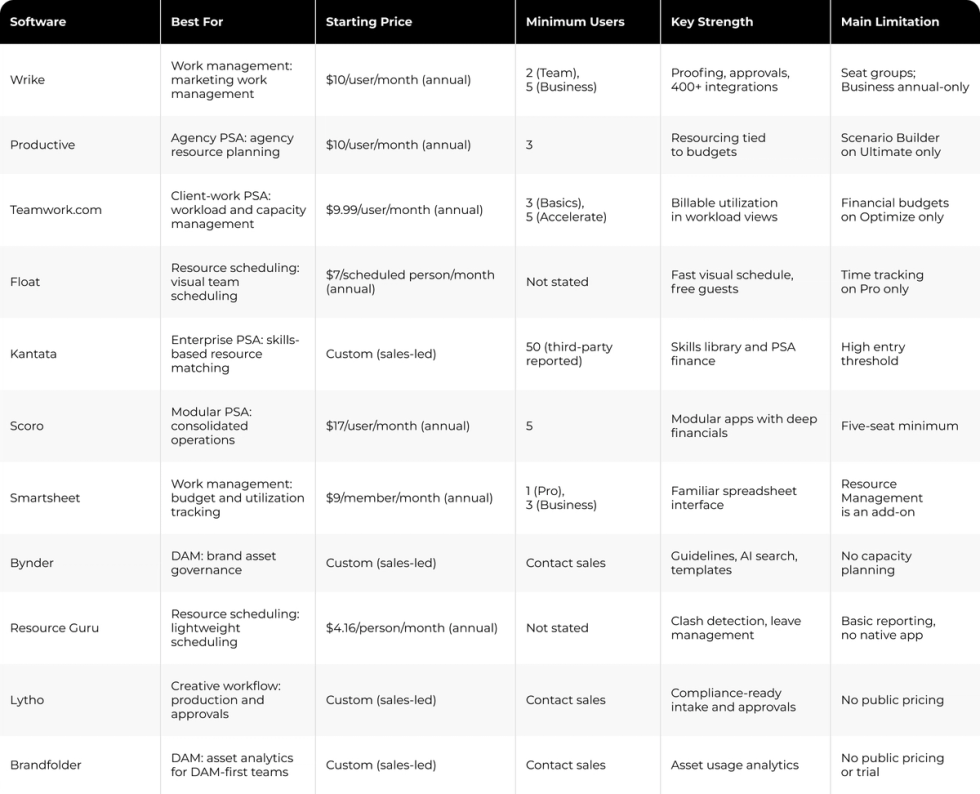
The table below groups all 11 tools by operating model, so you can match a category to your main problem before you compare prices and seat rules.
How Darwin Builds the Integration Layer Around Marketing Operations
An MRM tool can report only what the systems around it feed into it. When hours live in one tool, budgets in another and pipeline in the CRM, utilization and profitability reports drift apart and leaders stop trusting the numbers.
Meltwater had a related integration challenge at global scale: the company needed its marketing automation tools, including Marketo, connected to a network of regional sites. Darwin integrated those tools and managed updates and patches for 23 global sites, creating a more consistent operating setup.
This was an integration engagement, not an MRM implementation. For teams that need MRM data to reflect CRM and finance systems, the same principle applies: confirm the required integrations and reporting governance before selecting a platform.
FAQs
Q1. What is marketing resource management software?
Marketing resource management (MRM) software brings people, budgets, assets and workflows into one system. Teams use it to plan capacity, track spend against campaigns, route approvals and store approved assets, so conflicts and overruns appear early enough to fix.
Q2. What is the difference between MRM and marketing automation?
Marketing automation runs campaigns: email, lead nurturing, scoring and audience journeys. MRM manages the work behind those campaigns, including people, capacity, budgets, assets and approvals. Many teams use both, with automation for execution and MRM for planning and resources.
Q3. How much does MRM software cost for mid-market teams?
Published pricing checked in October 2026 spans $4.16 to $57 per user per month on annual billing, from Resource Guru Grasshopper to the Scoro End-to-end combination. Kantata, Bynder, Brandfolder and Lytho sell on custom quotes, and seat minimums raise the real cost.
Q4. When is a project management tool enough for Marketing Ops?
A project management tool is enough when the main need is tracking tasks, deadlines and owners for a team of moderate size. Once capacity conflicts, budget tracking and multi-step approvals start causing delays, a resource planning or MRM tool adds value.
Q5. Do mid-market marketing teams need a full MRM platform?
Not always. A full MRM platform helps when capacity, budgets, assets and approvals all need coordination. Teams with one main problem often get further with a scheduler, a DAM or better integrations between the tools they already use.