
Quick Answer:
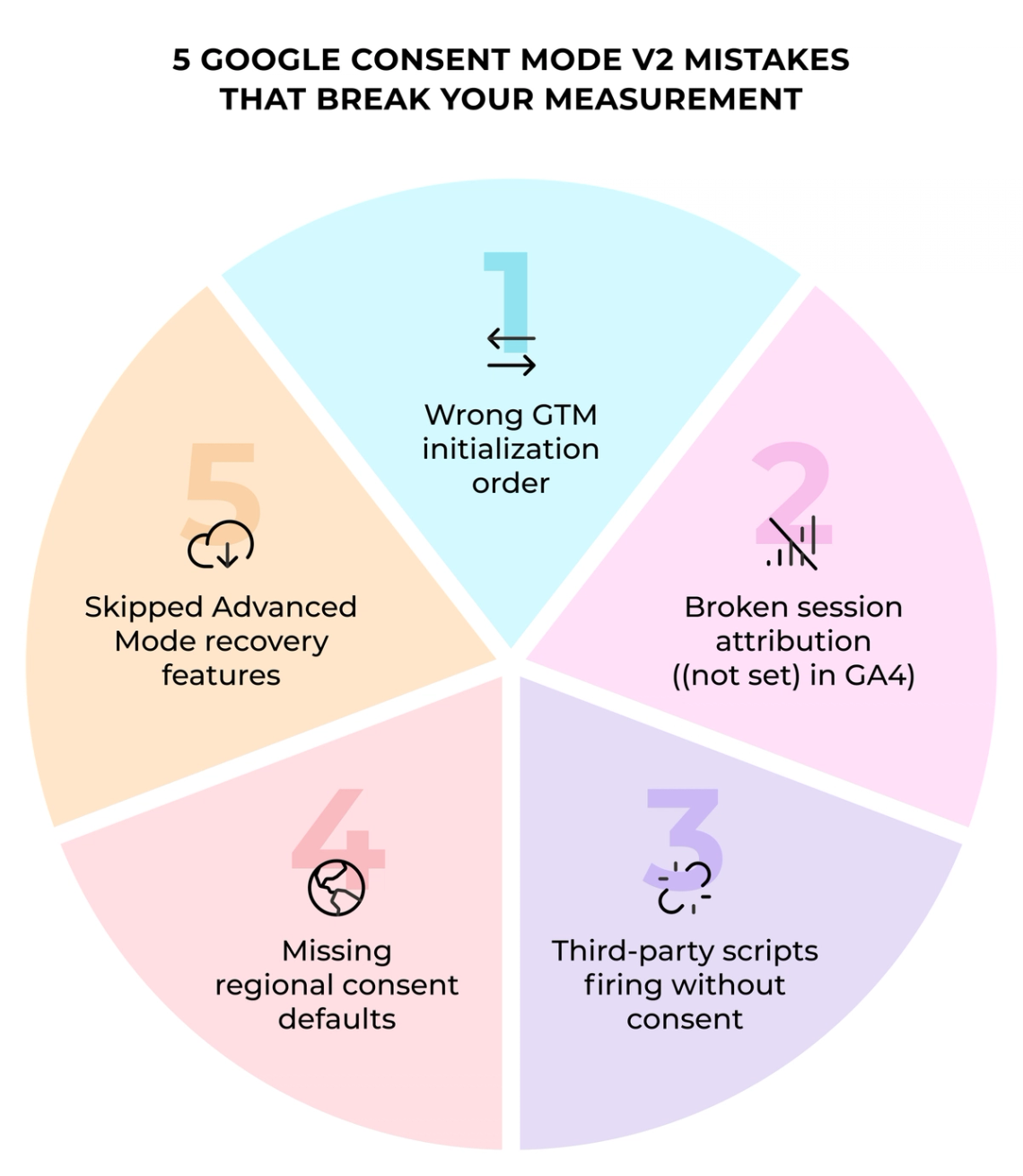
The most damaging Google Consent Mode V2 mistakes are incorrect GTM initialization order, broken session attribution from missing session_start events, third-party scripts firing outside the tag container, misconfigured regional consent defaults and skipped conversion modeling setup. Each one creates data gaps that compound over time. Fixing them requires auditing tag sequencing, regional rules and consent signal timing before reporting is trusted for budget decisions.
TL;DR
- GTM setups fail when consent defaults fire on Page View triggers instead of the Consent Initialization trigger, letting tags execute before any consent state is set.
- Missing session_start and page_view events cause GA4 to show (not set) for traffic sources throughout the acquisition report.
- Third-party scripts embedded outside GTM fire before consent banners load, creating compliance exposure regardless of CMP configuration.
- Global consent defaults applied without regional rules collect too much data in EEA jurisdictions and too little everywhere else.
- Advanced Consent Mode recovery features, blended reporting and conversion modeling, require deliberate activation and minimum data volume thresholds to work.
- Before June 15, 2026, verify your Consent Mode V2 ad signals because Google Ads data controls will rely more directly on consent parameters.
A paid media team reviews campaign results two months after a Google Consent Mode V2 rollout. Conversion volume is down. Retargeting audiences shrank. The attribution report shows (not set) for a significant share of traffic sources. Nobody flagged a problem because the banner appeared to be working. The implementation was broken from day one.
For marketing leaders, the risk is bigger than compliance: reports stop reflecting what is actually happening, and budget decisions become harder to defend.
Misconfigured consent mode produces silent data loss, attribution collapse and compliance exposure. Problems surface weeks later in reports, long after the implementation is done. This article covers five categories of mistakes that produce those outcomes and the specific fixes for each.
Where This Fits in Darwin Flux
Consent Mode V2 touches the full Darwin Flux framework, with the biggest impact on Connections and Clarity.
At the Surface level, the cookie banner and CMP determine which signals reach the measurement stack. At the Connections level, GTM initialization order and tag sequencing determine whether GA4, Google Ads and server-side systems receive consent-compliant data. When those connections break, attribution and reporting become unreliable.
Clarity depends on consistent session attribution and complete event flow. Missing events and broken consent updates make acquisition reports harder to trust for budget decisions.
At the Momentum level, conversion modeling and blended reporting only work when the underlying tracking flow is stable. Otherwise bidding systems optimize using incomplete conversion data.
Mistake 1: What Breaks When GTM Consent Setup Is Wrong?
GTM setups fail before a single user interaction occurs. Tags fire, cookies write and data hits Google servers before the consent logic initializes. The official Google developer guide is explicit: consent state must be established before any tags read it. By the time the consent banner renders, tracking has already collected data without permission.
Not Setting Consent Defaults Before Tags Fire
The default consent command must run before anything else touches the dataLayer. When a GA4 configuration tag fires before the default command sets analytics_storage to denied, that tag reads an undefined consent state and behaves as if consent was granted. Cookies write. Full hits reach Google servers.
The sequencing failure happens when consent defaults sit on standard triggers like Page View or All Pages. Those triggers fire after GTM initialization, giving other tags a head start. The correct approach sets all consent signals to denied at the earliest possible moment, then updates them only after users make their choices.
Missing Consent Initialization Trigger
GTM includes a specialized trigger called Consent Initialization that fires before any other trigger in the container. The dataLayer event for this trigger is gtm.init_consent. Your CMP integration or default consent tag must fire on this trigger, not on standard initialization triggers.
Every web container includes a built-in "Consent Initialization - All Pages" trigger by default. Placing a consent management platform tag on anything else creates a race condition where tracking tags execute before consent state is established.
"The "default" command should be set to fire on the Consent Initialization trigger so that the default state is established before any other tags fire." Simo Ahava, Co-Founder, Simmer
Update Events Firing at Wrong Time
The update command must fire the moment users make consent choices. Waiting until page unload means browsers may cancel that network request before it completes. Pushing the update too early, before the CMP has written preferences to storage, causes the update to reference stale or missing values.
When consent is already known at GTM load time, the update call belongs right after the default call, also on the Consent Initialization trigger. When consent changes through user interaction later, the update fires at that exact moment of confirmation. Simo Ahava's guide to consent settings in GTM covers the full sequencing logic.
Using Custom HTML Tags Instead of Templates
Custom HTML tags executing gtag commands in callbacks or asynchronous code are not guaranteed to complete before the next trigger fires. This timing gap lets other tags read incomplete consent states. Templates built with GTM's Consent APIs handle sequencing properly, ensuring consent information is available immediately.
Mistake 2: Why Does GA4 Show (Not Set) After Consent Mode V2 Implementation?
(Not set) in GA4 acquisition reports signals that session attribution broke during the consent transition. When session source or medium shows (not set), that traffic lands in the Unassigned channel group because no channel rules can match missing data.
The (Not Set) Traffic Source Problem
GA4 drops a placeholder called (not set) when it lacks information about where traffic originated. Direct traffic differs: Direct means GA4 detected a normal session but could not identify the source. (Not set) means something broke. When the session source shows (not set), attribution reports become unreliable and campaign performance tracking collapses.
Missing session_start and page_view Events
The session_start event helps establish session context used for attribution, including source, medium and campaign. Without it, GA4 cannot tie future activity to any traffic source. Landing page shows (not set) when the page_view event never fires. AnalyticsMania documents all root causes of (not set) in GA4 in detail.
This became common after the V2 rollout on sites using opt-in consent models. A user lands with consent denied by default. They grant consent after interacting with the banner. If tags fire incorrectly after that transition, GA4 misses the session start entirely. Google launched backend improvements in October 2024 to retroactively apply session context to events triggered before consent was granted, but only when the proper consent update is sent.
How Config Command Order Breaks GA4 Consent Mode
The GA4 configuration tag must fire on the Initialization trigger before any other Google Analytics tags execute. When GA4 event tags fire before the main config tag, traffic source dimensions pull from session_start before the session is established. The result is (not set) in campaign performance tracking reports. Bounteous covers this pattern in their GA4 attribution issues guide.
Using the default command to set all consent values, including updates after user interaction, removes the user_engagement event and drops the session_start parameter from the initial event. The update command handles consent changes after users make choices. Default applies only at initialization.
Custom Events Firing Before Configuration
Custom events that execute before the Google Tag initializes lack critical context like client_id and session_id. A form submission logged before identity settings or consent states apply creates disconnected session data.
Google rolled out an update on November 13, 2024 requiring a config command before custom events are processed. Previously, only automatic events like page_view waited for config. Custom events could fire earlier, causing session breaks and lost attribution. Campaign metrics become unreliable when early events fire without proper configuration.
Mistake 3: Why Do Third-Party Scripts Bypass Consent Settings?
Google Tag Manager controls when tags inside its container fire. It does not stop scripts embedded directly in page code from executing. A Facebook Pixel in a theme footer, a chat widget in a plugin, an A/B testing tool loaded via a hard-coded script tag: GTM has no control over any of them. The hidden cost of GA4 compliance includes exactly these architecture gaps that standard CMP setups miss.
Allowing Third-Party Scripts to Fire Without Consent
Scripts with async attributes download and execute as soon as they are ready, in no particular order. If the consent management code has not loaded yet, those scripts fire anyway. Visitors see a banner, but tracking already happened. 75% of tracking activities happen before users interact with consent banners, or when they actively reject cookies.
Manual blocking is necessary because automatic blocking through CMPs can miss scripts, slow down the site or block essential functionality. Each third-party script needs to be identified and wrapped in consent checks that prevent execution until users grant permission.
Uncategorized Cookies Bypassing Consent Logic
Cookie scans catch most tracking cookies, but anything added after the last scan slips through undetected. A new analytics script added on a Friday drops cookies immediately because the CMP does not know it exists. Uncategorized cookies do not match any category in consent logic and fire regardless of user choices.
Regular scanning matters, but so does a review process for categorizing new cookies before they go live. Scripts assigned to undefined categories bypass blocking rules entirely.
How Poor Cookie Management Breaks Retargeting Lists
Retargeting audiences lose qualified users quickly. Consent decline rates hit 30-60% for European traffic. Users who reject tracking never get added to remarketing lists. An audience of 10,000 warm prospects shrinks to 3,000 to 4,000.
Campaigns still run, but they reach a fraction of qualified users. Frequency climbs because the same small group sees ads repeatedly. Costs increase as competition for limited inventory grows. When cookie management fails, the highest-ROI channel shrinks with it.
Mistake 4: How Do Regional Consent Defaults Create Compliance Risk?
Setting one blanket consent default for every visitor creates three problems at once: compliance risk in strict jurisdictions, broken attribution in opt-in regions and unnecessary data loss where banners are not legally required.
Setting Global Defaults Instead of Regional Rules
The consent framework supports ISO 3166-2 region codes. Two-letter country codes like FR or DE, or state-level codes like US-CA for California. More specific regions override broader rules automatically. A US-level granted setting for ad_storage combined with a US-CA denied setting means California visitors receive the more specific rule. The practical setup guide for region-based consent rules covers the full configuration.
Google's EU User Consent Policy applies to the EEA, UK and Switzerland. Sites with European traffic must pass consent choices through proper regional configuration. Treating all global traffic as one undifferentiated bucket violates how Consent Mode V2 operates.
How Region Mismatches Create Compliance Risk
Regional mismatches produce two failure modes. First, data collection exceeds what regulations permit in stricter jurisdictions, creating compliance exposure. Second, measurement is unnecessarily restricted in regions where consent banners are not legally required.
A common pattern: analytics_storage scopes to specific regions while ad_storage stays global. That mismatch silently introduces compliance risk and breaks GA4 consent mode reporting consistency throughout the property.
Testing Your Setup with VPN and Chrome Tools
Chrome DevTools lets you set a simulated visitor location to verify region-specific consent behavior. Tag Assistant consent debugging recommends verifying default consent state, checking updates after user interaction and repeating tests with different simulated geographic locations. Without regional testing, the setup remains unverified until problems surface in production.
Mistake 5: What Happens When Advanced Consent Mode Recovery Features Are Skipped?
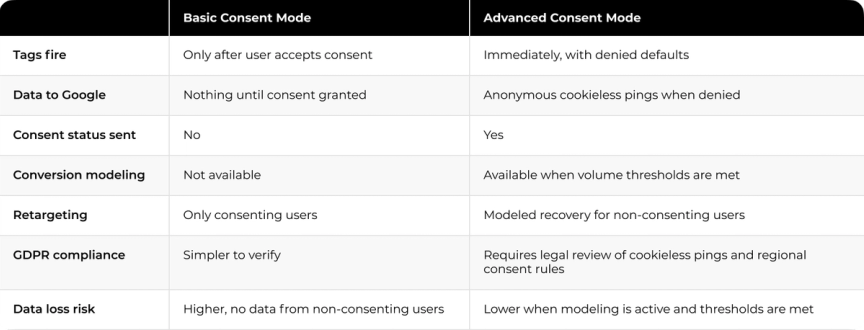
Advanced mode unlocks measurement recovery features that require deliberate activation. A technically correct implementation without these features active leaves significant data gaps unfilled. The difference between Basic and Advanced Consent Mode affects whether lost measurement can be recovered at all.
Skipping Blended Reporting in Google Analytics Consent Mode
Behavioral modeling appears when the property is eligible and Blended reporting identity is selected. Navigate to Admin, then Data Display, then Reporting Identity. Choose Blended to see combined observed and modeled data. Without this setting, reports only show consenting users. User counts appear artificially low and marketing analytics decisions rely on a fraction of actual traffic.
Missing Conversion Modeling Opportunities in Google Ads
Conversion modeling recovers can recover more than half of ad-click-to-conversion journeys lost to consent denials on average, with recovery rates varying by setup. Machine learning analyzes observable patterns from consenting users and applies those relationships to fill attribution gaps. Modeled conversions appear in the Conversions column with the same granularity as observed data.
Target ROAS and Target CPA bidding strategies use modeled conversions for optimization. If targets were adjusted downward after implementing Consent Mode V2, restore them to original ROI goals once modeling activates.
Not Meeting Data Volume Thresholds
Modeling requires at least 1,000 daily events with analytics_storage denied for seven consecutive days, plus 1,000 daily users with analytics_storage granted for seven of the past 28 days. Below these thresholds, Google Analytics consent mode cannot train accurate models. Properties with insufficient traffic see 90-95% drops in reported user counts. The cause is modeling that never activated, not user churn.
How to Verify Modeling Is Working
Check the Diagnostics tab in GA4 for modeling uplift metrics calculated per domain and country. Look for the data quality icon in reports showing "Including estimated user data." Sites that meet the volume threshold and have conversion modeling active in Google Ads can verify performance in the Conversions column directly. Starting June 15, 2026, Google will change how GA4 and Google Ads consent controls interact so any property running Advanced mode should verify modeling status after that date.
How Darwin Fixes Consent Mode Before It Breaks Reporting
Measurement fails when the consent layer is treated as a legal checkbox and the tracking foundation is ignored. Darwin starts by mapping where the signal breaks: GTM initialization order, regional consent defaults, third-party script exposure and modeling activation status. The fix rebuilds the foundation so attribution, reporting and optimization all work from the same clean signal.
When Cleo's team needed to maintain GDPR compliance without losing measurement, Darwin implemented Google Consent Mode, cookie banner configuration and BigQuery integration. The setup preserved usable analytics while keeping the property fully compliant. Consent infrastructure shapes whether the measurement system can still produce reliable insight while staying compliant.
In Darwin Flux, this is the Connections layer doing its job: protecting the signal at the point of collection so Clarity can support reporting, attribution and budget decisions downstream.
The consent setup that works correctly does not require ongoing firefighting. It produces clean data, compliant infrastructure and measurement systems that reflect actual user behavior.
FAQs
Q1. What is the difference between Basic and Advanced Google Consent Mode V2?
Basic Consent Mode blocks all Google tags until users accept consent. No data reaches Google, including consent status. Advanced Consent Mode loads tags immediately with denied defaults and sends anonymous cookieless pings when consent is rejected. Advanced mode enables conversion modeling that can recover more than half of lost measurement data on average, with recovery rates varying by setup and volume, but requires minimum volume thresholds of 1,000 daily events for seven consecutive days to activate.
Q2. Why does my GA4 traffic source show (not set) after implementing Consent Mode V2?
(Not set) appears when session_start and page_view events fail to fire correctly during the consent transition. This happens when tags execute before the GA4 configuration tag initializes, or when consent update commands fire at the wrong time. The session loses attribution context and lands in the Unassigned channel group, making acquisition reporting unreliable.
Q3. What are the four consent parameters in Google Consent Mode V2?
The four parameters are analytics_storage, which controls whether analytics cookies can be read or written; ad_storage, which governs advertising cookies; ad_user_data, which determines whether personal data reaches Google for advertising purposes; and ad_personalization, which enables or blocks personalized ads. V1 had only two parameters. The last two are new in V2 and control how collected data can be used downstream for remarketing and audience building.
Q4. How do I stop third-party scripts from bypassing my consent settings?
Google Tag Manager only controls tags inside its container. Scripts embedded directly in page code, theme files, plugins and hard-coded script tags fire regardless of GTM configuration. Each third-party script needs to be identified, categorized in the CMP and wrapped in consent checks that block execution until users grant permission. Regular cookie scanning is required because scripts added after the last scan will fire uncategorized.
Q5. How do I know if conversion modeling is active in my GA4 property?
Check the Diagnostics tab in GA4 for modeling uplift metrics calculated per domain and country. Reports that include modeled data display a data quality icon showing "Including estimated user data." For modeling to activate, the property must collect at least 1,000 daily events with analytics_storage denied for seven consecutive days, plus 1,000 daily consenting users for seven of the past 28 days.