
Quick Answer:
GA4's native AI Assistant channel, added in May 2026, tags visits from recognized assistants like ChatGPT and Gemini automatically, and it excludes Perplexity along with every session that arrives without a referrer. To track AI referral traffic end to end, pair a custom GA4 channel group with UTM parameters and a hidden form field, then map the source into CRM lead and opportunity records so it survives to closed-won revenue.
TL;DR
- GA4 added a native AI Assistant channel on May 13, 2026. It recognizes sources like ChatGPT and Gemini and skips Perplexity plus all referrer-less sessions.
- A custom channel group with a source regex catches the platforms and sessions GA4 misses. Order it above Referral so it evaluates first.
- UTM parameters and a hidden form field lock the AI source to the lead before the CRM overwrites it.
- Map that source to a CRM Lead Source and a read-only First Touch field so it carries through opportunity and closed-won reporting.
- Join GA4 and CRM in one dashboard to report AI traffic as pipeline and revenue, not session counts.
AI assistants moved from novelty to a live acquisition channel faster than most reporting stacks adapted. When a buyer asks ChatGPT or Perplexity which platform fits their workflow and clicks through to your site, that visit carries real intent. The problem is what happens next in your analytics. GA4 shipped a native AI Assistant channel in May 2026, which helped, and it left two gaps open: Perplexity may still land in Referral unless you cover it with a custom channel group, and any session that loses its referrer header lands in Direct. Both gaps break the line between an AI-sourced click and the revenue it produces. This guide walks through the tracking design that closes them, from the first GA4 setting to a revenue report your CFO will trust.
AI Traffic Stays Invisible Until You Track It
Every AI referral leaves a faint signal, a referrer header or a UTM parameter. That signal is fragile, and it decays as the visitor moves: the browser can strip it, a form can overwrite it, a sales handoff can drop it. Reliable measurement means catching the source at the click and carrying it through each system that touches the lead, so the visit GA4 sees stays tied to the revenue the CRM records. Get that chain right and AI discovery stops being a curiosity in a referral report and turns into a channel you can defend when budgets are set.
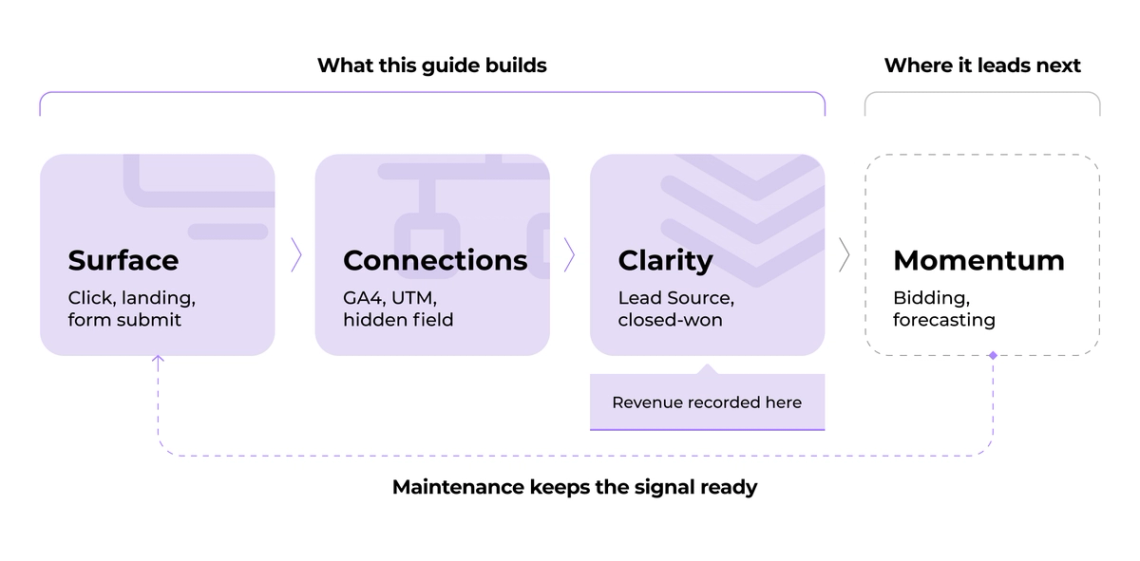
In Darwin Flux terms, that path runs through four stages: Surface, Connections, Clarity and Momentum. Surface is where the signal first appears: the click from an assistant answer, the landing page and the form submission that marks intent. It then has to survive Connections, where GA4 channel rules, UTM parameters and a hidden field carry the origin into the CRM. Clarity comes next, when Finance and Marketing read the same number through Lead Source and First Touch fields that hold from first touch to closed-won. Momentum is where a clean signal would go next, into bidding, forecasting and automation. That is a separate build. Here the goal is narrower: keep the signal trustworthy through weekly, monthly and quarterly checks, so it is ready when those decisions come.
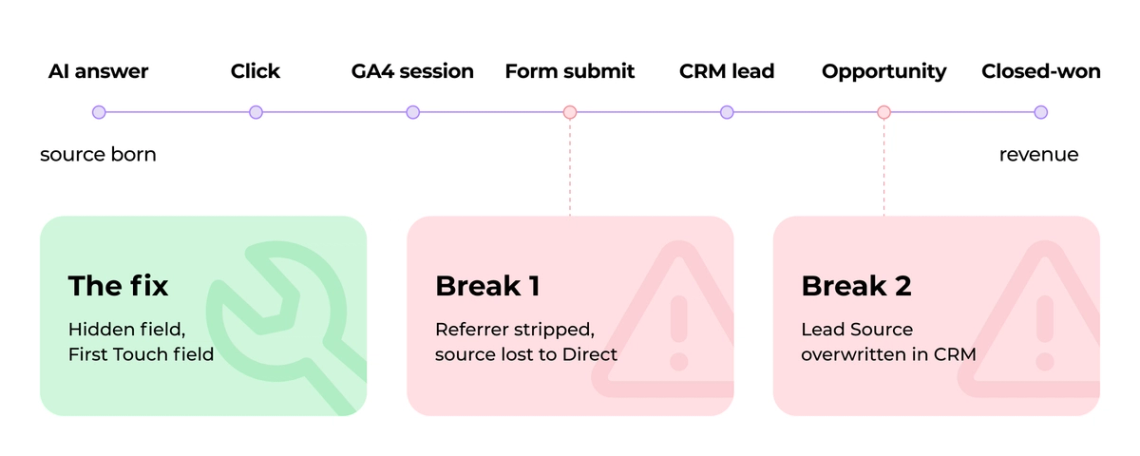
Two failure points sit in the Connections and Clarity layers. GA4 records the visit, then the source is lost at the form submit, or it reaches the CRM and gets overwritten before the opportunity closes. The rest of this guide follows that chain, from surfacing the source at the click to holding it through to revenue.
Four Traffic Types That Look Alike in GA4
Four things arrive in GA4 looking similar, and only one is the AI referral traffic you want to report. Naming them correctly decides how you measure each.
- AI referral traffic. A user reads an assistant's answer, such as a ChatGPT recommendation, and clicks the link to your site. This is intentional, discovery-driven traffic and the subject of this guide.
- AI crawlers. Bots that index your content for training or answers. They do not create user sessions and should be filtered out of session counts.
- Google AI Overviews. Summaries that appear inside search results. Clicks from them report under Organic Search, not as a separate AI source.
- Standard organic search. A user finds you through a keyword search on Google or Bing. The referrer stays intact and GA4 assigns it cleanly to the Organic channel.
Each needs a different treatment. AI referrals need custom channel logic or UTM tagging to avoid misattribution. Crawlers get excluded. AI Overviews roll into organic. Only standard search fits GA4's built-in channel rules without help.
Set Up a Custom AI Channel Group in GA4
GA4's native AI Assistant channel covers part of this traffic, so a custom channel group fills the rest. The two work together: the native channel handles recognized referrers, and your custom group catches the platforms and sessions Google leaves out.
Know What the Native AI Assistant Channel Covers
Google added a native AI Assistant channel to GA4 on May 13, 2026, with broad availability to most properties by early June. When GA4 detects a referrer matching a recognized assistant, it sets the medium to ai-assistant, groups the session under the AI Assistant channel and stamps the campaign as (ai-assistant). No setup is required. Two limits matter before you rely on it. Google's current default channel description names sources like ChatGPT, Gemini, Deepseek, Copilot and Grok, and it excludes Google AI Overviews and AI Mode. Perplexity is not listed there, so validate whether it still lands under Referral in your own property and cover it with a custom channel group. Default channel groups cannot be edited in GA4, so you cannot add Perplexity to the native channel directly. Sessions that arrive without a referrer header, common on mobile apps and copied links, fall into Direct regardless.
Create the Custom Channel Group
1. In GA4, open Admin (bottom left), then Data display and Channel groups.
2. Click Create new channel group and name it Default + AI Traffic.
3. GA4 copies your default channels as a starting template.
4. Click Create channel and name the new channel AI Traffic.
Write the Source Regex
In the AI Traffic channel, set the condition to Source, match type Matches regex, and use a pattern that includes Perplexity explicitly:
(^|\.)(chatgpt\.com|chat\.openai\.com|openai\.com|perplexity\.ai|claude\.ai|gemini\.google\.com|copilot\.microsoft\.com|deepseek\.com|grok\.com|meta\.ai|you\.com)$The (^|\.) prefix matches each domain and its subdomains, and $ closes the match. Perplexity sits in this list because the native channel omits it. Validate the pattern against your own Session source values before you rely on it, since platforms add domains and subdomains over time.
Order the AI Channel Above Referral
GA4 evaluates channel rules from top to bottom, so rule order decides attribution. Drag the AI Traffic channel above Referral. If Referral evaluates first, AI sessions match it and get miscategorized. A working order runs Organic Search, Paid Search, Paid Social, Paid Other, AI Traffic, Referral, Direct, then Other. Save the channel group once the order is set.
Validate in Realtime and Explorations
Open Reports and Realtime, then visit your site through a live ChatGPT or Perplexity link in another tab and confirm the session appears with the expected Source / Medium, for example perplexity.ai / referral. For a deeper check, open Explore, add Session source as a dimension and Sessions as a metric, and filter Session source with the regex chatgpt|perplexity|claude|gemini|copilot|deepseek|you|grok. Compare the result against your custom channel group so the AI Traffic totals line up.
Preserve the AI Source from Click to CRM
GA4 records the source, and a UTM parameter plus a hidden field keep it alive once the visitor becomes a lead. Referrer loss is the reason both are needed: some 2026 analyses estimate that a significant share of AI sessions arrive without a referrer header. Design for that case, not the ideal one.
Tag Outbound Links with UTM Parameters
Where you control the link, add UTM parameters as a failsafe for stripped referrers. You do not control every link an assistant shows from an organic answer, so this helps only where the link is yours: owned prompts, partner links, campaigns, AI answer testing pages and controlled distributions. Keep the naming consistent: utm_source is the platform domain, utm_medium is ai_referral to group all AI traffic, and utm_campaign is a descriptive label. An example URL:
https://yoursite.com/solution?utm_source=chatgpt.com&utm_medium=ai_referral&utm_campaign=ai-assistantThese values also populate GA4's Campaign field, giving you a second attribution anchor when the referrer is gone.
Capture the Source in a Hidden Form Field
A hidden field on every form records the AI source at submission, so attribution survives even when the visitor leaves and returns before converting. Add the field to the form:
<input type="hidden" name="ai_source" id="ai_source" value="">Store the first detected source in localStorage so a later visit does not overwrite it. Read UTM source first, then the referrer domain, then direct only when neither exists, and populate the field from that stored value at submission:
var AI = /chatgpt|openai|perplexity|claude|gemini|copilot|deepseek|grok/i; var src = localStorage.getItem("ai_source"); if (!src) { var utm = new URLSearchParams(location.search).get("utm_source"); var ref = document.referrer ? new URL(document.referrer).hostname : ""; src = utm || (AI.test(ref) ? ref : "") || "direct"; localStorage.setItem("ai_source", src); } document.getElementById("ai_source").value = src;Because the value is written on the first visit, the ai_source that flows into the CRM is the true first touch, not the last page a visitor happened to arrive from.
Map the Source to CRM Lead Fields
Configure the CRM to translate GA4 and UTM values into a CRM Lead Source and campaign field so every AI-sourced lead carries a consistent label:
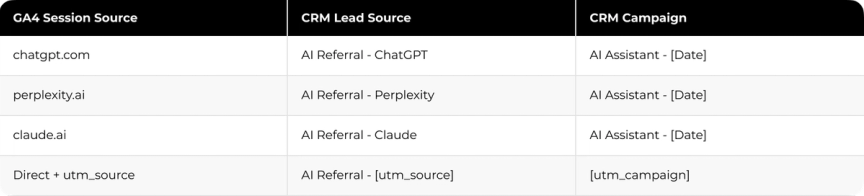
Match utm_source against your known AI domains to set the Lead Source, use the hidden field as a backup when the UTM is missing, and populate Campaign from utm_campaign or a dated default. The revenue team can then filter reports by Lead Source to see which assistants drive pipeline.
Carry Attribution Through Pipeline to Revenue
A lead source only proves ROI when it survives the handoff to an opportunity and a closed deal. The chain is simple: lead source, opportunity created, deal closed. At each step the First Touch Source must remain intact.
- When a lead converts from an AI referral, the CRM record captures the source as a Lead Source value.
- When sales opens an opportunity, a workflow rule copies the lead source into a custom First Touch Source field on the opportunity.
- The opportunity is tagged with the specific assistant so revenue can be segmented by source later.
- The First Touch Source field stays read-only as the deal moves through stages, which prevents accidental overwrites.
An illustrative path: a prospect finds your platform through a ChatGPT answer, lands on your pricing page and books a demo. The hidden field records chatgpt.com as the source, and the CRM creates a lead tagged AI Referral - ChatGPT. When the account executive opens an opportunity, a workflow copies that value into the read-only First Touch Source field. Months later the deal closes, and the revenue traces back to that first AI answer.
With this in place, a report that filters opportunities and closed-won deals by First Touch Source shows patterns you can act on, such as which assistant sends the leads that close. That is the point where AI discovery earns a line in the revenue conversation.
Build One Dashboard That Ties AI Traffic to Pipeline
A single dashboard joining GA4 sessions and CRM revenue turns scattered numbers into one report leadership reads. Track a short set of metrics that runs from demand to revenue:
- AI sessions by source, to see which assistants send traffic.
- Leads sourced from AI, counting form submissions and demo requests tied to AI sessions.
- Opportunities created from AI leads, the bridge from awareness to pipeline.
- Pipeline value and closed-won revenue attributed to AI traffic.
- Conversion rates by AI source: session to lead, lead to opportunity, opportunity to revenue.
To isolate AI traffic inside GA4 Explorations, filter Session source with the same regex you used for validation, chatgpt|perplexity|claude|gemini, then combine it with dimensions like Landing page and Country and metrics like Sessions and Conversions. Update the dashboard weekly to catch attribution drift early, and compare AI conversion rates against your other channels so the numbers stay honest.
Keep AI Attribution Accurate Over Time
AI platforms and referrer behavior change, so the tracking needs a light maintenance rhythm. Most attribution gaps come from a handful of predictable causes.
- Referrer stripping. Some AI sessions lose their referrer in transit and land as Direct. Watch the Direct and Unassigned channels weekly for spikes that signal a new platform variant or a browser privacy change.
- Copied and pasted links. Users copy an AI link and paste it into a new tab or a chat tool, which drops the referrer. UTM parameters on links you control recover the source.
- Mobile app referrals. Native assistant apps commonly strip referrers entirely. Add a UTM layer where you can, and document the remaining gap in your reporting.
- Overwritten lead sources. If a form defaults Lead Source to Website, it can overwrite the hidden field. Confirm the hidden value maps first, or protect it with a workflow rule.
- Downstream loss. Manually created or duplicated opportunities can drop the First Touch Source. Audit opportunity workflows monthly to confirm the field populates at conversion.
A simple cadence keeps the system reliable: weekly, spot-check Realtime by session source for Direct spikes; monthly, run 10 to 15 recent AI leads through the pipeline to confirm First Touch Source persists; quarterly, update the domain regex for new platforms like Deepseek and Grok and validate that UTM parameters still append correctly.
When the AI Number Has to Survive a CFO's Questions
The hard part is not seeing AI traffic in GA4. It is proving that the traffic became pipeline and revenue when finance asks. That proof lives in the join between analytics and the CRM, and it breaks wherever the source is dropped along the way.
Darwin rebuilt that join for Cleo by connecting GA4, Salesforce and BigQuery into Looker Studio, so reporting logic became easier to trust and maintain.
The AI Assistant channel gives you a starting number. Turning that number into a revenue line your leadership trusts is a data design task, and it is the same task whether the source is Perplexity, ChatGPT or the next assistant that appears.
FAQs
Q1. Does GA4's native AI Assistant channel track Perplexity?
No. Google's current default channel description names sources like ChatGPT, Gemini and Copilot, and Perplexity is not listed there, so teams should validate whether it still lands under Referral in their own property and cover it with a custom channel group if needed.
Q2. Why does AI traffic show up as Direct in GA4?
Many AI sessions arrive without a referrer header, which is common on mobile apps and copied links. GA4 has no source to read, so it files the visit as Direct. UTM parameters and a hidden form field recover the source.
Q3. Can I edit GA4's default AI Assistant channel to add platforms?
No. Default channel groups are not editable in GA4. To capture platforms Google omits, build a separate custom channel group and order the AI rule above Referral.
Q4. How do I connect an AI referral to closed-won revenue?
Capture the source in a hidden form field, map it to a CRM Lead Source, then copy it into a read-only First Touch field on the opportunity. The value then follows the deal to closed-won.
Q5. What should a SaaS team prioritize first when implementing AI privacy controls?
Start where risk is highest. Teams processing sensitive data at scale should prioritize encryption and isolation, while teams leaning on third-party AI should audit vendor compliance first. For most, the practical order is to inventory AI features, classify risk and add logging and transparency.