Quick Answer:
A website security audit is the readiness check you run ahead of a penetration test. It reviews your public-facing site, forms, integrations and data-capture points for known weaknesses, so a paid pentest spends its time on real gaps, not basic misconfigurations. The ten checks below cover attack surface, TLS, security headers, CMS and dependencies, access controls, exposed secrets, form handling, third-party scripts, logging and remediation planning.
TL;DR
- A website audit is a non-exploitative external review; a penetration test is active and hands-on. Run the audit first so the pentest starts from a clean baseline.
- Scope the audit to the website and its data-capture chain: public assets, forms, CMS, third-party scripts and integrations feeding your CRM and analytics.
- The most common findings are basic: expired certificates, missing security headers, outdated CMS plugins and exposed secrets in client-side code.
- Document every finding with an owner, a severity and a remediation date, then decide which gaps genuinely need specialist penetration testing.
- Darwin runs a free external website security audit that maps this surface and hands you a prioritized remediation list.
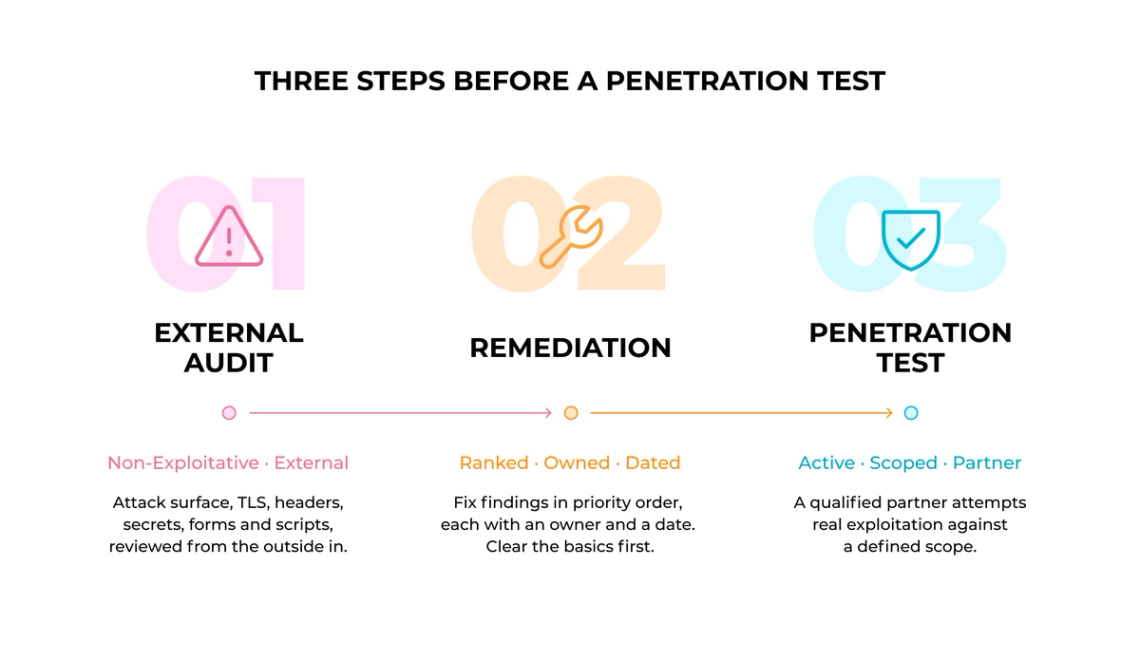
A website security audit is the health check you run before you commit to a penetration test. The two are often confused, so it helps to separate them early. An audit is a non-exploitative external review: it looks at your public-facing site, forms and integrations from the outside and flags known weaknesses. A penetration test is active and hands-on: a qualified security partner attempts real exploitation against a defined scope.
Running the audit first changes the economics of the whole exercise. The website issues that surface during testing are usually basic hygiene problems, and paying a specialist to rediscover an expired certificate or a missing security header is expensive. This guide walks through ten checks scoped to your website and its data-capture chain, so the pentest you eventually book starts from a clean baseline and spends its budget on genuine risk.
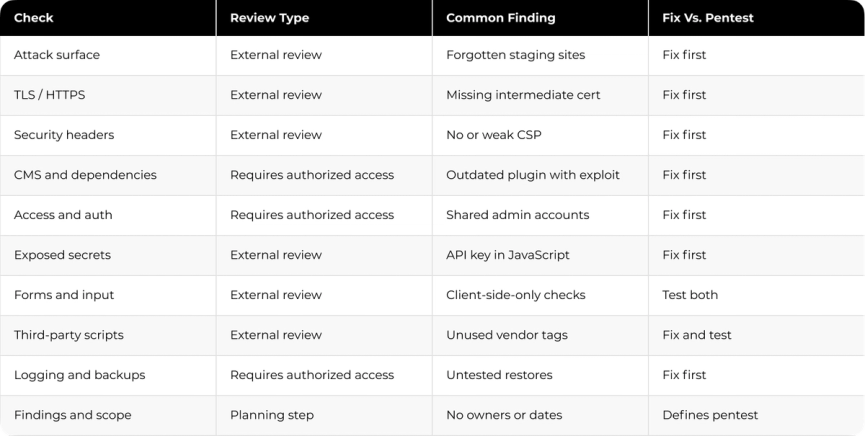
Some of these checks can be completed externally. Others, including account reviews, dependency inventories, and backup restore tests, need access from your internal team or an authorized security partner. Darwin’s external audit focuses on publicly observable website risks and flags the internal checks that should follow. The list below marks which checks are external and which need internal access.
Where a Website Audit Fits Your Broader Security Picture
A website audit is most useful when it connects to the systems behind the site and does not sit as a one-off report. Darwin structures that connection through four working ideas. Surface means mapping every public entry point an attacker can reach: domains, subdomains, forms and exposed endpoints. Connections covers the data paths where those forms and scripts hand information to your CRM, analytics and third-party services, since a weak link there exposes data the website itself never stored. Clarity turns raw findings into a ranked, owned remediation list that a team can act on. Momentum keeps the work moving after the first pass, because a static audit ages the moment new code ships.
Read together, these four ideas of Darwin Flux frame website security as an ongoing property of your architecture, so the checks below feed a repeatable process, not a single snapshot.
1. Map Your Public-Facing Assets and Attack Surface
What to Check
Your attack surface is every public-facing asset tied to your brand, and mapping it is the first thing an audit does. Start with what an outsider can reach: your primary domain, every subdomain, marketing microsites, staging sites left online, and any web application or API exposed to the internet.
Document the data each asset touches. A campaign landing page that captures emails carries different risk from a brochure page, so note where forms, logins and payment flows live.
Why It Matters
An audit can only cover assets you have written down. Around 76% of organizations have suffered at least one attack through an unknown, unmanaged or poorly managed internet-facing asset, and forgotten subdomains and abandoned staging sites are common culprits.
For a B2B website, the surface expands quietly. Marketing spins up microsites, developers register test subdomains, and each one becomes an entry point that no one is watching.
How to Implement
Use external discovery that sees your infrastructure the way an attacker does, from the outside in, so you catch assets your internal inventory missed. Cross-check DNS records, certificate transparency logs and your domain registrar for anything you forgot.
Classify each asset by the sensitivity of the data it handles, then flag anything public that should not be, such as an exposed admin panel or a staging site indexed by search engines.
Common Pitfalls to Avoid
A common gap is auditing only the primary domain and missing the long tail of subdomains and microsites. Attackers look there first because that is where oversight is thinnest.
A one-time map ages fast. Treat discovery as a recurring task, because a new subdomain can appear the moment a campaign launches.
2. Verify TLS and HTTPS Configuration
What to Check
TLS configuration decides whether traffic to your site is genuinely protected, so the audit validates both the certificate and the protocol. Confirm the certificate is valid, unexpired, issued by a trusted authority and covers every hostname visitors genuinely use, including the bare and www variants.
Check the protocol and cipher settings your server negotiates. Current deployment guidance favors modern TLS versions and retiring legacy protocols and weak ciphers that expose sites to downgrade attacks.
Why It Matters
A broken or missing certificate breaks trust immediately, and browsers now warn users away from sites that fail validation. A frequent real-world failure is a missing intermediate certificate, which can work in one browser and fail in another.
Certificate lifetimes are shrinking on a fixed schedule. The CA/Browser Forum set a phased reduction from 398 days to 200 days in 2026, 100 days in 2027 and 47 days by 2029, which makes renewal automation a genuine operational concern, not an annual afterthought.
How to Implement
Run an external TLS scan to confirm the certificate chain, supported protocols and cipher suites in one pass. Set expiry alerts well ahead of the renewal date so a lapse never reaches production.
Enforce HTTPS everywhere with a redirect and an appropriate HSTS policy, so browsers refuse to downgrade the connection.
Common Pitfalls to Avoid
Incomplete certificate chains cause the most trouble, because the site loads for you while failing for a first-time visitor whose browser has not cached the intermediate.
Self-signed certificates belong in development only. In production they produce browser warnings that drive users away.
3. Review Security Headers
What to Check
Security headers are instructions your server sends the browser about how to handle your pages, and the audit checks which ones you send. Look for Content-Security-Policy, which limits where scripts and styles may load from, X-Content-Type-Options set to nosniff, X-Frame-Options or a frame-ancestors policy to block clickjacking, and Strict-Transport-Security to lock in HTTPS.
Review the values, not just the presence. A header that exists but is misconfigured gives a false sense of safety.
Why It Matters
Headers are a low-cost line of defense that shut down whole classes of browser-level attack, and they usually require little change to the application itself. A tuned Content-Security-Policy is one of the strongest defenses against cross-site scripting available to a web team.
Automated scanners grade a handful of critical headers and flag missing ones as findings, so gaps here surface quickly during any external review.
How to Implement
Configure headers at the web server or CDN, not in application code, so they apply uniformly. On common servers this is a directive in the configuration file, per vendor guidance, and it should be tested ahead of the live release.
Start Content-Security-Policy in report-only mode, watch what it would block, then enforce it once legitimate sources are allowlisted.
Common Pitfalls to Avoid
An overly permissive policy defeats its own purpose. A Content-Security-Policy that allows scripts from anywhere protects nothing.
Short HSTS max-age values weaken the guarantee, since browsers discard the policy quickly, per Okta guidance. Apply headers consistently on every deployment so gaps do not appear between staging and live.
4. Audit CMS, Plugins, Frameworks and Outdated Dependencies
What to Check
Your CMS and its extensions are the most attacked part of most B2B websites, so the audit inventories every component and its version. List the CMS core, every active and inactive plugin or module, the theme, and the front-end and back-end frameworks the site depends on.
Compare each version against its current release and known vulnerability advisories. An outdated plugin with a public exploit is one of the most common ways a marketing site gets compromised.
Why It Matters
Known vulnerabilities in outdated components are a fast-growing entry point. The Verizon 2025 DBIR found that exploited vulnerabilities were the initial access vector in 20% of breaches, a 34% rise year over year, and attackers scan for these published flaws automatically.
First-time application scans routinely surface at least one vulnerability, so treating an unscanned stack as clean is a guess, not a finding.
How to Implement
Maintain a dependency inventory and subscribe to advisories for every component in it. Automate scanning so a newly disclosed vulnerability in a plugin you run reaches you the same week.
Remove inactive plugins and unused themes entirely, because deactivated does not mean safe. Dormant code still ships to the server and can still be exploited.
Common Pitfalls to Avoid
Leaving deactivated plugins installed is a frequent oversight. If the files are on disk, they can be reached.
Skipping updates on a site that "just works" is how a quiet marketing microsite becomes the breach that reaches your main infrastructure.
5. Check Access Controls and Authentication
What to Check
Access control decides who can reach what, and the audit examines authentication, session handling and authorization together. Pull the current list of accounts for every system that touches the website and its data: CMS admins, hosting, DNS, and any connected marketing platform.
Check whether you use role-based access control, which assigns permissions to roles, not to individuals and makes reviews far faster. Look for vertical gaps, where an ordinary user can reach admin functions, and horizontal gaps, where one user can reach another user's data.
Why It Matters
Broken access control ranks among the most exploited weaknesses in real-world web attacks. The damage spreads into unauthorized data exposure and privilege escalation.
“Access control is only effective when implemented in trusted server-side code or serverless APIs, where the attacker cannot modify the access control check or metadata.”
OWASP Top 10, A01: Broken Access Control, 2025
Compromised credentials remain a leading breach cause. The Verizon 2025 DBIR reports that stolen credentials were the initial access vector in 22% of breaches, and that 88% of attacks against basic web applications involved stolen credentials. That is why multi-factor authentication on every privileged account matters so much.
How to Implement
Apply least privilege: give each account the minimum access its job needs, and enforce authorization on the server, since hiding buttons in the interface is not enforcement. Require multi-factor authentication for all administrative access.
Cross-check the access list against your current staff roster, and remove accounts for people who have left. Review access on a schedule that matches the site's risk.
Common Pitfalls to Avoid
Shared administrator accounts destroy accountability, since you cannot trace an action to a person. Give everyone their own credentials.
Relying on security questions for recovery is weak, because the answers often sit on public social profiles.
6. Find Exposed Secrets and Sensitive Information
What to Check
Exposed secrets are credentials and keys that end up somewhere public, and the audit hunts for them through the site's delivery. Inspect client-side JavaScript, HTML comments, exposed configuration files and public repositories for API keys, access tokens, database strings and internal endpoints.
Check what your error pages and directory listings reveal. Verbose errors and open directories hand attackers a map of your stack.
Why It Matters
A single leaked key in front-end code can grant access to a connected service that stores far more than the website itself. Because the code runs in the browser, anyone can read it.
Secrets committed to a public repository are found quickly, since automated tools continuously scan public code for exactly this pattern.
How to Implement
Keep secrets server-side and out of anything shipped to the browser. Route third-party calls through a backend so keys never appear in client code.
Scan your front-end bundles and repositories for credential patterns, and rotate any key that has ever been exposed, on the assumption someone noticed.
Common Pitfalls to Avoid
Hard-coding an API key into client-side JavaScript for convenience is a recurring mistake, and it is trivial to extract.
Leaving default error verbosity on in production leaks stack traces and file paths that speed up an attacker's work.
7. Test Forms and Input Handling
What to Check
Forms are where your website accepts untrusted input, so the audit tests how every input is validated and sanitized. Cover every entry point: contact and demo forms, search boxes, file uploads, URL parameters and any API the front end calls.
Confirm validation happens on the server, because client-side checks are easily bypassed with browser tools or a proxy. Client-side validation improves the user experience but provides no security on its own.
Why It Matters
Missing or weak input validation drives many web vulnerabilities, including cross-site scripting and SQL injection. For a B2B site, a vulnerable form is a direct line into the CRM or database behind it.
Validation alone does not stop every attack, though it reduces the attack surface and limits the damage when something does get through.
How to Implement
Validate input as early as it arrives, using an allowlist of acceptable values and rejecting everything else. Use parameterized queries for every database call so input can never be executed as a command.
Sanitize and encode output based on where it is rendered, and treat file uploads as hostile until proven otherwise.
Common Pitfalls to Avoid
Blocklist validation fails because no one can anticipate every malicious input. Allowlisting the acceptable set is the reliable approach.
Relying on sanitization while skipping parameterized queries leaves the SQL injection door open regardless of how clean the input looks.
8. Review Third-Party Scripts and External Integrations
What to Check
A third-party script loaded directly into a page can access and modify page content available to first-party JavaScript, so the audit inventories every external script and integration on the site. List analytics tags, chat widgets, ad pixels, A/B testing tools and anything loaded from a domain you do not control.
Map where each integration sends data. A tag that captures form fields and ships them to an external service is part of your data-capture chain and belongs in the review.
Why It Matters
A compromised third-party script executes in your users' browsers with full access to the page, including data entered into forms. Supply-chain attacks through analytics and widget vendors are a proven route to skimming customer data.
For a B2B site wired into a CRM and analytics stack, these integrations are exactly where the website meets the systems that hold your pipeline data. A weak link here exposes more than the page.
How to Implement
Keep a living inventory of every external script and the vendor behind it, and remove tags no one uses anymore. Load third-party code with integrity checks where the vendor supports them.
Constrain what external scripts can do through your Content-Security-Policy, so a compromised vendor cannot exfiltrate freely.
Common Pitfalls to Avoid
Tag sprawl is the common failure: marketing adds scripts over years and no one removes them, leaving forgotten vendors with access to every page.
Trusting a vendor's domain indefinitely ignores that the vendor itself can be breached. Review who still needs to be on the page.
9. Verify Logging, Monitoring and Backups
What to Check
Logging tells you what happened and backups let you recover, so the audit confirms both exist and work. Check that access, error and administrative actions are logged, forwarded off the web server, and retained long enough to investigate an incident.
Confirm backups run on a schedule, are encrypted, and sit in storage separate from production so a single compromise cannot destroy both.
Why It Matters
Without logs, a breach is invisible until the damage is public, and you cannot reconstruct how an attacker got in. Logs kept only on the compromised server disappear in the attack that mattered.
A backup you have never restored is an assumption. Recovery plans fail during real incidents precisely because no one tested the restore.
How to Implement
Forward logs to separate storage and set alerts for suspicious patterns such as repeated failed logins. Retain enough history to investigate a slow-moving intrusion.
Follow a layered backup strategy with copies in more than one location, and test the restore on a schedule so you know it works before you need it.
Common Pitfalls to Avoid
Storing backups only on the same infrastructure as production means one incident takes out both. Keep at least one copy elsewhere.
Skipping restore tests means you discover corruption during the recovery you were counting on.
10. Document Findings and Define Pentest Scope
What to Check
The audit is only useful if it ends in an ordered plan, so the final step turns findings into a ranked remediation list. Record every issue with its location, a severity based on real exploitability and business impact, an owner and a target date.
Separate what you can fix yourself from what genuinely needs specialist testing. That separation defines the scope of the penetration test you book next.
Why It Matters
A pile of findings with no owners or dates changes nothing. Findings need structure: severity, ownership and a remediation trail auditors and buyers can follow.
“Defenders cannot afford to take weeks to patch systems that can be autonomously exploited en masse.”
Chris Butera, Acting Executive Assistant Director for Cybersecurity, CISA
Severity scores measure technical seriousness, not business risk. Two issues with the same score can carry very different real-world impact depending on which asset they sit on.
How to Implement
Keep findings in one repository, rank them by exploitability and the value of the data at risk, and track remediation to closure. Fix the basics the audit surfaced before the pentest, so the engagement targets real depth.
Scope the penetration test around what the audit could not settle: business logic, chained exploits and anything requiring active attempts. Pair the non-exploitative external review with active testing where the risk justifies it.
Common Pitfalls to Avoid
Treating the audit as a compliance checkbox, filed and forgotten, undermines the point. The list exists to drive fixes.
Handing an engineer-grade technical report to executives loses the audience. Pair it with a business-level view of the risk.
Comparison Table
Turning a Website Audit Into Measurable Security Work
For most teams the hard part is not the checklist itself, it is turning a long findings list into work that ships. An audit that names 40 issues and never ranks them or assigns owners produces activity with little to show for it, and the genuinely dangerous gaps sit next to cosmetic ones with no way to tell them apart.
This is the connection problem Darwin works on: keeping the website and the systems behind it dependable as they change. For AlertMedia, Darwin set up automated checks that scanned every plugin and theme on the site every 12 hours, added monthly reporting and alerts to the right people, and cut vulnerability resolution time to 4 to 6 hours. The public site became a monitored, managed part of the stack, no longer a blind spot.
The order is what makes this work. A passive external audit finds the known weaknesses, remediation clears them in priority order, and a penetration test then targets the deeper risk that only active testing can reach. Run in that order, security testing spends its budget where it counts.
FAQs
Q1. What is the difference between a website security audit and a penetration test?
An audit is a non-exploitative external review: it looks at your public site, forms and integrations for known weaknesses and stops short of exploitation. A penetration test is active: a qualified partner attempts real attacks against a defined scope. The audit comes first so the pentest starts from a clean baseline.
Q2. How often should we run a website security audit?
Frequency depends on how often the site changes, its risk profile and any compliance requirements. A site under active development benefits from continuous or monthly checks, while a stable brochure site can run less often. The trigger that always matters is change: new code, a new integration or a new subdomain warrants a fresh look.
Q3. Can a security audit replace a penetration test?
No. An audit finds known, surface-level weaknesses and gives you a remediation list. A penetration test probes business logic, chained exploits and depth that passive review cannot reach. The two are sequential steps, and the audit makes the pentest more valuable by clearing the basics first.
Q4. What does a website security audit cover in practice?
A website-scoped audit covers your public attack surface, TLS configuration, security headers, CMS and dependency versions, access controls, exposed secrets, form handling, third-party scripts, and logging and backups. It ends with a ranked list of findings and a recommended scope for any specialist testing.
Q5. Does passing an audit mean we will pass a penetration test?
Not by itself. Clearing the audit removes the obvious issues and improves your odds. A penetration test can still surface deeper problems in logic or configuration. The honest goal is a clean baseline and a known scope. Treat it as readiness, never as a guarantee.